
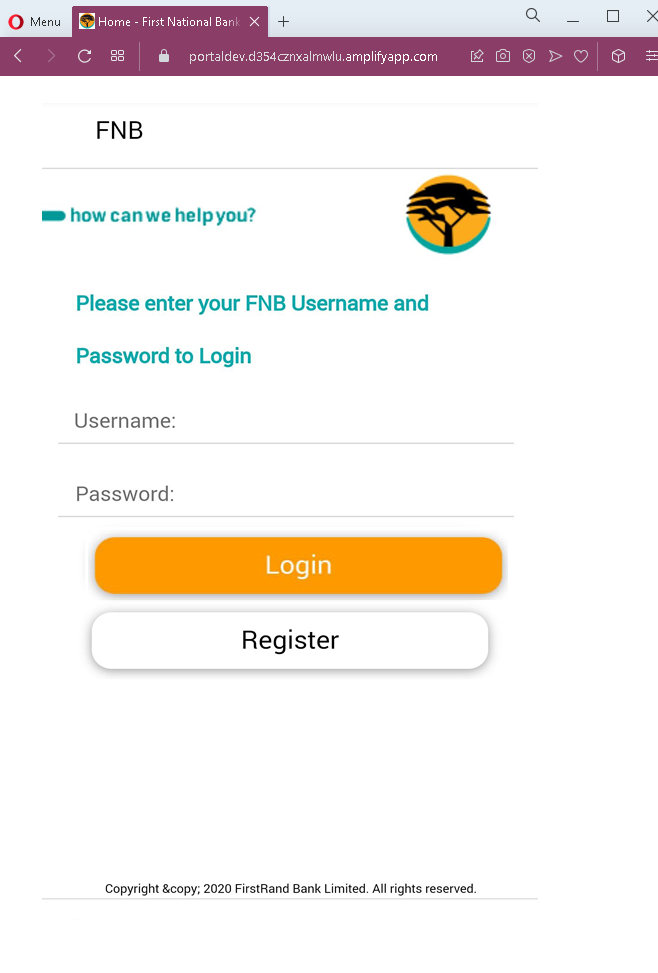
FNB Online Banking Phishing – Credential Harvesting Page
This phishing campaign impersonates FNB (First National Bank) , a major bank in South Africa. The page is designed to steal customers’ online banking credentials—specifically the Username and Password used to access FNB’s online banking platform.
How it works:
The victim receives a phishing email, SMS, or other message claiming a security alert, account issue, or the need to verify their information. The message includes a link to this fake FNB login page. When the victim enters their Username and Password and clicks “Login,” the credentials are captured and sent to the attacker.
The goal:
The attacker aims to steal the victim’s FNB online banking credentials. With these, they can log into the victim’s real bank account, view balances, transfer funds, pay bills, and potentially commit further fraud.
Red flags to watch for:
- Suspicious URL: The page is hosted on a domain that is not
fnb.co.zaorfnb.com. The legitimate FNB online banking domain isfnb.co.za. Always check the address bar before entering any credentials. - Extremely minimal design: The legitimate FNB login page includes additional security elements such as a security image, personalized greeting, or step-by-step authentication flow. This page is bare and lacks those features.
- Generic branding: The page uses a basic FNB logo but lacks the full branding, navigation menus, and security indicators present on the real FNB site.
- No security messaging: Legitimate FNB login pages display security tips, fraud warnings, and links to report suspicious activity. This page has none.
- Outdated copyright notice: The footer shows “Copyright © 2020” while the legitimate site would display the current year. This is a common oversight in phishing pages.
- Unsolicited login request: FNB does not send emails or messages with links requiring customers to log in to resolve account issues. Customers should always access online banking by typing the URL directly or using the official FNB app.
What to do if you encounter this:
- Do not enter your Username, Password, or any other personal information on this page.
- If you are an FNB customer, always access online banking by typing
fnb.co.zadirectly into your browser or by using the official FNB app. - If you have already entered your credentials, contact FNB immediately through their official customer service hotline to secure your account and change your password.
- Report the phishing page to FNB’s fraud department (e.g., by forwarding the original message to
[email protected]or using their official reporting channels).
Why this scam is effective:
FNB is one of South Africa’s largest banks, with millions of digital banking users. The simple, clean design of the page mimics the real FNB login interface enough to deceive users who are not paying close attention to the URL. The use of the FNB logo and the familiar “how can we help you?” tagline adds to the illusion. Many phishing pages rely on the fact that users often glance at the logo and layout rather than scrutinizing the address bar.
Protective measures:
- Bookmark the official FNB login page and use that bookmark to access online banking—never click links in emails or messages.
- Use a password manager: It will autofill only on legitimate
fnb.co.zadomains, not on phishing sites. - Enable two-factor authentication (2FA) on your FNB account if available, to add an extra layer of protection.
- Be suspicious of any unsolicited message that creates urgency and asks you to log in to your bank account.
- Check the URL carefully: Legitimate FNB domains end with
fnb.co.za. Look for misspellings, extra words, or unusual top-level domains. - If in doubt, contact FNB directly using a phone number from your bank statement or the official website—never use contact information provided in a suspicious message.