
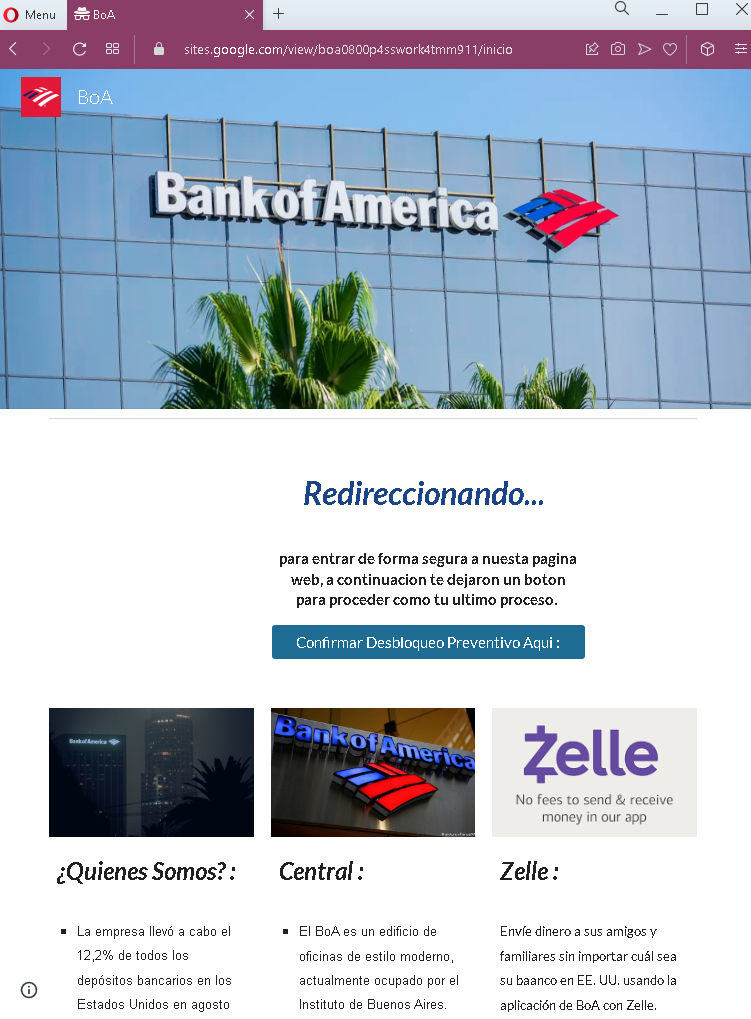
Bank of America Phishing – Fake “Preventive Unlock” Scam (Spanish Variant)
This phishing campaign impersonates Bank of America (BoA) , one of the largest banks in the United States, and targets Spanish-speaking customers. The page uses a fake security alert—claiming the account requires a “preventive unlock”—to create urgency and direct victims to a credential harvesting page.
How it works:
The victim receives a phishing email, SMS, or other message in Spanish claiming that their Bank of America account has been locked or requires verification. The message includes a link to this page. The page presents a message stating that the user must click a button to proceed with an “unlock” process. Clicking the button leads to a fake Bank of America login page (not shown in this screenshot) where the victim is asked to enter their online banking credentials.
The goal:
The attacker aims to steal the victim’s Bank of America online banking credentials (User ID and password). With these, they can log into the victim’s real bank account, view balances, transfer funds, and commit fraud.
Red flags to watch for:
- Suspicious URL: The page is hosted on a domain that is not
bankofamerica.com. Always check the address bar before interacting with any page claiming to be from your bank. - Poor Spanish grammar: The text contains awkward phrasing and grammatical errors that would not appear in official Bank of America communications. Legitimate bank communications are professionally written and localized.
- Vague and irrelevant content: The page includes unrelated text about “the company” carrying out deposits in the United States, a description of a “BoA” building in Buenos Aires (Argentina), and information about Zelle. This content is copied from various sources and is not cohesive—a clear sign of a hastily assembled phishing page.
- Generic redirect message: The page claims to be “redirecting” but presents a button to click. Legitimate banking websites do not use such redirect pages with manual confirmation buttons for account unlocks.
- Unsolicited account action request: Bank of America does not send messages with links requiring customers to click a button to “unlock” their account. Customers should always access their accounts by typing the official URL directly or using the official app.
- Mixed geographic references: The page mentions the United States (deposits) and Buenos Aires (Argentina) in the same context, which is inconsistent for a US-based bank targeting customers.
What to do if you encounter this:
- Do not click the button to “Confirm” or proceed with any unlock process.
- Do not enter any personal information, User ID, or password on any subsequent pages.
- If you are a Bank of America customer, always access online banking by typing
bankofamerica.comdirectly into your browser or by using the official Bank of America mobile app. - If you have already entered your credentials, contact Bank of America immediately through their official customer service number to secure your account and change your password.
- Report the phishing page to Bank of America’s fraud department (e.g., by forwarding the original message to
[email protected]).
Why this scam is effective:
Bank of America has a large Spanish-speaking customer base in the United States. The use of Spanish language and the “preventive unlock” pretext (which implies a security measure) can cause concern and prompt quick action. The inclusion of familiar terms like Zelle adds a veneer of legitimacy. Victims who are not carefully checking the URL may click the button and proceed to enter their credentials on the following fake login page.
Protective measures:
- Bookmark the official Bank of America login page and use that bookmark to access online banking—never click links in emails or messages.
- Use a password manager: It will autofill only on legitimate
bankofamerica.comdomains, not on phishing sites. - Enable two-factor authentication (2FA) on your Bank of America account to add an extra layer of protection.
- Be suspicious of any unsolicited message that creates urgency and asks you to click a button to unlock or verify your account.
- Check the URL carefully: Legitimate Bank of America domains end with
bankofamerica.com. Look for misspellings, extra words, or unusual top-level domains. - If in doubt, contact Bank of America directly using a phone number from your bank statement or the official website—never use contact information provided in a suspicious message.
- Be aware of language quality: Legitimate bank communications are professionally written. Grammatical errors, awkward phrasing, or irrelevant content are strong indicators of a scam.