
Incident Report: This spoofed page was logged, cross-checked, and neutralized firsthand by the
Antiphishing.bizsecurity team during our standard URL vetting operations. To protect the public, the phishing source domain has been fully defanged within our infrastructure. We document and analyze these live visual patterns to help security researchers and users detect replica fraud techniques before financial damage occurs.
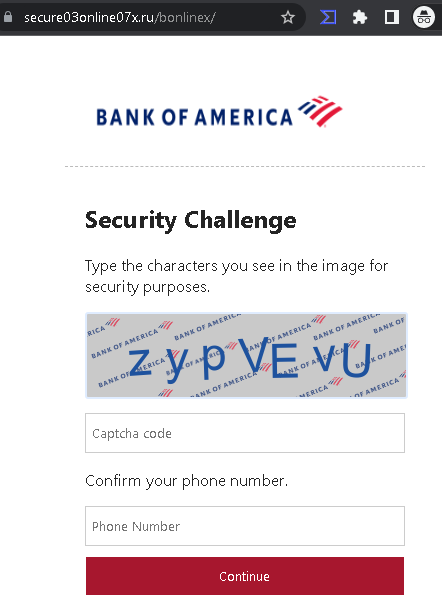
Threat Analysis: Bank of America Phishing – Fake “Security Challenge” Harvesting Phone Numbers
This phishing campaign impersonates Bank of America, one of the largest banks in the United States. The page presents a fake “Security Challenge” that asks the victim to complete a CAPTCHA and enter their phone number. This page is typically encountered after the victim has already entered their online banking credentials on a previous phishing page, or it may be used as a standalone data collection step.
How it works:
The victim receives a phishing email, SMS, or other message claiming a security alert, account issue, or the need to verify their information. The message includes a link to a phishing page. This specific page:
- Displays a Bank of America logo
- Presents a “Security Challenge” with a CAPTCHA (images of characters to type)
- Requests the victim’s phone number
- Has a “Continue” button
The goal:
The attacker aims to:
- Collect the victim’s phone number, which can be used for identity theft, SIM swapping, or to intercept SMS-based two-factor authentication (2FA) codes
- Potentially capture the victim’s banking credentials if this page is part of a longer multi-step phishing flow (with the CAPTCHA serving to make the page appear legitimate)
Red flags to watch for:
- Suspicious URL: The page is hosted on a domain that is not
bankofamerica.com - CAPTCHA on a banking login flow: While CAPTCHAs are sometimes used to prevent bots, it is unusual for a legitimate bank to present one after the initial login screen. This is a common phishing tactic to make the page appear more “secure” to victims.
- Phone number request without context: A legitimate Bank of America security challenge would not ask for a phone number in this manner. If additional verification is needed, it would be handled through established 2FA methods (SMS to a number already on file) within a secure, authenticated session.
- Unsolicited login request: Bank of America does not send emails or messages with links requiring customers to log in and complete “security challenges.” Customers should always access online banking by typing the official URL directly or using the official app.
- Minimal branding: The page uses a simple Bank of America logo but lacks the full navigation, security notices, and account-specific information present on the legitimate site.
What to do if you encounter this:
- Do not complete the CAPTCHA or enter your phone number on this page.
- If you are a Bank of America customer, always access online banking by typing
bankofamerica.com - If you have already entered your credentials on a previous page and reached this page, assume your credentials have been compromised. Contact Bank of America immediately to secure your account.
- If you have entered your phone number, be aware that attackers may use it for SIM swapping or other fraudulent activities. Contact your mobile carrier to add additional security to your account (such as a PIN or port-out protection).
- Report the phishing page to Bank of America’s fraud department (e.g., by forwarding the original message to
[email protected]).
Why this scam is effective:
Bank of America has millions of online banking customers. The addition of a CAPTCHA and a phone number request creates the illusion of a legitimate security measure. Victims who have already entered their credentials on a previous page may be primed to trust this next step. The CAPTCHA also serves to make automated security tools less likely to flag the page, and it can convince victims that the page is “official” because it includes a verification step.
Protective measures:
- Never enter banking credentials or personal information on pages reached via unsolicited links.
- Bookmark the official Bank of America login page and use that bookmark to access online banking.
- Use a password manager: It will autofill only on legitimate
bankofamerica.com - Enable two-factor authentication (2FA) using an authenticator app rather than SMS where possible, to reduce the risk of SIM swapping.
- Be suspicious of any unsolicited message that creates urgency and asks you to log in to your bank account or complete “security challenges.”
- Check the URL carefully: Legitimate Bank of America domains end with
bankofamerica.com - If in doubt, contact Bank of America directly using a phone number from your bank statement or the official website—never use contact information provided in a suspicious message.