
Incident Report: This scam layout was detected, analyzed, and contained firsthand by the Antiphishing.biz security team during our automated link scanning workflows. To protect the public, the hostile origin link has been completely disabled within our infrastructure. We document and analyze these live visual patterns to help security researchers and users recognize deceptive clone designs before financial damage occurs.
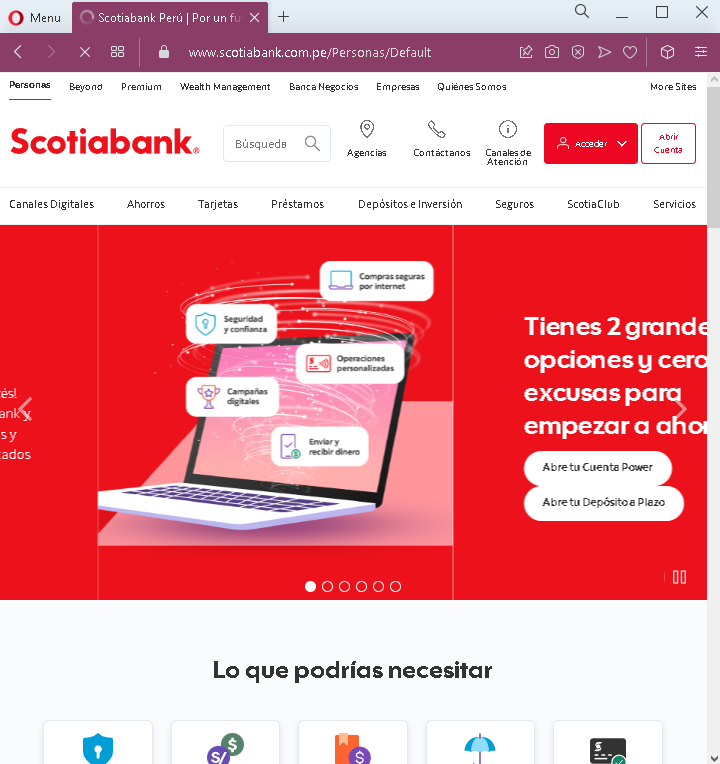
Then user will be redirected to the truth Scotiabank’s Website:
Threat Analysis: Scotiabank Phishing – Multi-Step Credential & Email Harvesting with Real Bank Redirection
This sophisticated phishing campaign impersonates Scotiabank, targeting Spanish-speaking customers (likely in Latin America). The attack uses a multi-page flow to capture the victim’s bank login credentials (document number and password) and email account credentials. After capturing this information, the victim is redirected to the real Scotiabank website, making the attack harder to detect.
How it works:
The victim receives a phishing email, SMS, or other message claiming a security alert, account issue, or the need to verify their information. The message includes a link to the first phishing page.
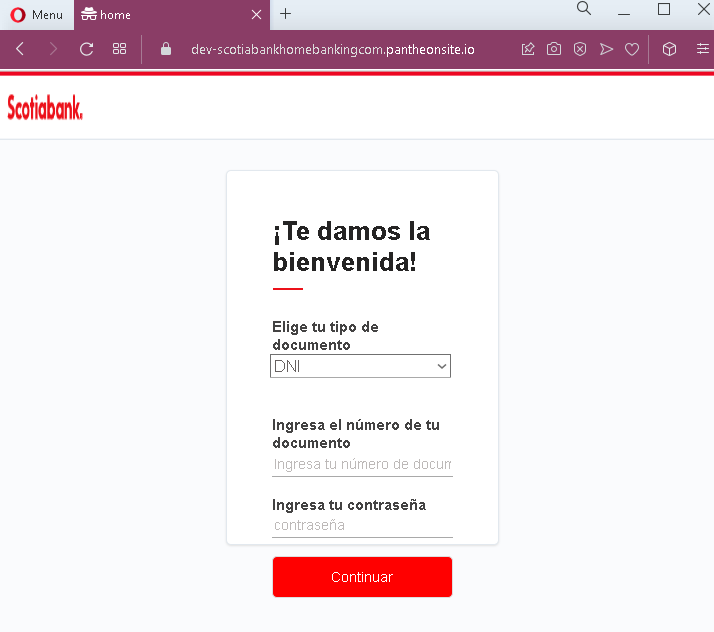
Step 1 – Fake Bank Login Page (First Screenshot)
The first page asks for:
- Document type (pre-selected as DNI – national ID)
- Document number
- Password
This page captures the victim’s primary banking credentials.
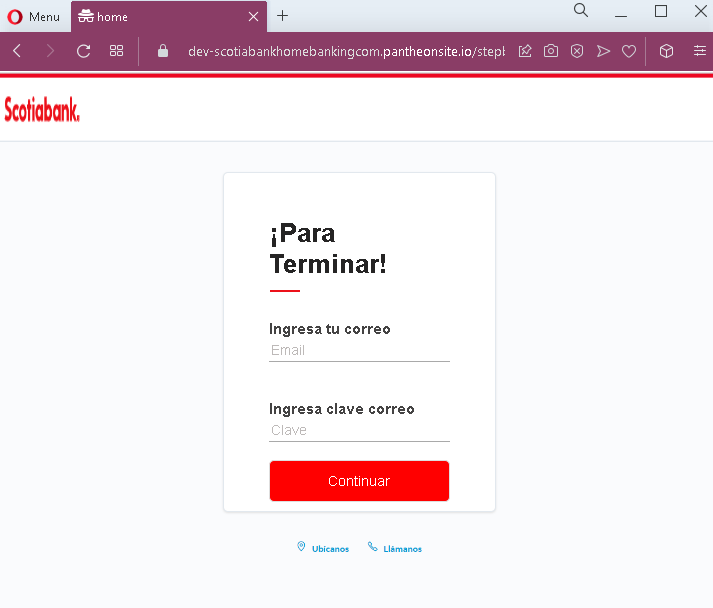
Step 2 – Fake Email Credentials Page (Second Screenshot)
The second page asks for:
- Email address
- Email password
This step captures the victim’s email account credentials, which can be used to intercept bank communications, reset passwords, and maintain persistent access.
Step 3 – Redirect to Genuine Scotiabank Dashboard (Third Screenshot)
After the victim submits their email credentials, they are redirected to the real Scotiabank online banking dashboard. The victim sees their actual accounts and balances, believing their login was successful and that nothing suspicious occurred. In reality, the attacker has already captured the credentials on the preceding fake pages.
The goal:
The attacker aims to:
- Steal the victim’s Scotiabank online banking credentials
- Capture the victim’s email address and password
- Gain full access to both the bank account and email account
With email access, the attacker can intercept password reset emails, delete fraud alerts, and maintain long-term access. The redirection to the real bank site reduces the likelihood that the victim will immediately realize they have been scammed, giving the attacker more time to exploit the stolen credentials.
Red flags to watch for:
- Suspicious URL: The first two pages are hosted on domains that are not official Scotiabank domains. Victims should carefully check the address bar before entering any credentials. The redirection to the real site happens after the credentials are stolen.
- Request for email password: No legitimate bank asks for your email account password. This is a clear indicator of a phishing attack designed to take over your email as well.
- Multi-step flow with unrelated requests: Banking login and email credentials are never requested together in a legitimate banking session.
- Unsolicited login request: Scotiabank does not send emails or messages with links requiring customers to log in to resolve account issues.
- Typographical error: The first page contains a minor typo (“Ingresa tu número de docur” instead of “documento”), which is uncommon in official bank communications.
What to do if you encounter this:
- Do not enter your document number, bank password, email address, or email password on pages reached via unsolicited links—even if you are later redirected to what looks like the real bank site.
- If you are a Scotiabank customer, always access online banking by typing the official Scotiabank URL for your country directly into your browser or by using the official mobile app.
- If you have already entered your email credentials, change your email password immediately, enable two-factor authentication on your email account, and check for any unauthorized forwarding rules or account changes.
- If you have entered your banking credentials, contact Scotiabank immediately through their official customer service hotline to secure your account and change your password.
- Report the phishing pages to Scotiabank’s fraud department.
Why this scam is particularly dangerous:
This is a sophisticated phishing technique that combines credential theft with a redirection to the legitimate site. Victims often assume that because they ended up on the real bank website after logging in, the first pages must have been legitimate. The email credential harvesting gives attackers persistent access to the victim’s communications, enabling them to intercept fraud alerts and maintain control even if the victim later changes their bank password.
Protective measures:
- Always initiate banking sessions by typing the official URL directly—never click links in emails or messages.
- Use a password manager: It will autofill only on legitimate Scotiabank domains, not on phishing sites.
- Never enter your email password on any page that claims to be your bank. Legitimate banks never ask for this.
- Enable two-factor authentication (2FA) on both your bank account and email account, using an authenticator app rather than SMS where possible.
- Be suspicious of any unsolicited message that creates urgency and asks you to log in to your bank account.
- Check the URL carefully before entering credentials: Legitimate Scotiabank domains vary by country (e.g.,
scotiabank.com.mxfor Mexico,scotiabank.com.pefor Peru,scotiabank.clfor Chile). Look for misspellings, extra words, or unusual top-level domains. - If in doubt, contact Scotiabank directly using a phone number from your bank statement or the official website—never use contact information provided in a suspicious message.