
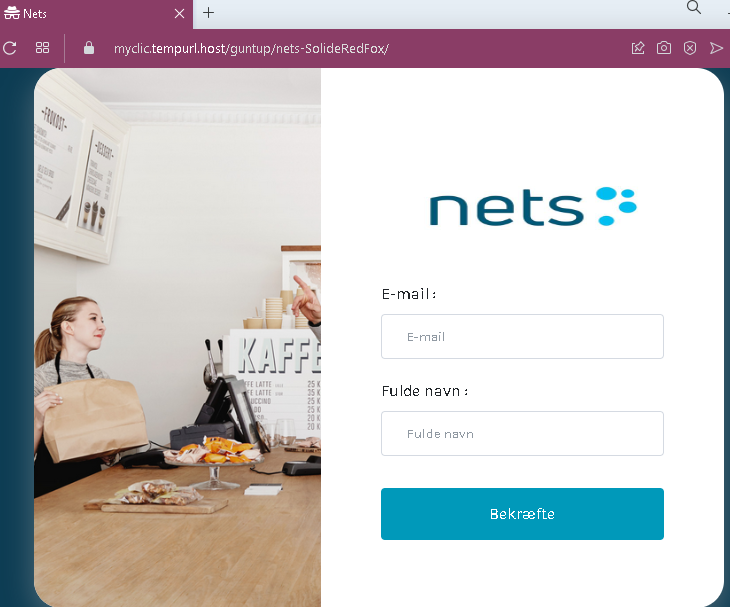
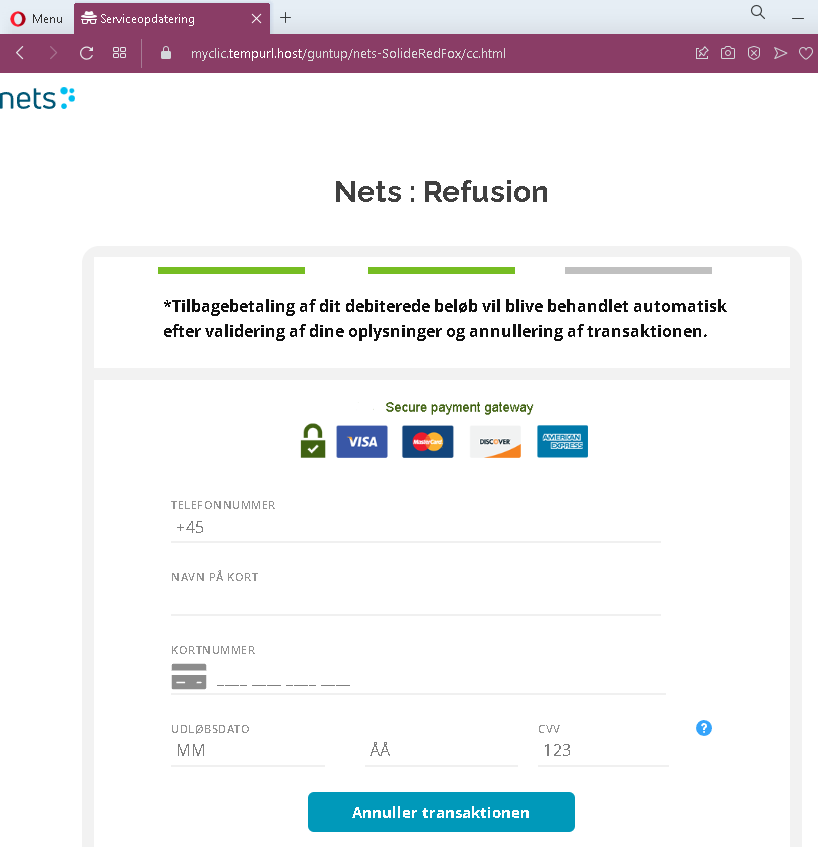
These two screenshots show a phishing campaign impersonating Nets, a major Danish payment service provider. The scam uses a fake “refund” pretext to trick victims into providing their email address, full name, phone number, and full credit/debit card details.
Threat Analysis: Nets Refund Phishing – Card & Personal Data Harvesting
This phishing campaign impersonates Nets, a widely used payment processor in Denmark (and other Nordic countries). The victim is led to believe they are receiving a refund for a debited amount. To “process” the refund, they are asked to provide personal and card information.
How it works:
- The victim receives a phishing email, SMS, or other message claiming a refund is available due to a transaction error or cancellation.
- The first page asks for an email address and full name.
- The second page, branded with Nets logos, asks for:
- Phone number (pre‑fixed with +45, the Danish country code)
- Name on card
- Card number
- Expiration date
- CVV
The button on the second page is labelled “Annuller transaktionen” (Cancel the transaction), which is a deceptive trick—clicking it actually submits the stolen data.
The goal:
The attacker aims to collect:
- The victim’s full name, email address, and phone number (for identity theft or follow‑up scams)
- Complete card details (card number, expiry, CVV) to make fraudulent purchases or clone the card
Red flags to watch for:
- Suspicious URL: The first page is hosted on a subdomain of
myclickempurl.host, a domain completely unrelated tonets.euornets.dk. Legitimate Nets services are accessed through official domains. - Request for full card details for a refund: A legitimate refund does not require the customer to enter their card number, expiry date, and CVV. Refunds are processed automatically to the original payment method.
- Misleading button text: The button says “Cancel the transaction,” but the page is designed to capture card data. This is a social engineering trick to make victims click without realizing they are submitting their details.
- Poor design and mismatched branding: While the second page uses Nets logos, the overall design is simple and lacks the security features (e.g., proper SSL certificate, consistent navigation) of the real Nets site.
- Unsolicited refund offer: Nets does not send unsolicited emails or messages asking customers to enter card details to receive a refund.
What to do if you encounter this:
- Do not enter your email, name, phone number, or card details on these pages.
- If you are a Nets user or a customer of a merchant using Nets, always check your transactions through your bank or the official Nets portal—never through links in messages.
- If you have already entered your card details, contact your bank immediately to block the card and dispute any unauthorized charges.
- Report the phishing pages to Nets’ fraud team and to the relevant authorities (e.g., the Danish police cybercrime unit).
Why this scam is effective:
Nets is a trusted name in Denmark and the Nordic region. Refund scams are common because people expect to receive money back after a transaction error. The multi‑step flow (first personal info, then card details) makes the process seem legitimate. The deceptive “Cancel the transaction” button may actually reassure victims that they are not “confirming” a payment but rather stopping one—while in fact they are handing over their card information.
Protective measures:
- Never click links in unsolicited messages claiming a refund or payment issue. Instead, log into your bank or the relevant service directly via a bookmarked URL.
- Check the URL carefully: Legitimate Nets domains end with
nets.euornets.dk. Look for misspellings, extra words, or unusual top‑level domains. - Never enter your card number, expiry, and CVV on a page that claims to be processing a refund. Legitimate refunds happen automatically without re‑entering card details.
- Use a password manager – it will not autofill on fake domains.
- Enable two‑factor authentication on your bank and email accounts to add an extra layer of security.