
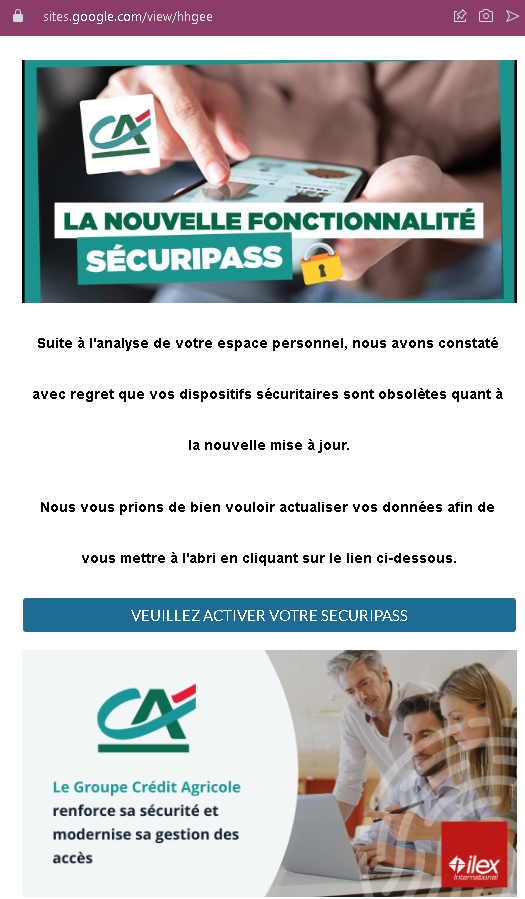
This screenshot shows a phishing page hosted on Google Sites impersonating Crédit Agricole, a major French bank. The page uses a fake “SécuriPass activation” pretext to trick victims into clicking a malicious link.
Threat Analysis: Crédit Agricole Phishing – Fake SécuriPass Activation on Google Sites
The page claims that security devices are obsolete due to a new update and urges the victim to click a button to activate “SÉCURIPASS.” The link leads to a fake Crédit Agricole login page designed to steal online banking credentials.
How it works:
The victim receives an email, SMS, or other message directing them to this Google Sites page. The page mimics official Crédit Agricole communication, warning of outdated security devices. Clicking the activation button takes the victim to a fraudulent login page (not shown in this screenshot) where they are asked for their online banking identifier and password.
The goal:
The attacker aims to steal Crédit Agricole online banking credentials to access accounts and commit fraud.
Red flags to watch for:
- Suspicious URL: The page is hosted on
sites.google.com/view/higee. Official Crédit Agricole pages are oncredit-agricole.frdomains, not on a free Google Sites subdomain. - Unsolicited activation request: Crédit Agricole does not send links requiring customers to “activate” SécuriPass via third‑party sites.
- Generic, copied content: The text is a variation of standard phishing templates used against multiple French banks.
- Threat of negative consequences: The message implies that ignoring the activation will leave the account unprotected, creating urgency.
What to do if you encounter this:
- Do not click any button or link on this page.
- If you are a Crédit Agricole customer, access online banking by typing
credit-agricole.frdirectly into your browser. - Report the Google Sites phishing page to Google and to Crédit Agricole’s fraud team (
[email protected]).
Why this scam is effective:
Google Sites is a legitimate platform, and some users may not realize that anyone can create a page there. The page closely mimics Crédit Agricole’s visual style and uses real security terminology (“SécuriPass,” “DSP2”), making it appear credible at first glance.
Protective measures:
- Always check the full URL. Official bank pages do not use free hosting services like Google Sites, WIX, or Weebly.
- Never activate security features via links in unsolicited messages. Go directly to the bank’s official website or app.
- Bookmark your bank’s official login page and use that bookmark exclusively.
- Enable two‑factor authentication (SécuriPass) through the official app, not through web links.