
This screenshot shows a phishing page impersonating IAA (Insurance Auto Auctions) , a legitimate online vehicle auction platform. The page is designed to steal victims’ login credentials (email and password) used to access their IAA accounts.
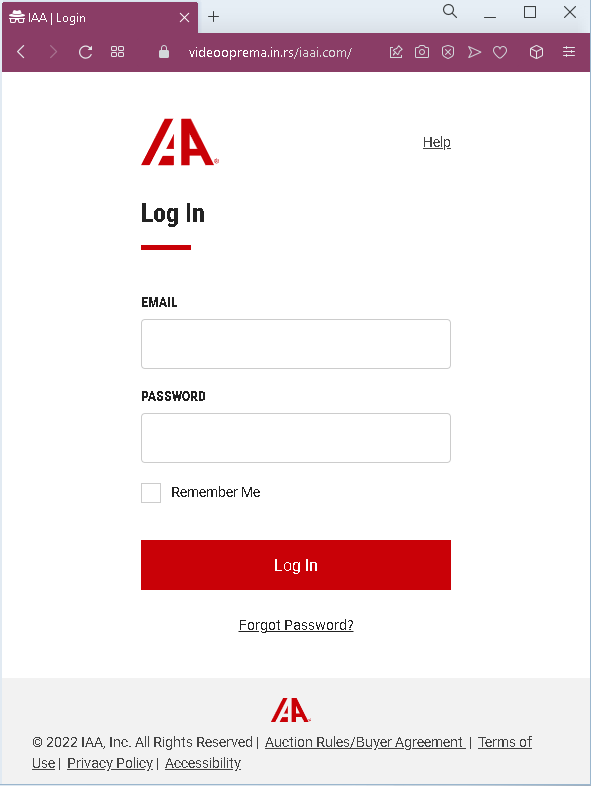
Threat Analysis: IAA Phishing – Credential Harvesting
How it works:
The victim receives a phishing email, SMS, or message claiming an issue with their IAA account (e.g., a bid alert, payment problem, or account suspension). The link leads to this fake login page. The victim enters their email and password and clicks “Log In.” The credentials are captured and sent to the attacker.
The goal:
The attacker aims to steal IAA account credentials to:
- Access the victim’s auction account
- View bidding history, payment information, and personal data
- Place fraudulent bids or transfer vehicles
- Use the same email/password combination to compromise other accounts (if the victim reuses credentials)
Red flags to watch for:
- Suspicious URL: The page is hosted on
videooprema.in.rs/iaai.com/– this is not the official IAA domain. Legitimate IAA login pages are oniaai.comor regional subdomains (e.g.,buy.iaai.com). - Generic design: The page is minimal and lacks the full branding, security notices, and personalized elements found on the real IAA login page.
- No multi‑factor authentication prompt: IAA supports MFA; a genuine login page may prompt for a second factor after credentials – this page does not.
- Unsolicited login request: IAA does not send links requiring users to log in to resolve account issues.
What to do if you encounter this:
- Do not enter your email or password.
- If you are an IAA customer, always access the site by typing
iaai.comdirectly into your browser. - If you have already entered your credentials, change your IAA password immediately. If you use the same password elsewhere, change those accounts as well. Enable two‑factor authentication on your IAA account if available.
- Report the phishing page to IAA’s security team.
Protective measures:
- Bookmark the official IAA login page and use that bookmark.
- Use a password manager – it will autofill only on legitimate domains.
- Enable two‑factor authentication on your IAA account and email.
- Be suspicious of any unsolicited message that asks you to log in.