
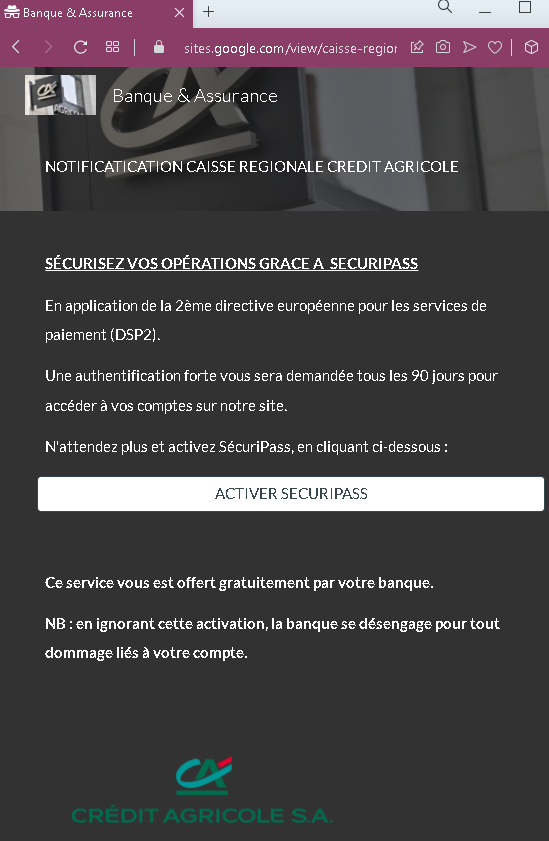
This screenshot shows a phishing email or landing page impersonating Crédit Agricole, a major French bank. The message uses the legitimate “SécuriPass” security feature and the European PSD2 directive as a pretext to pressure victims into clicking a malicious activation button.
Threat Intel: This malicious interface was detected, analyzed, and contained firsthand by the Antiphishing.biz security team during our standard URL vetting operations. To protect the public, the phishing source domain has been safely deactivated within our infrastructure. We document and analyze these live visual patterns to help security researchers and users recognize deceptive clone designs before financial damage occurs.
Threat Analysis: Crédit Agricole Phishing – Fake “SécuriPass Activation” Scam
How it works:
The victim receives an unsolicited email (or lands on this page via a link) claiming that due to the PSD2 directive, strong authentication is required every 90 days. The message urges the victim to click a button to activate “SécuriPass” and warns that ignoring the activation will release the bank from liability for any account damage.
Clicking the button leads to a fake Crédit Agricole login page designed to steal the victim’s online banking credentials and potentially two‑factor authentication codes.
The goal:
The attacker aims to capture the victim’s Crédit Agricole login credentials to access the account, transfer funds, and commit fraud.
Red flags to watch for:
- Suspicious URL: The link behind the button leads to a domain that is not
credit-agricole.fr. Legitimate bank communications use official domains. - Threat of consequences: The warning that the bank “will not be responsible for damages” is a classic fear tactic to pressure victims into clicking without thinking.
- Unsolicited activation request: Crédit Agricole does not send emails or messages requiring customers to click a link to activate SécuriPass. Legitimate activation happens within the app or after logging in.
- Generic greeting: The message does not address the victim by name or reference a specific account.
- Misspelling: “NOTIFICATIATION” instead of “Notification” is a minor but telling error.
What to do if you encounter this:
- Do not click the activation button or any links.
- Access your Crédit Agricole account by typing
credit-agricole.frdirectly into your browser or using the official mobile app. - If you have already clicked and entered your credentials, contact Crédit Agricole immediately to secure your account.
- Report the phishing page to Crédit Agricole’s fraud team (
[email protected]).
Protective measures:
- Never click links in unsolicited messages claiming you need to activate security features.
- Always type your bank’s official website address directly into your browser.
- Enable SécuriPass through the official app – not via email links.
- Be suspicious of any message that threatens negative consequences and asks you to click a link.