
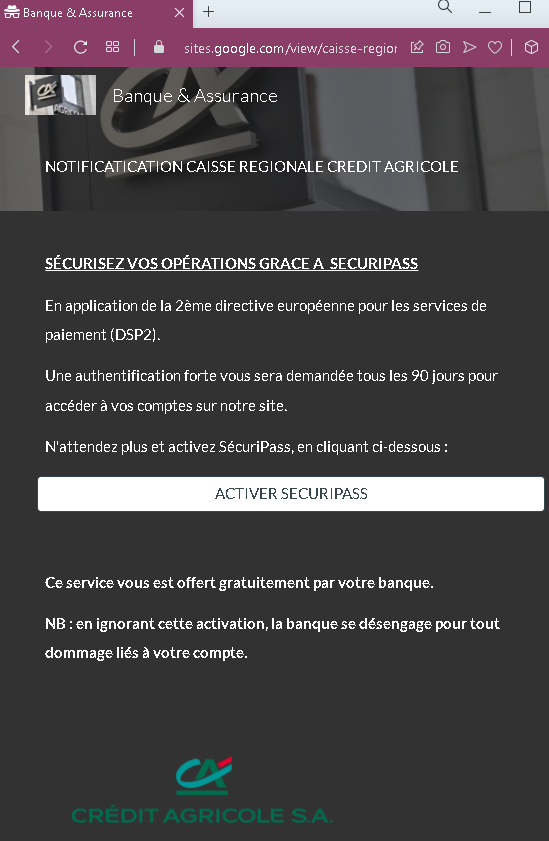
This screenshot shows a phishing email or landing page impersonating Crédit Agricole, a major French bank. The message uses the legitimate “SécuriPass” security feature and the European PSD2 directive as a pretext to pressure victims into clicking a malicious activation button.
Threat Analysis: Crédit Agricole Phishing – Fake “SécuriPass Activation” Scam
How it works:
The victim receives an unsolicited email (or lands on this page via a link) claiming that due to the PSD2 directive, strong authentication is required every 90 days. The message urges the victim to click a button to activate “SécuriPass” and warns that ignoring the activation will release the bank from liability for any account damage.
Clicking the button leads to a fake Crédit Agricole login page designed to steal the victim’s online banking credentials and potentially two‑factor authentication codes.
The goal:
The attacker aims to capture the victim’s Crédit Agricole login credentials to access the account, transfer funds, and commit fraud.
Red flags to watch for:
- Suspicious URL: The link behind the button leads to a domain that is not
credit-agricole.fr. Legitimate bank communications use official domains. - Threat of consequences: The warning that the bank “will not be responsible for damages” is a classic fear tactic to pressure victims into clicking without thinking.
- Unsolicited activation request: Crédit Agricole does not send emails or messages requiring customers to click a link to activate SécuriPass. Legitimate activation happens within the app or after logging in.
- Generic greeting: The message does not address the victim by name or reference a specific account.
- Misspelling: “NOTIFICATIATION” instead of “Notification” is a minor but telling error.
What to do if you encounter this:
- Do not click the activation button or any links.
- Access your Crédit Agricole account by typing
credit-agricole.frdirectly into your browser or using the official mobile app. - If you have already clicked and entered your credentials, contact Crédit Agricole immediately to secure your account.
- Report the phishing page to Crédit Agricole’s fraud team (
[email protected]).
Protective measures:
- Never click links in unsolicited messages claiming you need to activate security features.
- Always type your bank’s official website address directly into your browser.
- Enable SécuriPass through the official app – not via email links.
- Be suspicious of any message that threatens negative consequences and asks you to click a link.