
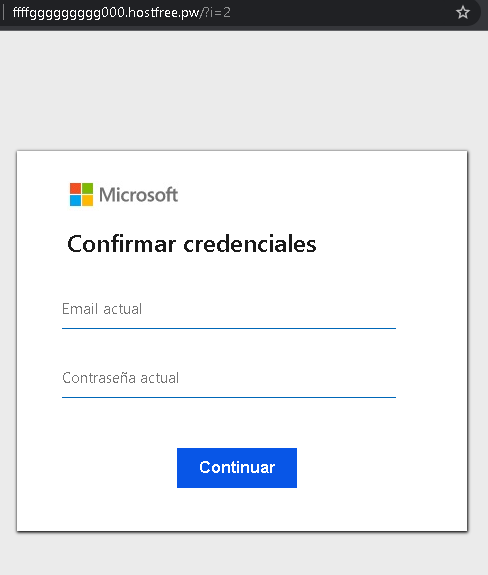
This screenshot shows a phishing page impersonating Microsoft, targeting Spanish‑speaking users. The page asks for the victim’s current email address and current password under the pretext of “confirming credentials.” It is hosted on a suspicious free hosting subdomain.
Threat Intel: This deceptive layout was intercepted, verified, and locked down firsthand by the
Antiphishing.bizsecurity team during our automated link scanning workflows. To protect the public, the phishing source domain has been completely disabled within our infrastructure. We document and analyze these live visual patterns to help security researchers and users spot lookalike phishing methods before financial damage occurs.
Threat Analysis: Microsoft Phishing – “Confirm Credentials” Scam
How it works:
The victim receives a phishing email, SMS, or message claiming a security alert, account suspension, or the need to verify their information. The link leads to this page, which mimics a Microsoft login interface. The victim is asked to enter their email address and current password, then click “Continuar.” The credentials are captured and sent to the attacker.
The goal:
The attacker steals Microsoft account credentials (email and password) to:
- Access the victim’s email (Outlook, Hotmail) and other Microsoft services (OneDrive, Office 365)
- Reset passwords for other accounts linked to that email
- Send further phishing messages to the victim’s contacts
- Attempt credential reuse on other platforms
Red flags to watch for:
- Suspicious URL: The page is hosted on
fffgfggggggggg000.hostfree.pwmicrosoft.comoutlook.com - Unprofessional domain name: Random characters and “
hostfree.pw” are clear indicators of a throwaway phishing site. - “Confirmar credenciales” pretext: Microsoft never asks users to “confirm credentials” via a link. Legitimate security alerts direct users to log in through the official website, not a separate page.
- Minimal design: The page lacks Microsoft’s full branding, security notices, and two‑factor authentication options.
- No personalization or security image: Genuine Microsoft login pages display a security image or account selection after entering an email.
- Unsolicited login request: Microsoft does not send links requiring users to log in to resolve account issues.
What to do if you encounter this:
- Do not enter your email or password.
- If you have already entered your credentials, change your Microsoft password immediately and enable two‑factor authentication (2FA).
- Always access Microsoft services by typing
outlook.commicrosoft.com - Report the phishing page to Microsoft (via
[email protected]or the built‑in reporting tool).
Protective measures:
- Bookmark the official Microsoft login page and use that bookmark.
- Use a password manager – it will autofill only on legitimate
microsoft.comoutlook.com - Enable two‑factor authentication on your Microsoft account (using an authenticator app or security key).
- Be suspicious of any unsolicited message that asks you to “confirm” your credentials via a link.