
This phishing campaign targeting Facebook Messenger users utilizes social engineering, where compromised accounts send fake “shocking video” links to contacts, leading to fraudulent, mobile-optimized login pages. Attackers capture credentials and 2FA codes in real-time, enabling account takeover and further distribution of the malware.
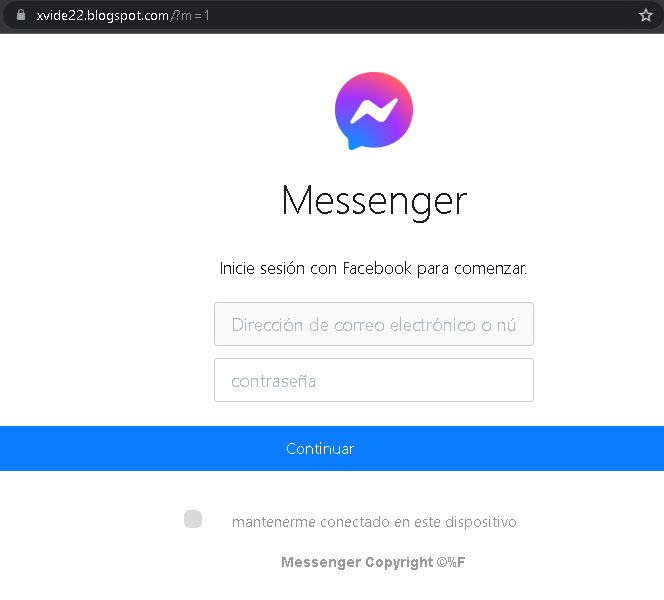
🛡️ Cybersecurity Measures: How to Avoid Messenger Phishing
To protect your Facebook account and personal data from being hijacked, follow these essential safety rules:
1. The “Think Before You Click” Rule
Phishing messages in Messenger often use “Bait” phrases like:
- “Is this you in this video?”
- “Look what someone said about you…”
- “I found this old photo of us!”
Action: Even if the message comes from a friend, do not click the link. Their account may have already been hacked and is now automatically sending spam to all their contacts.
2. Verify the Login Page (URL)
If you click a link and it asks you to “Log in to Facebook to see the content,” check the address bar immediately:
- Official: facebook.com or ://facebook.com.
- Fake: facebook-login-video.net, secure-fb-check.online, m-facebook.web.app.
Action: If the URL looks strange or long, close the tab. Facebook will never ask you to log in again if you are already using the Messenger app.
3. Enable Two-Factor Authentication (2FA)
This is your most powerful defense. If a scammer steals your password, they still won’t be able to log in without the code from your phone.
- Action: Go to Settings > Security and Login > Use two-factor authentication. Use an Authentication App (like Google Authenticator) instead of SMS for maximum security.
4. Use the “In-App” Verification
If you receive a suspicious message from a friend, contact them through a different channel (call them, text them via WhatsApp, or speak in person).
- Action: Ask them: “Did you just send me a link in Messenger?” Usually, they will be surprised to learn their account is sending spam.
5. Keep Your Browser and Apps Updated
Modern browsers (Chrome, Safari, Firefox) have built-in “Safe Browsing” features that block known phishing sites.
- Action: Always install the latest updates for your smartphone and browser to ensure you have the newest anti-phishing filters.
6. Use a Password Manager
Password managers (like Bitwarden, LastPass, or 1Password) identify sites by their URL.
- Action: If you are on a fake Facebook site, your password manager will not auto-fill your credentials. This is a clear technical warning that the site is a fraud.