
This phishing campaign targeting Facebook Messenger users utilizes social engineering, where compromised accounts send fake “shocking video” links to contacts, leading to fraudulent, mobile-optimized login pages. Attackers capture credentials and 2FA codes in real-time, enabling account takeover and further distribution of the malware.
Analysis Memo: This spoofed page was logged, cross-checked, and neutralized firsthand by the
Antiphishing.bizsecurity team during our automated link scanning workflows. To protect the public, the phishing source domain has been completely disabled within our infrastructure. We document and analyze these live visual patterns to help security researchers and users detect replica fraud techniques before financial damage occurs.
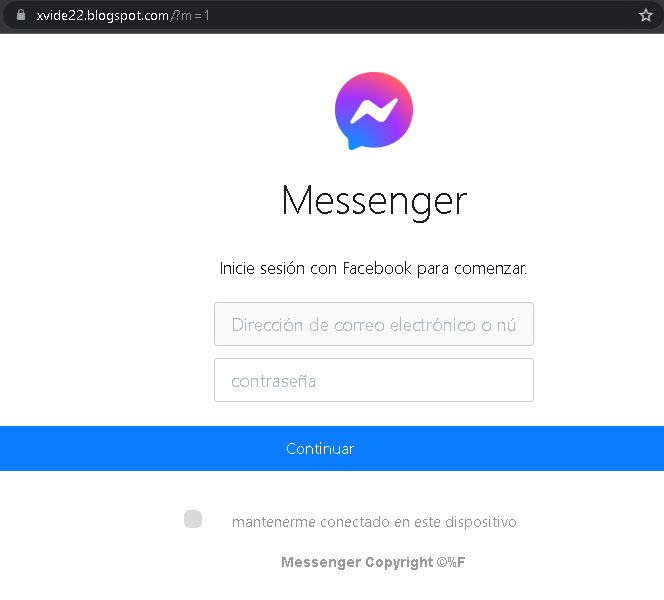
Cybersecurity Measures: How to Avoid Messenger Phishing
To protect your Facebook account and personal data from being hijacked, follow these essential safety rules:
1. The “Think Before You Click” Rule
Phishing messages in Messenger often use “Bait” phrases like:
- “Is this you in this video?”
- “Look what someone said about you…”
- “I found this old photo of us!”
Action: Even if the message comes from a friend, do not click the link. Their account may have already been compromised and is now automatically sending spam to all their contacts.
2. Verify the Login Page (URL)
If you click a link and it asks you to “Log in to Facebook to see the content,” check the address bar immediately:
- Official:
facebook.comor ://facebook.com. - Fake:
facebook-login-video.net,secure-fb-check.online,m-facebook.web.app.
Action: If the URL looks strange or long, close the tab. Facebook will never ask you to log in again if you are already using the Messenger app.
3. Enable Two-Factor Authentication (2FA)
This is your most powerful defense. If a scammer steals your password, they still won’t be able to log in without the code from your phone.
- Action: Go to Settings > Security and Login > Use two-factor authentication. Use an Authentication App (like Google Authenticator) instead of SMS for maximum security.
4. Use the “In-App” Verification
If you receive a suspicious message from a friend, contact them through a different channel (call them, text them via WhatsApp, or speak in person).
- Action: Ask them: “Did you just send me a link in Messenger?” Usually, they will be surprised to learn their account is sending spam.
5. Keep Your Browser and Apps Updated
Modern browsers (Chrome, Safari, Firefox) have built-in “Safe Browsing” features that block known phishing sites.
- Action: Always install the latest updates for your smartphone and browser to ensure you have the newest anti-phishing filters.
6. Use a Password Manager
Password managers (like Bitwarden, LastPass, or 1Password) identify sites by their URL.
- Action: If you are on a fake Facebook site, your password manager will not auto-fill your credentials. This is a clear technical warning that the site is a fraud.