
This screenshot shows a phishing page impersonating Orange, a major French telecommunications provider. The page is hosted on a free website builder (Strikingly) and mimics Orange’s login portal to steal email address / mobile number and password.
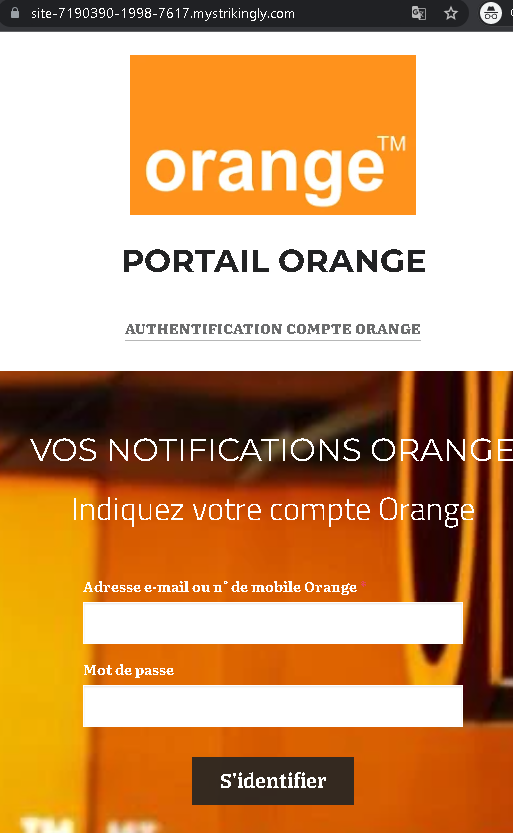
Threat Analysis: Orange Phishing – Fake “PortalOrange” Login Page
How it works:
The victim receives a phishing email, SMS, or message claiming a security alert, account issue, or unread notifications. The link leads to this page, which mimics the Orange login interface. The victim is asked to enter their Orange account identifier (email or mobile number) and password, then click “S’identifier” (Sign in). The credentials are captured and sent to the attacker.
The goal:
The attacker steals Orange account credentials to:
- Access the victim’s personal information, billing details, and phone services
- Port the victim’s phone number (SIM swapping) to bypass SMS‑based two‑factor authentication for banking or other accounts
- Use the account to send further phishing messages
Red flags to watch for:
- Suspicious URL: The page is hosted on a Strikingly subdomain (
site-7190390-1998-7617.mystrikingly.com), notorange.fror any official Orange domain. Strikingly is a free website builder – legitimate telecom providers do not use it for login pages. - Generic design / missing security features: The page uses the Orange logo but lacks the full navigation, security notices, and two‑factor authentication options present on the real Orange login portal.
- Unsolicited login request: Orange does not send links requiring customers to log in to resolve account issues or check notifications.
- “PORTALORANGE” and “AUTHENTIFICATION” wording: While these terms are used by Orange, the overall layout and the fact that it is on a third‑party domain are clear giveaways.
What to do if you encounter this:
- Do not enter your Orange identifier or password.
- If you are an Orange customer, always access your account by typing
orange.frdirectly into your browser or using the official Orange app. - If you have already entered your credentials, change your Orange password immediately and contact Orange customer service to secure your account and watch for SIM swapping attempts.
- Report the phishing page to Orange’s fraud team (e.g., via
spam.orange.fr).
Protective measures:
- Bookmark the official Orange login page and use that bookmark.
- Use a password manager – it will not autofill on fake domains.
- Enable two‑factor authentication on your Orange account if available.
- Be suspicious of any unsolicited message that asks you to log in via a link.
- Never log in on pages hosted on free website builders (Strikingly, Wix, Weebly, etc.) – these are almost never legitimate for banking or telecom services.