
This screenshot shows a phishing page that mimics Facebook’s sign‑up form, designed to collect full name, email address, password, and birthday – enough personal information to steal or create a Facebook account, or to use for credential stuffing on other services.
Incident Report: This scam layout was intercepted, verified, and locked down firsthand by the
Antiphishing.bizsecurity team during our automated link scanning workflows. To protect the public, the hostile origin link has been safely deactivated within our infrastructure. We document and analyze these live visual patterns to help security researchers and users spot lookalike phishing methods before financial damage occurs.
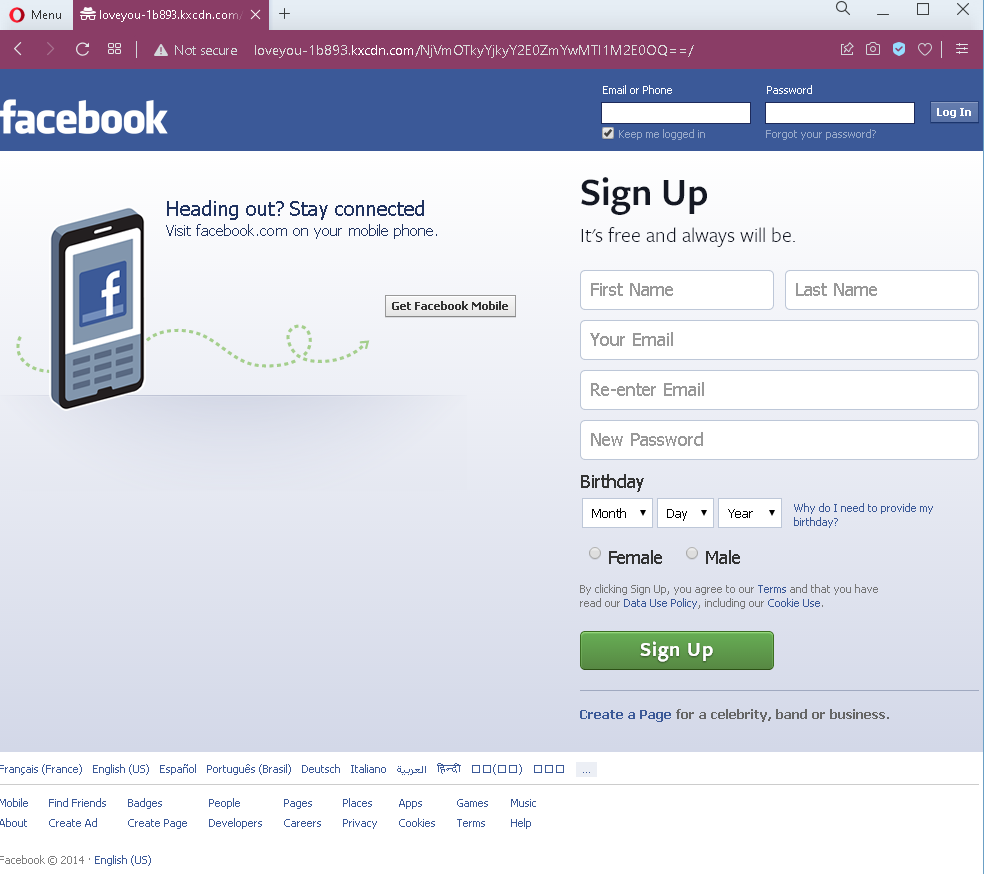
Threat Analysis: Facebook Fake Registration Phishing – Full Profile Harvesting
How it works:
The victim lands on this page via a malicious link (e.g., “Claim your prize,” “Verify your account,” or “Get a free gift”). The page looks exactly like Facebook’s real sign‑up interface. The victim is asked to provide:
- First name and last name
- Email address (and re‑enter it)
- New password
- Birthday
- Gender
After clicking “Sign Up,” the data is sent to the attacker. The victim may then be redirected to the real Facebook website, making the scam harder to detect.
The goal:
The attacker collects:
- Email and password – to compromise the victim’s Facebook account (if the same credentials are used) or to attempt credential stuffing on other platforms
- Full name, birthday, and gender – for identity theft, social engineering, or selling complete profiles on criminal markets
Red flags to watch for:
- Suspicious URL: The page is hosted on a domain that is not
facebook.com - Outdated copyright: The footer shows “© Facebook © 2014” – real Facebook updates this year every year. A 2014 date on a 2022 screenshot is a clear sign of a copied, old phishing template.
- Unsolicited registration page: You would only see a sign‑up form if you intentionally went to Facebook to create an account. Receiving a link to a sign‑up page is always suspicious.
- No HTTPS / security indicators: While not always visible in a screenshot, phishing pages often lack valid SSL certificates or show a “not secure” warning.
What to do if you encounter this:
- Do not enter any personal information.
- If you have already entered your email and password, change that password immediately on the real Facebook website (type
facebook.com - Always access Facebook by typing
facebook.com
Protective measures:
- Never click links that take you to a Facebook login or sign‑up page. Type the URL manually.
- Use a password manager – it will only autofill on legitimate
facebook.com - Enable two‑factor authentication on your Facebook account.
- Be suspicious of any unsolicited link that asks you to sign up or log in, even if the page looks identical to the real one.