
A phishing campaign targeting La Banque Postale users in France utilizes a sophisticated Man-in-the-Middle (MitM) attack to hijack credentials and Certicode Plus codes in real-time. Scammers use SMS and email, mimicking the official bank portal, to steal login IDs, PINs, and mobile numbers, urging victims to authorize fake “security synchronizations” that actually enable fraudulent transfers.
Threat Intel: This spoofed page was detected, analyzed, and contained firsthand by the
Antiphishing.bizsecurity team during our automated link scanning workflows. To protect the public, the dangerous destination URL has been safely deactivated within our infrastructure. We document and analyze these live visual patterns to help security researchers and users detect replica fraud techniques before financial damage occurs.
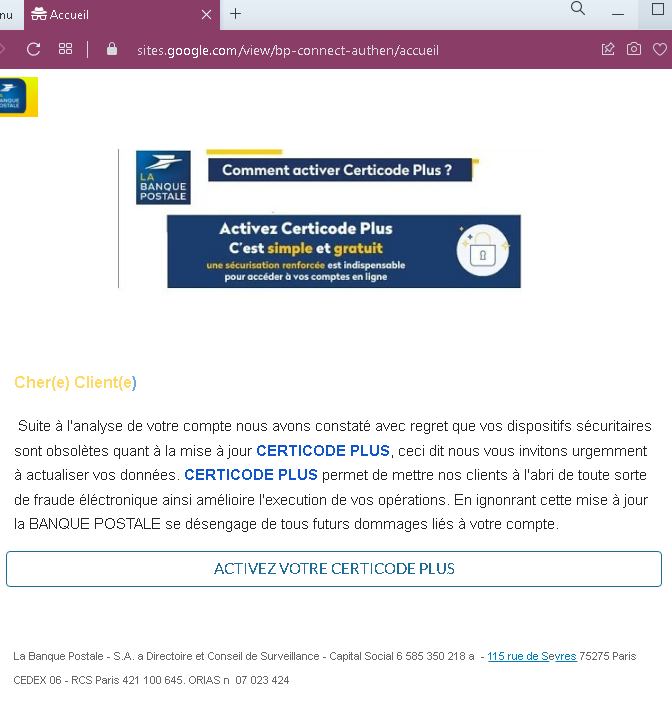
Cybersecurity Measures: How to Avoid La Banque Postale Phishing
To protect your La Banque Postale account and prevent unauthorized access to your funds, follow these essential safety rules:
1. Verify the Domain (The URL Rule)
Phishing sites often use deceptive lookalike domains (e.g., espace-client-labanquepostale.net, securite-labanquepostale.online, connexion-lpb-fr.com).
- Action: The only official website for La Banque Postale is
www.labanquepostale.fr. Always verify that the address bar displays exactly this domain before entering your user ID or your 6-digit personal password.
2. Watch Out for the “Virtual Keypad” Trap
La Banque Postale uses a randomized virtual numeric keypad to enter your password. Phishing kits often use a fake version of this keypad to capture your digits in real-time.
- Action: If the virtual keypad looks blurry, takes too long to load, or behaves strangely, close the tab. This is a script designed to steal your PIN.
3. The “Certicode Plus” Golden Rule
The most critical part of this attack is the attempt to hijack Certicode Plus (the bank’s mobile security system).
- Action: Never validate a Certicode Plus notification on your smartphone if you did not personally initiate a specific transaction (like adding a beneficiary or making a transfer). If a website asks you to “synchronize” or “reactivate” Certicode Plus by clicking a link, it is 100% a scam.
4. Ignore “Urgent” Account Security Alerts
Scammers use fear to induce panic, sending messages like:
- “Accès bloqué : identité à confirmer.” (Access blocked: identity to be confirmed.)
- “Mise à jour réglementaire de vos coordonnées.” (Regulatory update of your contact details.)
- Action: La Banque Postale will never send you an email or SMS containing a link that leads directly to a login page. Real alerts are only accessible through your secure “Message Center” within the official app.
5. Check the SMS Sender Name
Official messages from the bank usually come from verified short codes. Scammers often use standard 10-digit mobile numbers or spoofed names like “Info-LBP”.
- Action: If you receive a banking alert from a standard mobile number, do not trust it. Delete the message and do not click the link.
6. Use the Official “La Banque Postale” App
The safest way to manage your accounts is through the official mobile app downloaded from the App Store or Google Play Store.
- Action: Whenever possible, use the app instead of a mobile browser. The app’s environment is much more secure against redirection and phishing attacks.