
A phishing campaign targeting Cox Communications customers uses deceptive emails and text messages to steal user credentials and credit card information, often by creating a false sense of urgency regarding payment updates. The scam directs victims to a fraudulent website that clones the official Cox portal to harvest sensitive data. To stay safe, users should only enter credentials on the legitimate cox.com domain, never use links from messages, and enable multi-factor authentication.
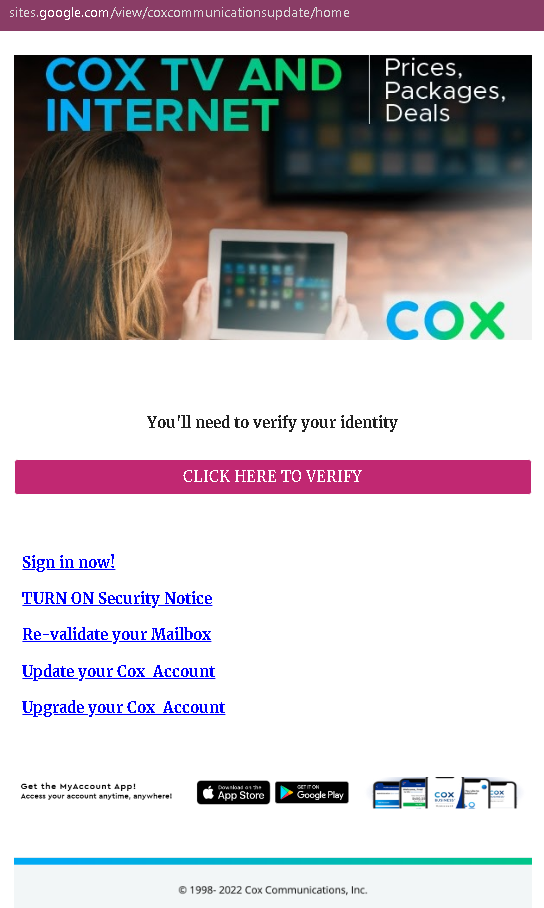
🛡️ Cybersecurity Measures: How to Avoid Cox Communications Phishing
To protect your Cox.com account and prevent hackers from accessing your personal billing information and email, follow these essential safety rules:
1. Verify the Official Domain (The URL Rule)
Phishing sites often use lookalike domains (e.g., cox-login-secure.com, myaccount-cox.net, verification-cox-tv.online).
- Action: The only official website for Cox Communications is ://cox.com. Before entering your User ID or Password, ensure the address bar shows exactly this domain. Any other variation is a fraud.
2. Beware of “Account Suspension” Threats
Scammers use high-pressure tactics to bypass your critical thinking, sending alerts like:
- “Your Cox service will be disconnected in 24 hours due to a billing error.”
- “Unusual activity detected: Please sign in to verify your identity.”
- Action: Cox will never threaten to immediately cut off your services via a link in an email or text. Real billing issues will be listed in your official “Statement” section after a safe login.
3. Mandatory Two-Step Verification (2FA)
Password theft is the primary goal of this phishing page. 2FA is your final line of defense.
- Action: Enable Two-Step Verification in your Cox account settings. This way, even if a scammer steals your password, they cannot log in without the code sent to your trusted mobile device.
4. The “Manual Entry” Policy
Emails with a “Login Now” or “Update Payment” button are common entry points for hackers.
- Action: Never log in through a link sent in an email. If you receive an alert, open a new browser tab and manually type ://cox.com or use the official Cox App to check your account status.
5. Inspect the Email Sender
Scammers often spoof the sender’s name to look like “Cox Support,” but the actual email address is unrelated (e.g., [email protected]).
- Action: On a computer, hover your mouse over the sender’s name to see the real email address. If it doesn’t end in @cox.com or @cox.net, it is a scam.
6. Use a Password Manager
Tools like Bitwarden, LastPass, or iCloud Keychain are designed to identify sites by their URL.
- Action: If you are on a phishing page, your password manager will not offer to auto-fill your credentials. This is a definitive technical warning that the site is a fraud.