
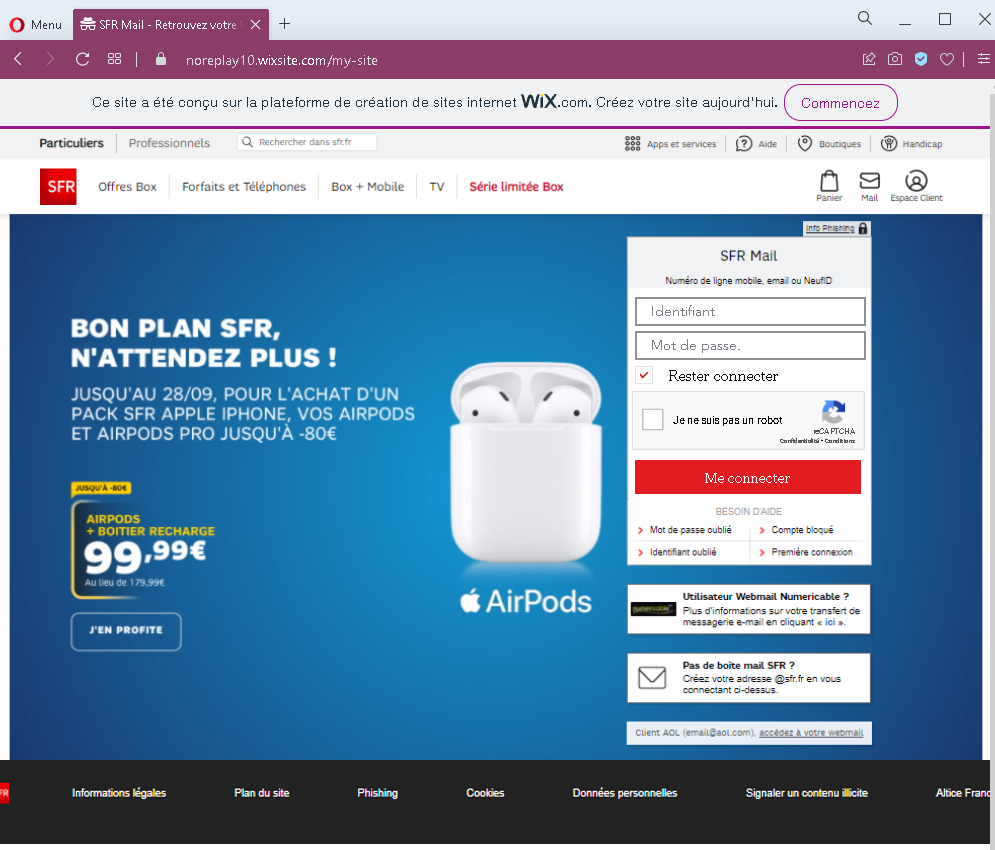
This screenshot shows a phishing page impersonating SFR Mail, a French email and internet service provider. The page is hosted on a free Wix.com website and mimics the SFR login interface to steal identifiants (identifier) and mot de passe (password) .
Threat Analysis: SFR Mail Phishing – Credential Harvesting on Wix
How it works:
The victim receives a phishing email, SMS, or other message claiming a security alert, account issue, or the need to verify their mailbox. The link leads to this page, which is built on a free Wix subdomain (visible in the URL noreplay10.wixsite.com/fm-site). The page copies SFR’s branding, including promotional banners, navigation menus, and footer links. The victim is asked to enter their identifiant (mobile number, email, or NeufID) and password, then click “Me connecter.” A CAPTCHA (“Je ne suis pas un robot”) is added to make the page appear more legitimate. The credentials are captured and sent to the attacker.
The goal:
The attacker steals SFR account credentials to:
- Access the victim’s email and personal information
- Reset passwords for other online accounts linked to that email
- Use the account to send further phishing messages
- Potentially compromise the victim’s internet and mobile services
Red flags to watch for:
- Suspicious URL: The page is on
noreplay10.wixsite.com/fm-site– notsfr.fr. Wix is a free website builder, not used by legitimate telecom providers for login pages. - Visible Wix banner: The blue banner at the top (“Ce site a été conçu sur la plateforme WIX.com”) is a clear indicator that this is not an official SFR page.
- Copied content: The promotional banners, menu items, and footer links are copied from the real SFR website. Attackers use this to make the page look authentic, but the domain gives it away.
- Unsolicited login request: SFR does not send links requiring users to log in to resolve account issues.
- Generic “I’m not a robot” CAPTCHA: While SFR may use CAPTCHAs, its presence on a Wix page is not a guarantee of safety – it is copied to appear legitimate.
What to do if you encounter this:
- Do not enter your identifier or password.
- If you are an SFR customer, always access your mailbox by typing
sfr.frdirectly into your browser or using the official SFR app. - If you have already entered your credentials, change your SFR password immediately and enable two‑factor authentication if available.
- Report the phishing page to SFR’s fraud team (e.g., via
[email protected]or their official reporting form).
Protective measures:
- Bookmark the official SFR login page and use that bookmark.
- Use a password manager – it will not autofill on fake domains.
- Never log in on a page hosted on a free website builder (Wix, Weebly, Strikingly, etc.) – legitimate services use their own domains.
- Enable two‑factor authentication on your email and telecom accounts.
- Be suspicious of any unsolicited message that asks you to log in via a link.