
This screenshot shows a fake reCAPTCHA page impersonating Amazon.de. The page claims the victim must prove they are “not a robot” by entering characters from an image – a classic tactic used to trick victims into completing a “verification” step that often leads to malware or credential theft.
Threat Intel: This spoofed page was detected, analyzed, and contained firsthand by the Antiphishing.biz security team during our automated link scanning workflows. To protect the public, the dangerous destination URL has been safely deactivated within our infrastructure. We document and analyze these live visual patterns to help security researchers and users spot lookalike phishing methods before financial damage occurs.
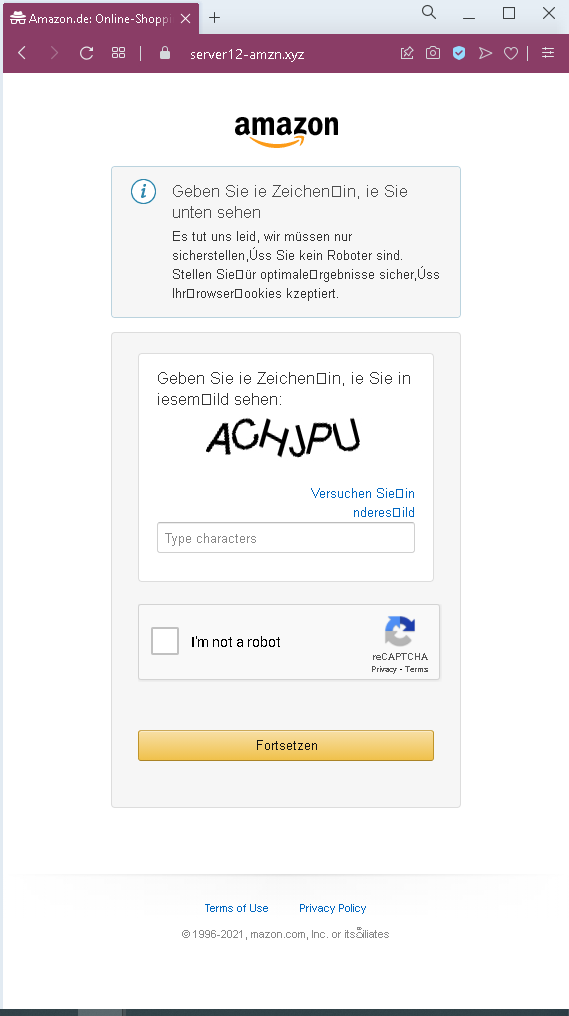
Threat Analysis: Amazon Fake reCAPTCHA Phishing – “I’m not a robot” Scam
How it works:
The victim receives a link (often via email, SMS, or malicious ad) that leads to this page. The page mimics a legitimate Amazon security check, displaying a fake CAPTCHA image with characters (“ACXJPVU”) and a checkbox “I’m not a robot.” The victim is instructed to enter the characters and click “Fortsetzen” (Continue). After submission, the victim is typically:
- Redirected to a phishing page asking for Amazon login credentials
- Prompted to download malware disguised as a “security update”
- Taken to a survey or offer wall (affiliate fraud)
The goal:
The attacker aims to:
- Trick the victim into entering information that can be used to bypass security measures
- Lead the victim to a subsequent phishing page where Amazon credentials are stolen
- Generate affiliate revenue through fake surveys or downloads
Red flags to watch for:
- Suspicious URL: The page is hosted on a domain that is not
amazon.de. Legitimate Amazon CAPTCHA challenges appear on official Amazon domains. - Generic design / missing Amazon branding: While the page uses the Amazon logo, the layout is minimal and lacks the full navigation, security notices, and footer links of the real Amazon site.
- Fake CAPTCHA image: The image text is simple and appears to be a static image, not a dynamically generated CAPTCHA. Real reCAPTCHA is more complex and interactive.
- Unsolicited verification request: Amazon does not require you to complete a CAPTCHA via an external link to “prove you’re not a robot.”
What to do if you encounter this:
- Do not enter any characters or click “Fortsetzen.”
- Do not click any links or download any files from such pages.
- If you have already entered information and were redirected to a login page, do not enter your Amazon credentials. Change your Amazon password immediately if you suspect you may have been tricked.
- Always access Amazon by typing
amazon.dedirectly into your browser.
Protective measures:
- Never complete a CAPTCHA on a page you reached via a link. Legitimate CAPTCHA challenges appear only on the official site you are already visiting.
- Check the URL carefully – Amazon.de domains end with
amazon.de. Look for misspellings, extra words, or unusual top‑level domains. - Use a password manager – it will not autofill on fake domains.
- Enable two‑factor authentication on your Amazon account.