
This screenshot shows a phishing page impersonating Orange Mail (Orange.fr), a major French telecommunications provider. The page asks for the victim’s email address and password, claiming they must log in to access their mailbox or client space.
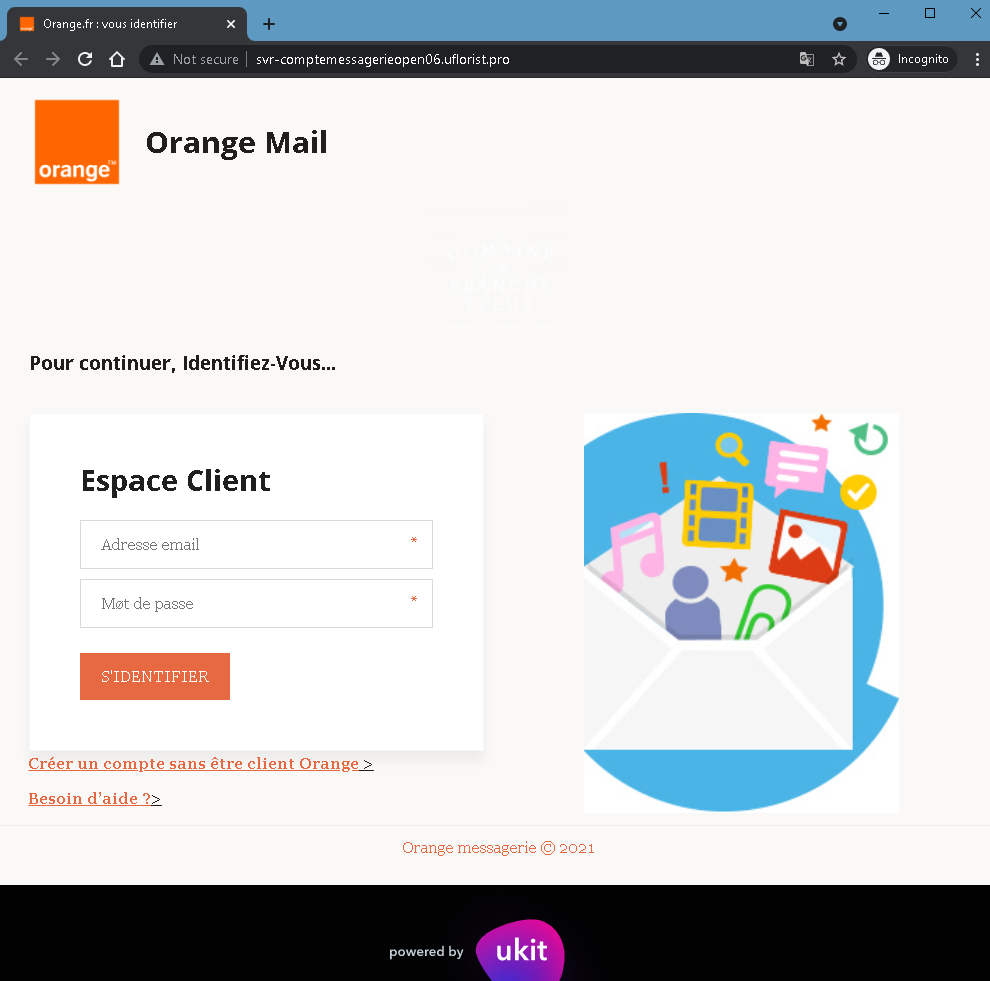
Threat Analysis: Orange Phishing – Fake “Espace Client” Login Page
How it works:
The victim receives a phishing email, SMS, or other message claiming a security alert, account issue, or the need to verify their mailbox. The link leads to this page, which mimics the Orange Mail login interface. The page asks for:
- Email address (Adresse email)
- Password (Mot de passe)
The victim is then prompted to click “S’IDENTIFIER” (Sign in). The credentials are captured and sent to the attacker. A note about creating an account without being an Orange customer and a help link are added to appear legitimate.
The goal:
The attacker steals Orange account credentials to:
- Access the victim’s email and personal information
- Reset passwords for other online accounts linked to that email
- Perform SIM swapping (porting the victim’s phone number) to bypass SMS‑based two‑factor authentication for banking or other services
- Use the account to send further phishing messages
Red flags to watch for:
- Suspicious URL: The page is hosted on a subdomain of
uflorist.pro, notorange.fr. Legitimate Orange login pages are only on official Orange domains. - “Not secure” browser warning: The URL bar shows “Not secure” – a clear indicator that the page lacks a valid SSL certificate for Orange’s official site.
- “powered by ukit” footer: Official Orange pages do not include “powered by ukit” – this indicates the page was built on a free website builder (Ukit), which is not used by legitimate telecom providers for login portals.
- Unsolicited login request: Orange does not send links requiring customers to log in to resolve account issues.
- Minimal design / missing security features: The page lacks the full branding, security notices, and two‑factor authentication options present on the real Orange login page.
What to do if you encounter this:
- Do not enter your email address or password.
- If you are an Orange customer, always access your mailbox by typing
orange.frdirectly into your browser or using the official Orange app. - If you have already entered your credentials, change your Orange password immediately and contact Orange customer service to watch for SIM swapping attempts.
- Report the phishing page to Orange’s fraud team (e.g., via
[email protected]).
Protective measures:
- Bookmark the official Orange login page and use that bookmark.
- Use a password manager – it will not autofill on fake domains.
- Enable two‑factor authentication on your Orange account if available.
- Never log in via a link in an unsolicited message – always type the URL manually.
- Avoid entering credentials on pages built with free website builders (Ukit, Wix, Weebly, etc.) – legitimate providers do not use these for secure login portals.