
This screenshot shows a phishing page impersonating Amazon’s sign‑in interface. The page asks for the victim’s email (or phone number) and password, then sends the credentials to the attacker.
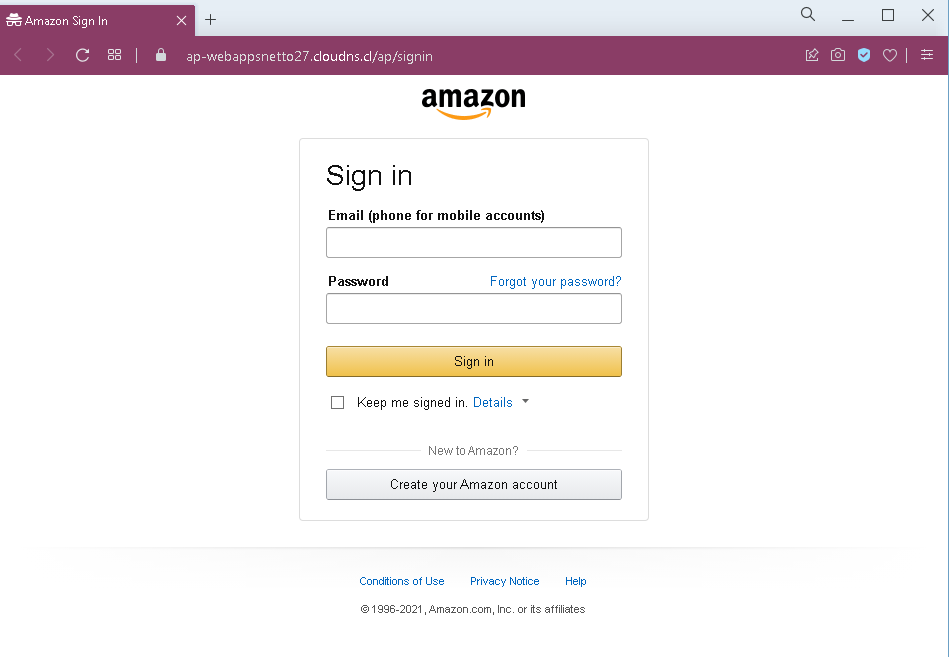
Threat Analysis: Amazon Phishing – Fake Sign‑In Page
How it works:
The victim receives a phishing email, SMS, or other message claiming an order problem, account suspension, or the need to verify payment information. The link leads to this page, which mimics the Amazon login portal. The victim is asked to enter their email (or mobile number) and password, then click “Sign in.” The credentials are captured and sent to the attacker. After theft, the victim may be redirected to the real Amazon website, making the scam less noticeable.
The goal:
The attacker steals Amazon account credentials to:
- Make fraudulent purchases using saved payment methods
- Access order history and personal information
- Change account settings (shipping addresses, email, password) to lock out the victim
- Use the same email/password combination to compromise other accounts (credential stuffing)
Red flags to watch for:
- Suspicious URL: The page is hosted on a subdomain of
cloudns.cl(e.g.,ap-webappsnetto27.cloudns.cl), notamazon.com. Legitimate Amazon sign‑in pages are only on official Amazon domains. - Outdated copyright: The footer shows “© 1996-2021” – the year 2021 is outdated for a screenshot likely taken later, a common sign of a copied phishing template.
- Unsolicited login request: Amazon does not send links requiring customers to log in to resolve account issues. Always type
amazon.commanually. - Missing security indicators: The page lacks the expected security badges, personalized elements (e.g., a saved email or security image), and two‑factor authentication prompts that appear on the real Amazon sign‑in page.
What to do if you encounter this:
- Do not enter your email/phone or password.
- If you have already entered your credentials, change your Amazon password immediately, enable two‑factor authentication, and check your account for unauthorized orders or changes.
- Always access Amazon by typing
amazon.com(or your local Amazon domain) directly into your browser.
Protective measures:
- Bookmark the official Amazon sign‑in page and use that bookmark.
- Use a password manager – it will autofill only on legitimate Amazon domains.
- Enable two‑factor authentication on your Amazon account.
- Be suspicious of any unsolicited message that asks you to log in via a link.
- Check the URL carefully – look for misspellings, extra words, or unusual top‑level domains (e.g.,
.cl,.cloudns.cl).