
Security Notice: This malicious interface was logged, cross-checked, and neutralized firsthand by the
Antiphishing.bizsecurity team during our automated link scanning workflows. To protect the public, the hostile origin link has been safely deactivated within our infrastructure. We document and analyze these live visual patterns to help security researchers and users recognize deceptive clone designs before financial damage occurs.
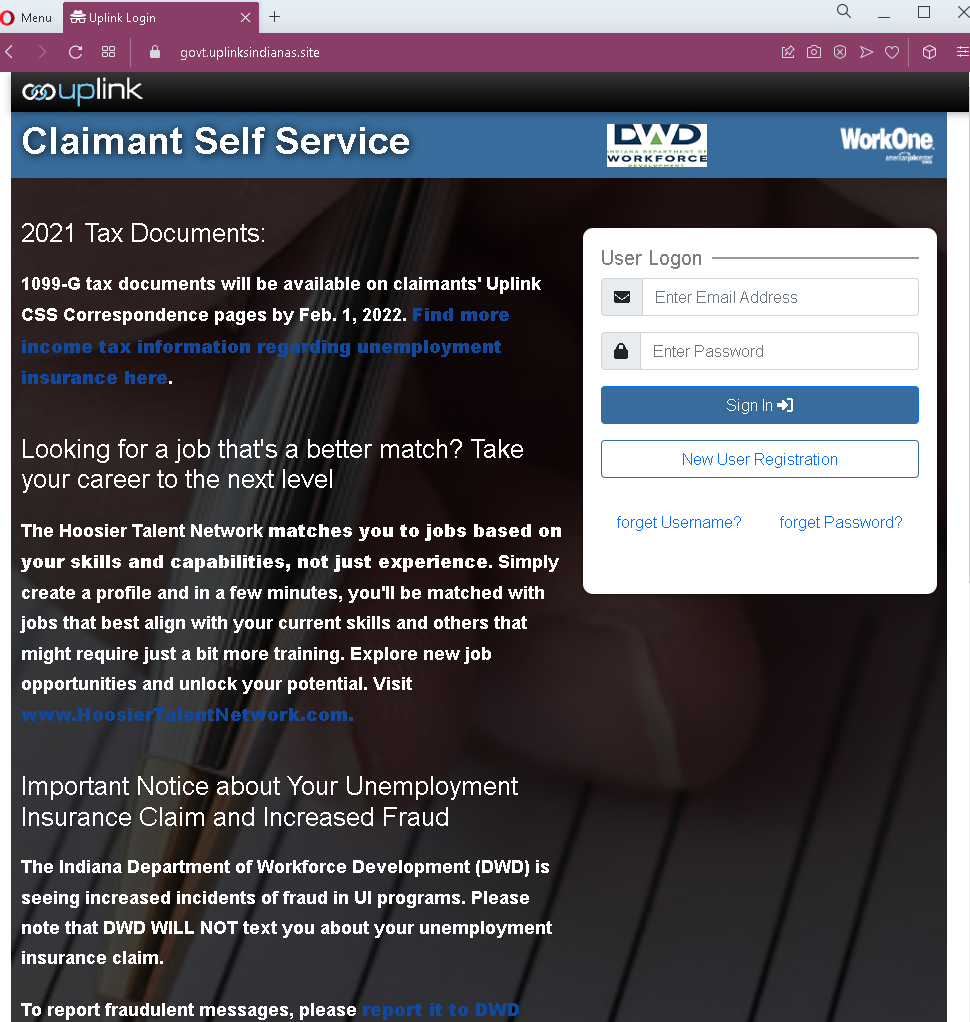
Threat Analysis: Indiana DWD Unemployment Benefits Phishing – Fake Uplink CSS Login Page
This phishing campaign impersonates the Indiana Department of Workforce Development (DWD) and its unemployment insurance portal (Uplink CSS). The page is designed to steal claimants’ login credentials—specifically the email address and password used to access unemployment benefits. Scammers target unemployment systems because they contain sensitive personal information and are used to disburse government funds.
How it works:
The victim receives a phishing email, SMS, or other message claiming a problem with their unemployment claim, a need to verify their identity, or a notice about tax documents. The message includes a link to this fake Uplink CSS login page. When the victim enters their email address and password and clicks “Sign In,” the credentials are captured and sent to the attacker.
The goal:
The attacker aims to steal unemployment benefits account credentials. With these, they can:
- Access the victim’s unemployment insurance account
- Redirect benefit payments to their own bank accounts
- Obtain sensitive personal information (Social Security number, address, etc.)
- Commit identity theft or sell the information
Red flags to watch for:
- Suspicious URL: The page is hosted on a domain that is not
in.govin.gov - Unsolicited login request: The Indiana DWD does not send emails or messages with links requiring claimants to log in to resolve issues. Claimants should always access Uplink CSS by typing the official URL directly.
- Generic page design: While the page includes some legitimate-looking content (such as a notice about 1099-G tax documents and the Hoosier Talent Network), these elements are copied from the real DWD website. Their presence does not make the page legitimate.
- Warning message copied from the real site: The page includes a notice about increased fraud and states that “DWD WILL NOT text you about your unemployment insurance claim.” Ironically, this warning is being displayed on a phishing page—a contradiction that careful users might notice.
- No personalization or security image: Legitimate Uplink CSS login pages may display personalized security questions or account-specific information after entering credentials. This page lacks such features.
- Incorrect date context: The page mentions “2021 Tax Documents” and a date of Feb. 1, 2022, which are outdated for a 2023 screenshot. While not a definitive red flag, it suggests copied content.
What to do if you encounter this:
- Do not enter your email address, password, or any other personal information on this page.
- If you are an Indiana unemployment insurance claimant, always access Uplink CSS by typing
uplink.in.govdwd.in.gov - If you have already entered your credentials, contact the Indiana DWD immediately to secure your account and change your password. Report the incident to their fraud department.
- Report the phishing page to the Indiana DWD and to the appropriate authorities (such as the FBI’s IC3 or the state’s fraud reporting system).
Why this scam is effective:
Unemployment insurance claimants are frequent targets of phishing because these accounts contain sensitive personal information and are directly tied to government benefits. The page closely mimics the look and feel of the legitimate Uplink CSS portal, including real program names (Hoosier Talent Network) and official-sounding fraud warnings. The promise of tax documents (1099-G) adds a layer of perceived legitimacy. Claimants who are eager to access their information may click the link without carefully checking the URL.
Protective measures:
- Bookmark the official Indiana DWD Uplink CSS login page (
uplink.in.gov - Use a password manager: It will autofill only on legitimate
in.gov - Enable two-factor authentication (2FA) on your unemployment account if available, to add an extra layer of protection.
- Be suspicious of any unsolicited message that creates urgency and asks you to log in to your benefits account.
- Check the URL carefully: Legitimate Indiana government domains end with
in.gov - If in doubt, contact the Indiana DWD directly using a phone number from your official correspondence or the official website—never use contact information provided in a suspicious message.