
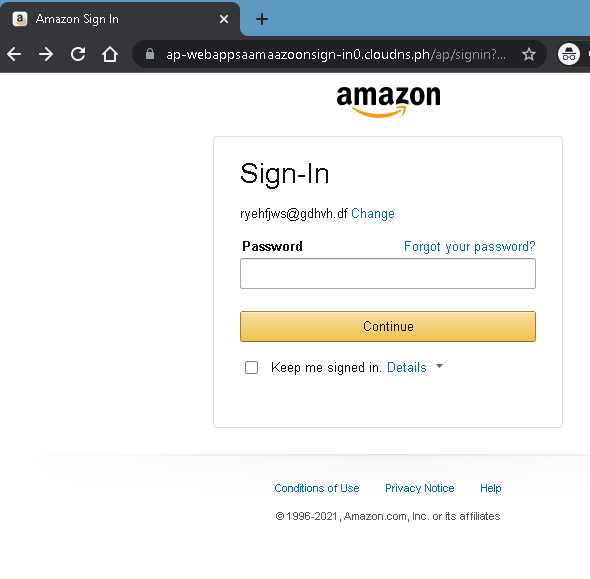
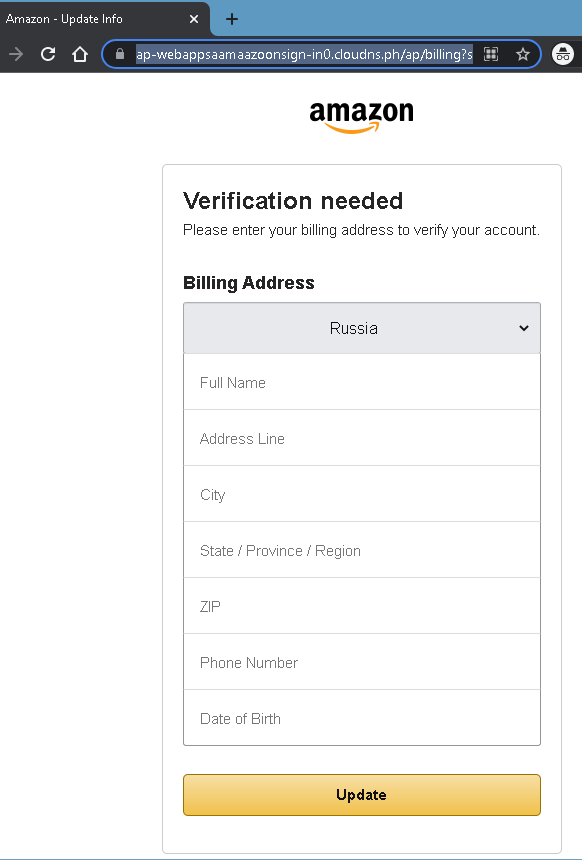
These two screenshots show a two‑step Amazon phishing campaign. The first page steals the victim’s email and password, while the second page harvests personal information (full name, address, phone number, date of birth) – enough data for identity theft or to answer security questions.
Incident Report: This spoofed page was detected, analyzed, and contained firsthand by the
Antiphishing.bizsecurity team during our standard URL vetting operations. To protect the public, the dangerous destination URL has been safely deactivated within our infrastructure. We document and analyze these live visual patterns to help security researchers and users spot lookalike phishing methods before financial damage occurs.
Threat Analysis: Amazon Phishing – Credential & Personal Data Harvesting
How the scam works:
Step 1 – Fake Sign‑In Page (First Screenshot)
The victim receives a phishing email or message claiming an account issue, order problem, or the need to verify their information. The link leads to this page, which mimics the Amazon login interface. The victim is asked to enter their email/phone and password. The page shows a static email address (“ryehfjws@gdhvh.df”) as a placeholder – a clear sign of a phishing template.
Step 2 – Billing Address Verification Page (Second Screenshot)
After submitting credentials, the victim is taken to a second page that claims “Verification needed” and asks for:
- Full name
- Address (street, city, state, ZIP)
- Phone number
- Date of birth
A fake URL containing “amazoon” (a misspelling of Amazon) and a suspicious domain (cloudns.ph
The goal:
The attacker collects:
- Amazon account credentials (email and password)
- Personal identity information (full name, address, phone, DOB)
With this data, the attacker can:
- Log into the victim’s Amazon account to make fraudulent purchases
- Use the personal information for identity theft
- Answer common security questions (“What is your date of birth?” “What is your address?”) to take over other accounts
- Sell the complete profile on criminal markets
Red flags to watch for:
- Suspicious URL: The second page shows
ap-webappsaamaazoonsign-in0.cloudns.phamazon.com.cloudns.ph - Fake placeholder email: The first page displays a nonsensical email (
[email protected]) – Amazon would never pre‑fill your sign‑in page with someone else’s email. - Request for date of birth and full address after login: Amazon does not ask for this information again during a normal “verification” flow.
- Outdated copyright: The footer shows “©
1996-2021” – a phishing page often copies an old year. - Unsolicited verification request: Amazon does not send links requiring customers to log in and then enter their full address and DOB to verify an account.
What to do if you encounter this:
- Do not enter your email, password, address, or date of birth.
- If you have already entered your Amazon credentials, change your password immediately and enable two‑factor authentication. Also check your Amazon account for unauthorized orders.
- If you entered personal information (address, DOB), monitor your credit reports and consider placing a fraud alert.
- Always access Amazon by typing
amazon.com
Protective measures:
- Bookmark the official Amazon login page and use that bookmark.
- Use a password manager – it will autofill only on legitimate
amazon.com - Enable two‑factor authentication on your Amazon account.
- Never provide your date of birth or full address on a page you reached via a link – Amazon already has this information on file.
- Check the URL carefully: Look for misspellings (
amazoonamazon.ph.cloudns.ph