
This screenshot shows a phishing page impersonating Crédit Mutuel de Bretagne, a French bank. The page threatens a “temporary ban on all debit operations” to pressure victims into providing sensitive personal and banking information.
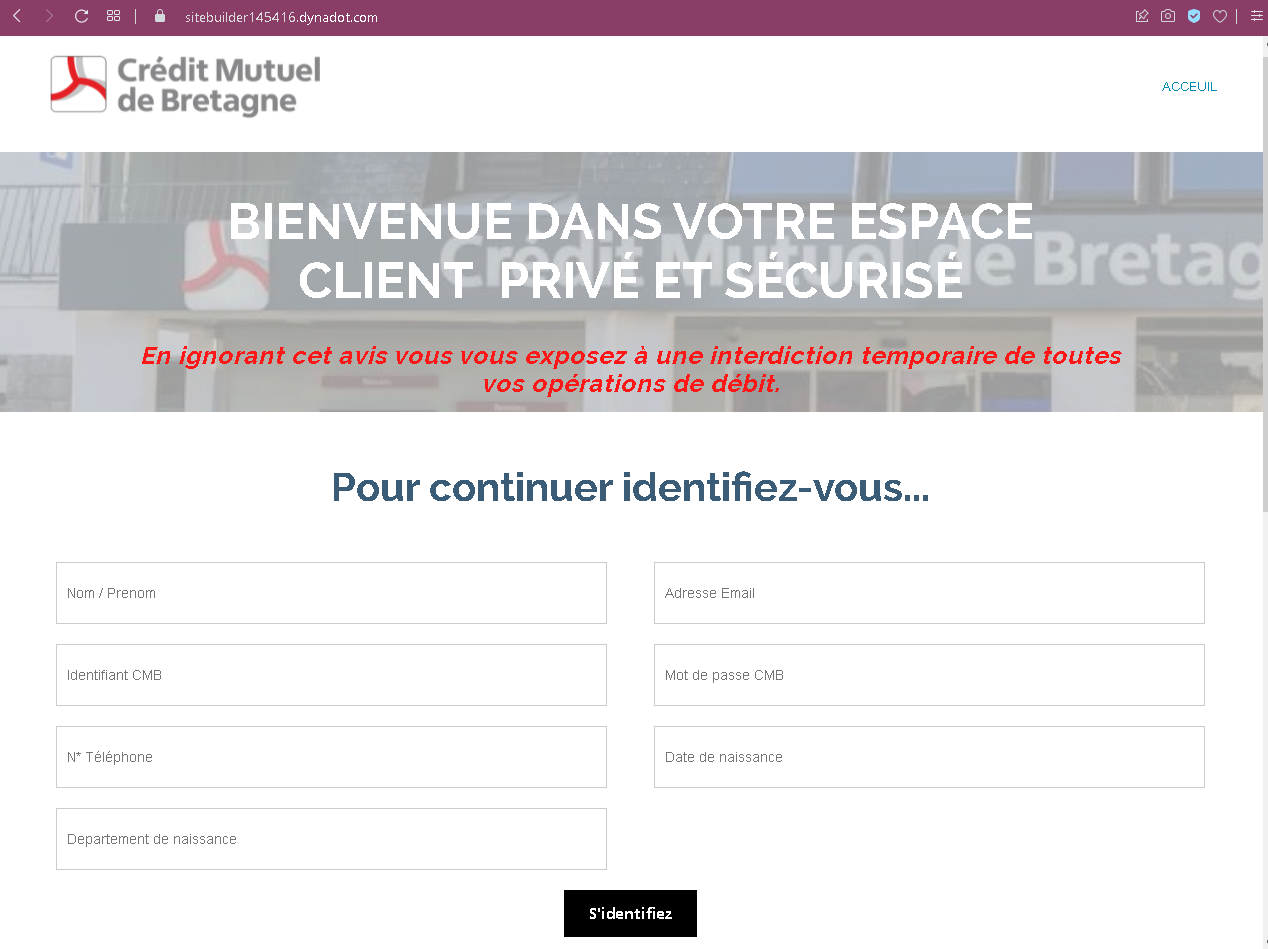
Threat Analysis: Crédit Mutuel de Bretagne Phishing – Full Identity & Banking Credential Harvesting
How it works:
The victim receives a phishing email, SMS, or other message claiming a security alert or account restriction. The link leads to this page, which mimics the bank’s client space. The victim is asked to provide:
- First and last name
- Email address
- Identifiant CMB (online banking username)
- Mot de passe CMB (password)
- Phone number
- Date of birth
- Department of birth
A threat is displayed: ignoring the notice will result in a temporary ban on all debit operations – a classic fear tactic.
The goal:
The attacker collects:
- Online banking credentials (identifier and password)
- Full personal identity information (name, DOB, birth department, phone, email)
- Enough data to potentially answer security questions or commit identity theft
With this information, the attacker can:
- Log into the victim’s Crédit Mutuel online banking account
- Authorize fraudulent transfers or payments
- Use personal details for identity fraud or to impersonate the victim
Red flags to watch for:
- Suspicious URL: The page is hosted on a subdomain of
dynadot.com(a domain registrar), not oncreditmutuel.fror an official Crédit Mutuel domain. - Threat of immediate consequences: The warning of a “temporary ban on all debit operations” is a fear tactic to pressure victims into acting without thinking.
- Excessive data requests: A legitimate bank login does not ask for full name, email, phone, date of birth, and department of birth all on the same page. This is a clear sign of a phishing kit designed to harvest as much personal data as possible.
- Unsolicited login request: Crédit Mutuel does not send links requiring customers to log in to avoid account restrictions.
- Poor design / generic layout: The page lacks the full branding, security notices, and two‑factor authentication features of the real Crédit Mutuel portal.
What to do if you encounter this:
- Do not enter any personal or banking information.
- If you are a Crédit Mutuel customer, always access your account by typing the official website URL directly (e.g.,
creditmutuel.fror your regional branch’s domain). - If you have already entered your credentials, contact Crédit Mutuel immediately to change your password and secure your account.
- Report the phishing page to Crédit Mutuel’s fraud team.
Protective measures:
- Bookmark the official Crédit Mutuel login page and use that bookmark.
- Use a password manager – it will autofill only on legitimate domains.
- Enable two‑factor authentication on your bank account if available.
- Never provide your date of birth, phone number, and banking credentials in response to a threat‑based message.
- Be suspicious of any unsolicited message that threatens account restrictions and asks you to log in via a link.