
A Bank of America phishing campaign employs a “System Maintenance” pretext to solicit user credentials and Social Security Numbers under the guise of security synchronization. The attack utilizes deceptive domains to mirror the official portal, aiming to capture sensitive information, including real-time, one-time passcodes (OTP).
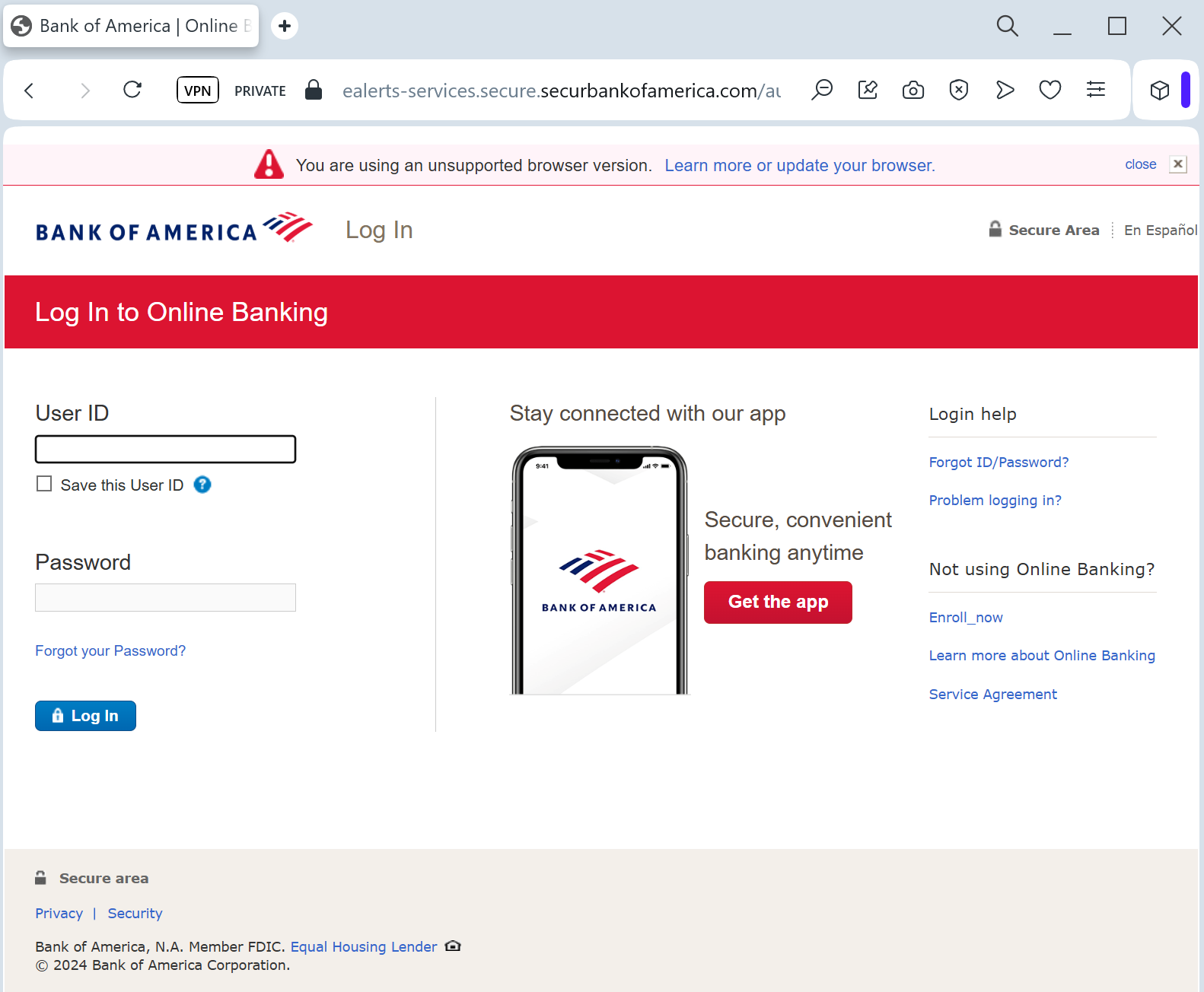
Target: Bank of America Customers (USA)
Threat Level: Critical (Identity & Full Account Takeover)
Phishing Method Description
This sophisticated attack goes beyond simple password theft. Scammers use a Multi-Step Credential Harvesting technique. The victim is often directed to this page via a “security alert” email or SMS claiming that their online access is out of sync with new federal banking regulations.
The fake site mimics the official Bank of America secure login environment. Once the victim enters their initial credentials, the phishing kit triggers a second page designed to harvest highly sensitive personal data used for identity recovery:
Online ID & Passcode
Security Challenge Questions & Answers (Mother’s maiden name, first pet, etc.)
Social Security Number (SSN)
Email Account Access (to intercept 2FA codes in real-time)
⚠️ Red Flags to Watch For
The URL Mask: While the page looks perfect, the address bar will show a domain like bofa-verification-portal.com, bankofamerica-support.net, or a compromised third-party site. The official domain is strictly bankofamerica.com.
Excessive Information Requests: A legitimate bank login will rarely ask for your full Social Security Number and answers to all your security questions in a single session unless you are manually resetting your password.
Broken “Security” Links: On these fake pages, links like “Privacy,” “Security,” or “Locations” are usually inactive or redirect back to the same phishing form.
🛡️ How to Protect Yourself
Never Share Security Answers: Treat your security question answers like passwords. Never enter them on a site you reached via a link.
Use the Mobile App: Bank of America’s official app uses device-level security. If there is a real “synchronization” issue, the app will notify you through a secure in-app message.
Enable Advanced 2FA: Switch from SMS-based codes to an authenticator app or a hardware security key if your bank supports it.
Direct Access: If you receive a suspicious alert, close your browser, open a new tab, and manually type ://bankofamerica.com to log in safely.