
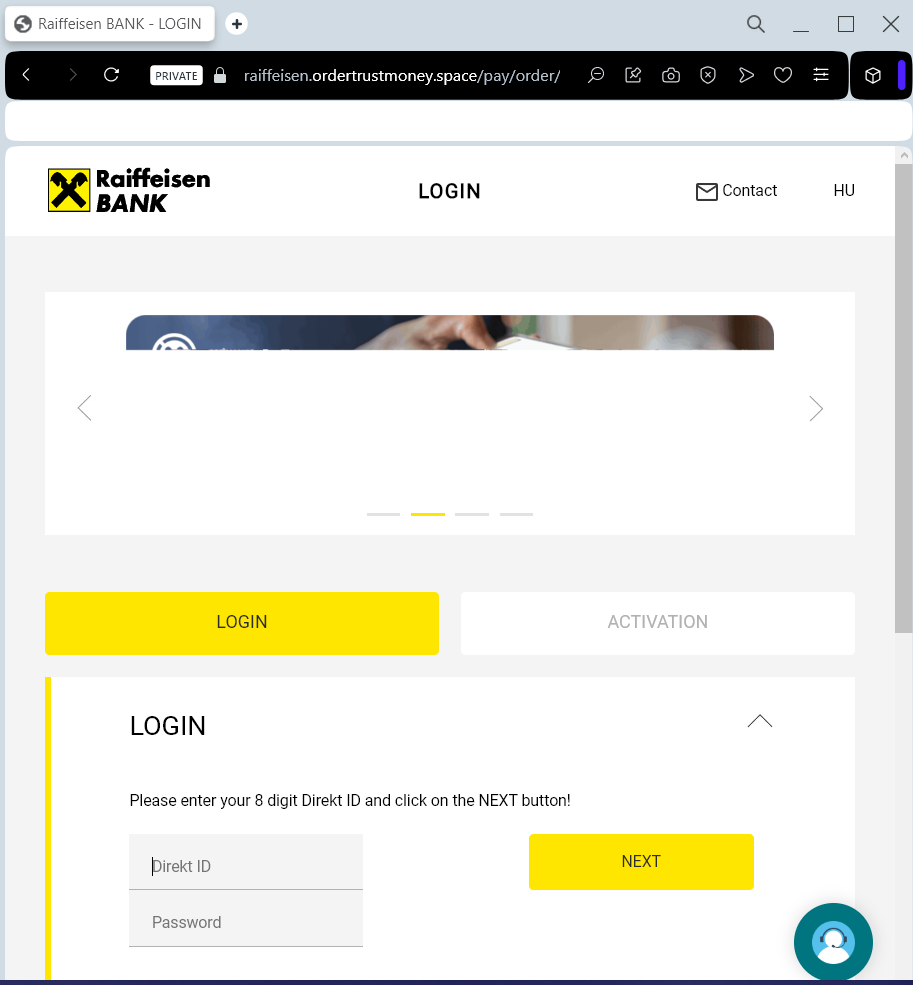
Raiffeisen Bank “Digital Security Update” Phishing
Target: Raiffeisen Bank Customers (Central and Eastern Europe)
Threat Level: Critical (Raiffeisen Identity & Digital Token Theft)
Phishing Method Description
This attack targets users of the Raiffeisen Online Banking and the Digital ID apps. Scammers distribute urgent notifications via SMS (Smishing) or Email, claiming that “New Security Regulations” or a “System Maintenance” requires the user to re-verify their profile to avoid account suspension.
The link leads to a high-fidelity clone of the Raiffeisen “Login” portal. This sophisticated phishing kit is specifically designed to harvest:
Customer ID / Username
PIN / Password
Mobile Phone Number
One-Time Password (OTP) / Push Authorization: The fake site prompts the victim to enter the code from their SMS or confirm a notification in their official Raiffeisen app in real-time. This allows the attacker to authorize a fraudulent transfer or link a new device to the account instantly.
⚠️ Red Flags to Watch For
The Lookalike URL: The official domains are raiffeisen.at, raiffeisen.ro, etc. Phishing sites use deceptive addresses like raiffeisen-securitate.online, verificare-raiffeisen.net, secure-raiffeisen-login.com, or free subdomains like raiffeisen.web.app.
Urgent & Threatening Tone: Phrases like “Immediate action required” or “Your access will be blocked within 24 hours” are classic social engineering tactics.
Link in SMS/Email: Raiffeisen Bank officially states they will never include a clickable link in an SMS or email that leads directly to a login page asking for your credentials.
💡 Expert Security Tip: The “Digital ID” Proxy Attack
The Method:
This case highlights a Real-Time Authentication Hijack. Scammers are not just looking for your password; they are acting as a “middleman” between you and the real bank server.
The Trap:
When you enter your credentials on the fake page, the attacker simultaneously enters them on the actual Raiffeisen website. This triggers a legitimate Push Notification or SMS OTP to your phone. The phishing site then asks you to “Confirm the notification to finish the update.” By doing so, you are not securing your account—you are signing a digital signature that authorizes the hacker to drain your funds.
How to Protect Yourself:
The “Context” Rule: Only confirm a notification or enter an OTP if YOU were the one who manually typed the official bank address into your browser. If a prompt appears after clicking a link, REJECT it.
Read the Prompt Carefully: If the notification on your phone says “Authorize a payment” or “Register a new device” but you are just trying to “log in,” it is 100% a scam.
Zero Trust for Links: Raiffeisen will never send you a link to “Log in” or “Update” your security credentials via SMS. Always use the official Raiffeisen Smart Mobile app.