
Orange Voicemail Phishing – Fake “New Messages” Notification
This phishing campaign impersonates Orange, a major telecommunications provider in France and other countries. The scam uses a fake voicemail notification to create urgency and trick victims into entering their Orange account credentials on a fraudulent login page.
How it works:
The victim receives a phishing email or SMS claiming to be from Orange, stating that new voicemail messages are waiting. The message includes a link to the first phishing page.
Step 1 – Fake Voicemail Notification Page
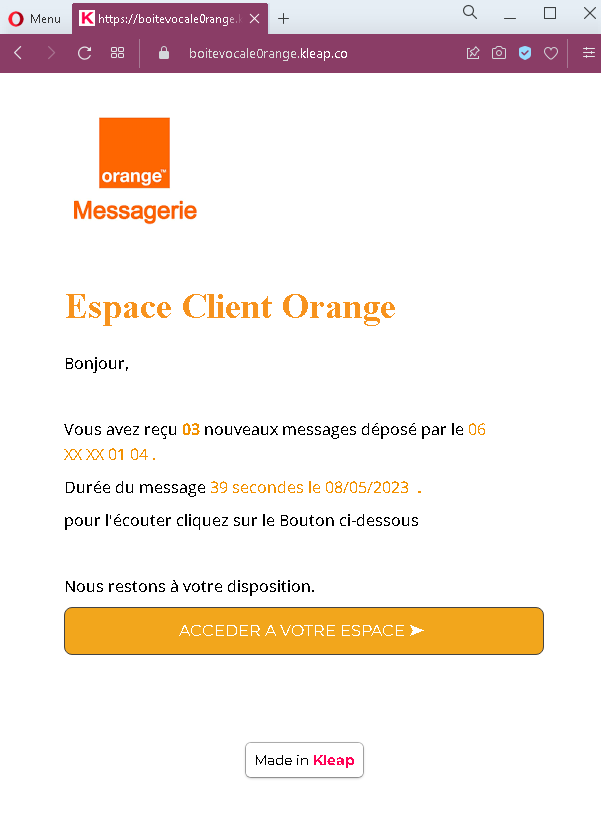
The first page displays:
- Orange branding
- A claim that the recipient has received new messages from a specific phone number
- A fabricated message duration and date
- A prominent button inviting the victim to access their account to listen to the messages
Step 2 – Fake Orange Login Page
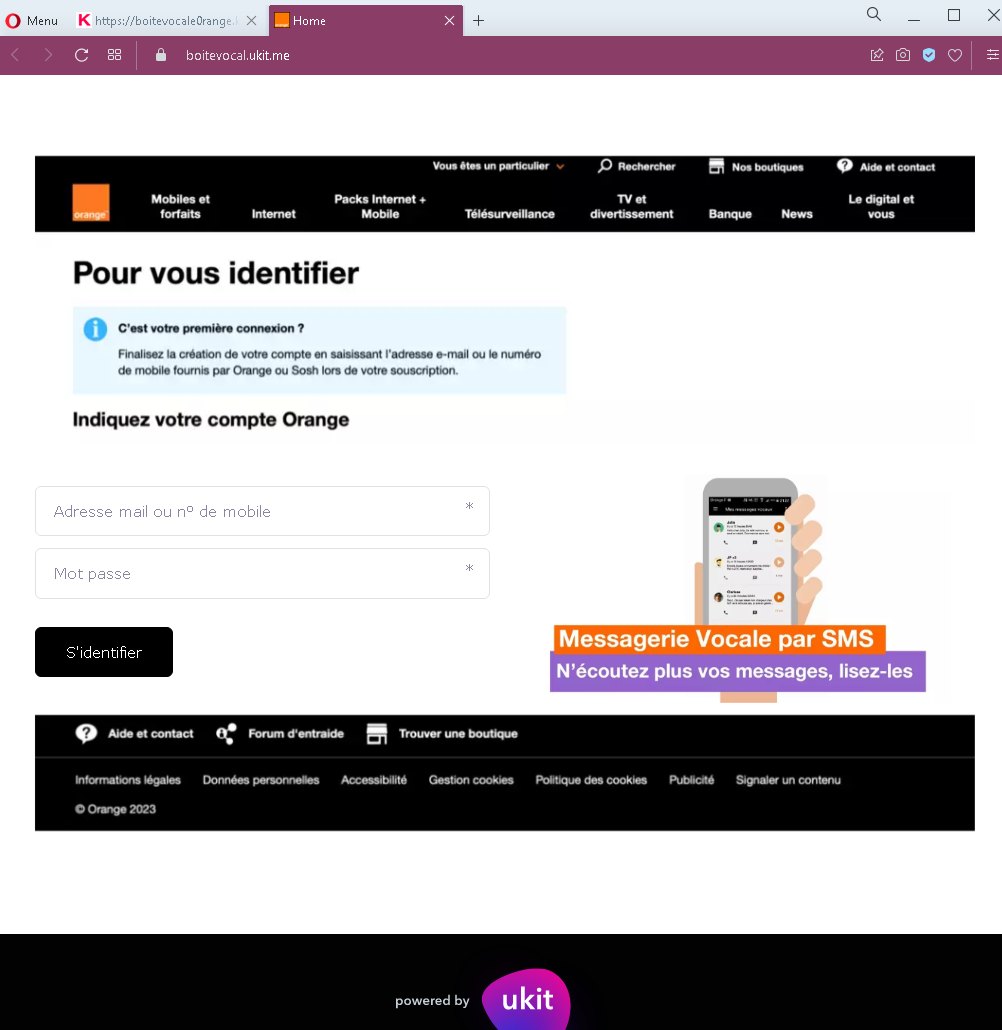
After clicking the button, the victim is taken to a page that mimics Orange’s official login interface. This page:
- Asks for the victim’s Orange account identifier (email or mobile number) and password
- Includes a “Sign in” button
- Features footer links commonly found on legitimate Orange pages (help, legal information, cookie policy) to appear authentic
The goal:
The attacker steals the victim’s Orange account credentials (username/email and password). With these, they can:
- Access the victim’s personal information stored in the Orange account
- Potentially port the victim’s phone number (SIM swapping) to gain control over SMS-based two-factor authentication for banking and other services
- Use the compromised account to send further phishing messages to the victim’s contacts
- Gain access to any services linked to the Orange account
Red flags to watch for:
- Unsolicited notification: A legitimate voicemail notification from Orange typically appears as a direct alert within the phone’s voicemail system or via a short SMS without a link. Orange does not send emails with buttons to “access your space” for voicemail playback.
- Suspicious URL: Both pages are hosted on a domain that is not
orange.fror any official Orange domain. Always check the address bar before entering credentials. - Generic design elements: The first page includes a “Made in Kleap” watermark (a website builder), which is not present on official Orange communications.
- No personalization: The notification does not address the recipient by name or reference a specific account number.
- Login page mismatch: The login page asks for credentials to listen to voicemail, but legitimate voicemail access is typically handled through the phone’s native voicemail system or a dedicated app—not through a web login form.
What to do if you encounter this:
- Do not click the button to “access your space.”
- Do not enter your Orange account credentials on such pages.
- If you have an Orange voicemail, access it directly through your phone’s voicemail feature or the official Orange app.
- If you are an Orange customer, always type the official Orange website URL (
orange.fror your local Orange domain) directly into your browser to log in. - If you have already entered your credentials, change your Orange account password immediately and enable two-factor authentication (2FA) if available. Also check for any unauthorized changes to your account (such as SIM swap requests).
- Report the phishing page to Orange’s fraud department.
Why this scam is effective:
Voicemail notifications are routine for mobile phone users, and the promise of “new messages” creates immediate curiosity. The use of Orange branding and a plausible message format (including a date, duration, and partial phone number) makes the notification seem credible. The second page closely mimics Orange’s actual login interface, complete with familiar footer links.
Protective measures:
- Never click links in unsolicited emails or SMS claiming to be from your telecom provider. Access your account by typing the official URL directly or using the provider’s official app.
- Be suspicious of any message that creates urgency and asks you to log in via a link.
- For voicemail, rely on your phone’s built-in visual voicemail or the carrier’s official voicemail number, not web links.
- Enable two-factor authentication (2FA) on your telecom account if offered, to prevent unauthorized access and SIM swapping.
- If you receive a suspicious message claiming to be from Orange, forward it to the company’s official phishing reporting address (e.g.,
spam.orange.fr).