
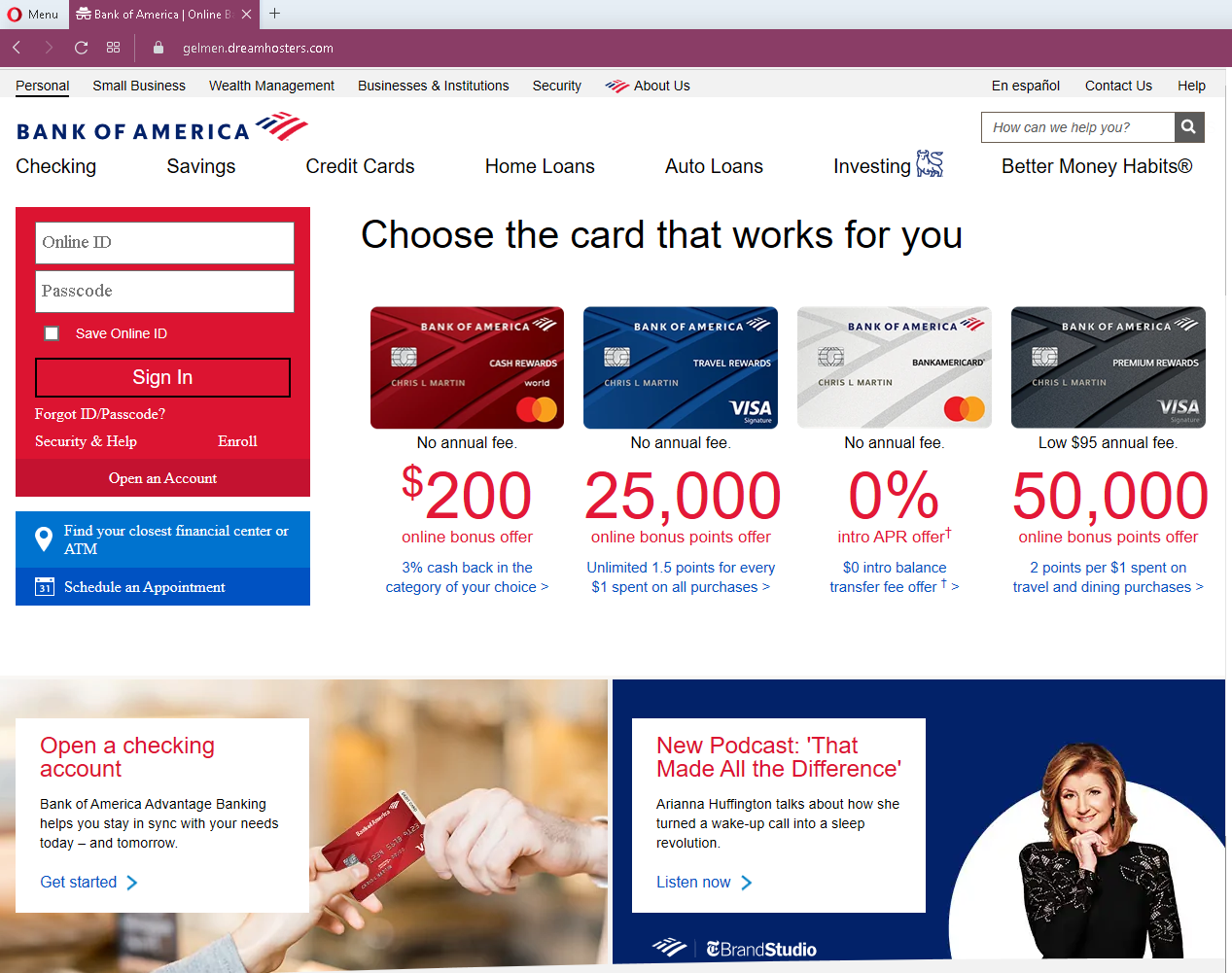
Threat Analysis: Bank of America Phishing – Fake “Checking Savings” Login Page
This phishing campaign impersonates Bank of America, one of the largest banks in the United States. The page mimics the bank’s login interface to steal customers’ Online ID and Passcode (password).
How it works:
The victim receives a phishing email, SMS, or other message claiming a security alert, account issue, or the need to verify their information. The message includes a link to this fake Bank of America login page. When the victim enters their Online ID and Passcode and clicks “Sign In,” the credentials are captured and sent to the attacker.
The goal:
The attacker aims to steal the victim’s Bank of America online banking credentials. With these, they can log into the victim’s real bank account, view balances, transfer funds, and commit fraud.
Red flags to watch for:
- Suspicious URL: The page is hosted on a domain that is not
bankofamerica.com. Legitimate Bank of America online banking is accessed through the official website. Always check the address bar. - Unsolicited login request: Bank of America does not send emails or messages with links requiring customers to log in to resolve account issues. Customers should always access online banking by typing the URL directly or using the official mobile app.
- Copied promotional content: The page includes credit card offers and a podcast promotion that are copied from the legitimate Bank of America website. Attackers use such content to make the page appear authentic, but its presence does not guarantee legitimacy.
- Missing security elements: Legitimate Bank of America login pages include security features such as a “Secure” badge, site key phrase, or personalized greeting. This page lacks these.
- Mixed branding elements: The page uses the Bank of America logo and “Checking Savings” header, but the layout is simpler and less polished than the actual site.
- “Save Online ID” checkbox: While this feature exists on the real site, phishing pages copy it to appear legitimate. The real security check is the URL, not the presence of familiar interface elements.
What to do if you encounter this:
- Do not enter your Online ID, Passcode, or any other personal information on this page.
- If you are a Bank of America customer, always access online banking by typing
bankofamerica.comdirectly into your browser or by using the official Bank of America mobile app. - If you have already entered your credentials, contact Bank of America immediately through their official customer service hotline to secure your account and change your password.
- Report the phishing page to Bank of America’s fraud department (e.g., by forwarding the original message to
[email protected]).
Why this scam is effective:
Bank of America has millions of online banking customers. This phishing page is particularly convincing because it includes real promotional content (credit card offers, podcast links) that is copied from the bank’s actual website. Victims who have seen these offers before may be reassured that the page is legitimate. The login form itself is simple and familiar, making it easy for a distracted user to enter credentials without checking the URL.
Protective measures:
- Bookmark the official Bank of America login page and use that bookmark to access online banking—never click links in emails or messages.
- Use a password manager: It will autofill only on legitimate
bankofamerica.comdomains, not on phishing sites. - Enable two-factor authentication (2FA) on your Bank of America account to add an extra layer of protection.
- Be suspicious of any unsolicited message that creates urgency and asks you to log in to your bank account.
- Check the URL carefully: Legitimate Bank of America domains end with
bankofamerica.com. Look for misspellings, extra words, or unusual top-level domains. - If in doubt, contact Bank of America directly using a phone number from your bank statement or the official website—never use contact information provided in a suspicious message.