
Threat Intel: This malicious interface was logged, cross-checked, and neutralized firsthand by the
Antiphishing.bizsecurity team during our automated link scanning workflows. To protect the public, the dangerous destination URL has been safely deactivated within our infrastructure. We document and analyze these live visual patterns to help security researchers and users detect replica fraud techniques before financial damage occurs.
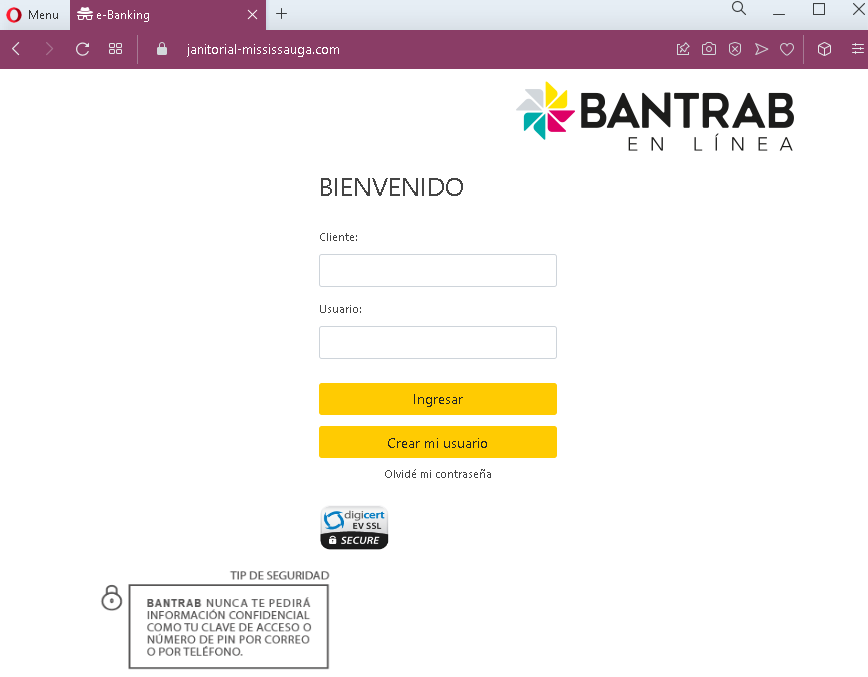
Threat Analysis: Bantrab Phishing – Fake Login Page Stealing Client Credentials
This phishing campaign impersonates Bantrab (Banco de los Trabajadores) , a prominent bank in Guatemala. The page mimics the bank’s login interface to steal customers’ Cliente (client ID) and Usuario (username) . This information is typically used as the first step in accessing online banking, after which the victim would be asked for a password on a subsequent page (likely part of a multi-step phishing flow).
How it works:
The victim receives a phishing email, SMS, or other message claiming a security alert, account issue, or the need to verify their information. The message includes a link to this fake Bantrab login page. When the victim enters their Cliente and Usuario and clicks “Ingresar” (Login), the credentials are captured and sent to the attacker.
The goal:
The attacker aims to steal the victim’s Bantrab online banking credentials. With these (and likely a password captured on a follow-up page), they can log into the victim’s real bank account, view balances, transfer funds, and commit fraud.
Red flags to watch for:
- Suspicious URL: The page is hosted on a domain that is not
bantrab.com.gt - Unsolicited login request: Bantrab does not send emails or messages with links requiring customers to log in to resolve account issues. Customers should always access online banking by typing the URL directly or using the official app.
- Minimal design: The page uses the Bantrab logo and a simple form, but lacks the full navigation, security notices, and personalized elements present on the legitimate login page.
- Missing security elements: Legitimate Bantrab login pages may display security tips, a virtual keyboard, or other features. This page has only a basic form.
- Typographical note: The page heading says “BENVENIDO” instead of “BIENVENIDO” (the correct Spanish spelling for “welcome”). While minor, such typos can appear in phishing pages and are not typical of official bank communications.
- Ironically, the security tip itself: The page includes a warning that “BANTRAB NUNCA TE PEDIRÁ INFORMACIÓN CONFIDENCIAL…” (Bantrab will never ask for confidential information). Yet the page itself is asking for confidential information—a contradiction that users should notice.
What to do if you encounter this:
- Do not enter your Cliente, Usuario, or any other personal information on this page.
- If you are a Bantrab customer, always access online banking by typing
bantrab.com.gt - If you have already entered your credentials, contact Bantrab immediately through their official customer service hotline to secure your account and change your password.
- Report the phishing page to Bantrab’s fraud department.
Why this scam is effective:
Bantrab is a well-known bank in Guatemala, and its online banking portal is familiar to many customers. The page uses the bank’s logo and a simple, clean design that resembles the real login screen. The inclusion of a security warning (even though it’s ironically being violated) can actually reassure some users who see it and think, “This must be legitimate because they’re warning me about security.” The typo “BENVENIDO” is a subtle red flag that careful users might notice.
Protective measures:
- Bookmark the official Bantrab login page and use that bookmark to access online banking—never click links in emails or messages.
- Use a password manager: It will autofill only on legitimate
bantrab.com.gt - Enable two-factor authentication (2FA) on your Bantrab account if available, to add an extra layer of protection.
- Be suspicious of any unsolicited message that creates urgency and asks you to log in to your bank account.
- Check the URL carefully: Legitimate Bantrab domains end with
bantrab.com.gt - If in doubt, contact Bantrab directly using a phone number from your bank statement or the official website—never use contact information provided in a suspicious message.