
Threat Analysis: Crédit Agricole Phishing – Fake “SecuriPass” Security Update Scam
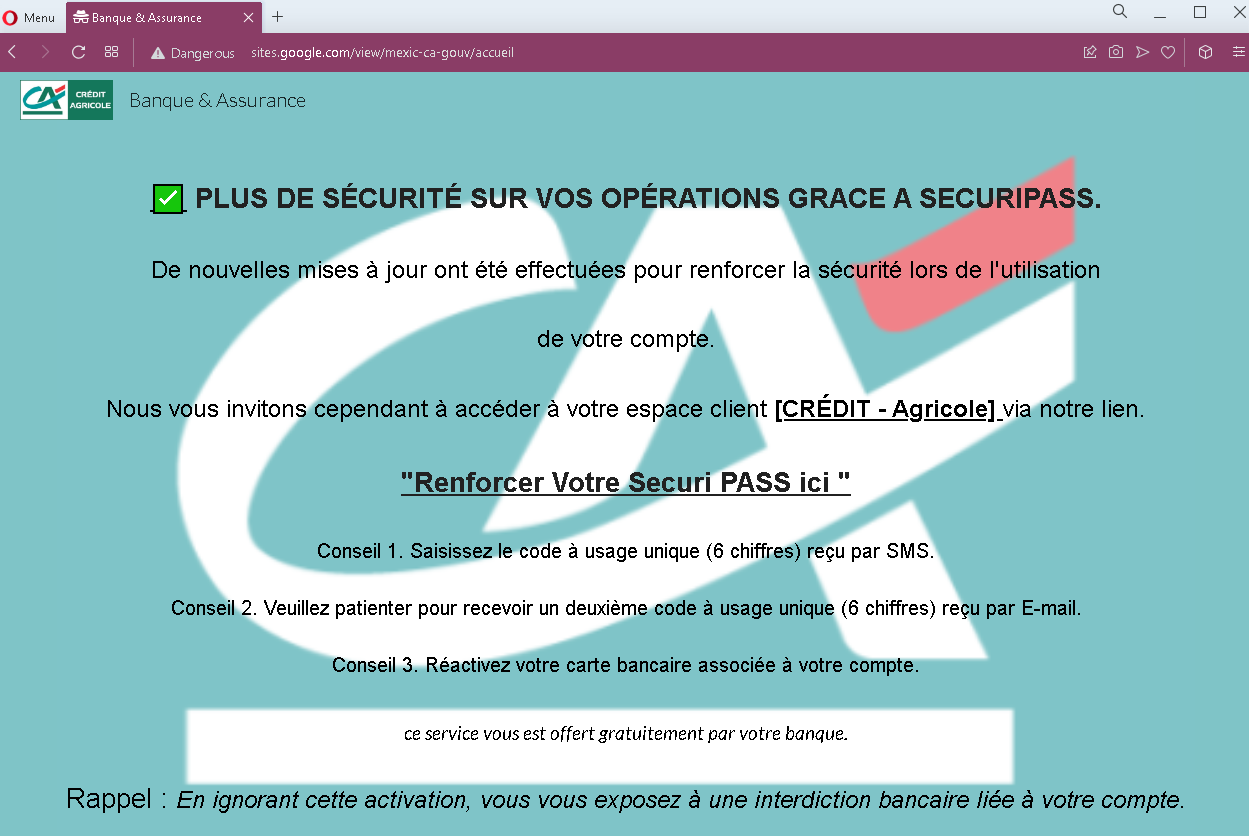
This phishing campaign impersonates Crédit Agricole, one of the largest banking groups in France. The page claims that security updates have been made and urges the victim to click a link to “reinforce” their SecuriPass (the bank’s real security feature). The page outlines a multi-step process involving SMS and email codes, followed by card reactivation—all designed to lead the victim through a series of phishing pages that capture sensitive information.
How it works:
The victim receives a phishing email (or lands on this page via a link in a message) claiming to be from Crédit Agricole. The page:
- States that new security updates have been implemented
- Claims the victim must access their client space via a provided link to reinforce SecuriPass
- Outlines three steps: entering a 6-digit SMS code, waiting for a 6-digit email code, and reactivating their bank card
- Warns that ignoring the activation will result in a banking restriction
When the victim clicks the link (likely embedded in the text), they are taken to a fake Crédit Agricole login page or a series of pages designed to capture their credentials, SMS codes, email codes, and card details.
The goal:
The attacker aims to:
- Steal the victim’s Crédit Agricole online banking credentials
- Capture SMS-based two-factor authentication (2FA) codes
- Capture email-based verification codes
- Obtain bank card details (through the fake “reactivation” step)
With this combination of information, the attacker can gain full access to the victim’s bank account, authorize transactions, and potentially compromise the victim’s email account as well.
Red flags to watch for:
- Suspicious URL: The page is hosted on a domain that is not
credit-agricole.fror any official Crédit Agricole domain. Legitimate bank communications are hosted on official domains. Always check the address bar. - Unsolicited security request: Crédit Agricole does not send emails or messages with links requiring customers to click to “reinforce” security features. Legitimate security updates are communicated through official app notifications or secure messages within the online banking portal.
- Multi-step code requests: The page mentions receiving two separate codes (SMS and email) and then reactivating a card. This is highly unusual for a legitimate security update and indicates a phishing kit designed to harvest multiple layers of authentication.
- Threat of consequences: The warning that ignoring the activation will result in a “banking restriction” is a classic fear-based tactic to pressure victims into acting without thinking.
- Generic greeting: The page does not address the victim by name or reference a specific account number—common in phishing messages.
- Poor formatting: While the design mimics Crédit Agricole’s branding, the overall layout and language contain stylistic inconsistencies compared to official communications.
What to do if you encounter this:
- Do not click any link in the message or on this page.
- Do not enter any personal information, credentials, SMS codes, or card details on any pages reached via this link.
- If you are a Crédit Agricole customer, always access online banking by typing
credit-agricole.frdirectly into your browser or by using the official Crédit Agricole mobile app. - If you have already clicked the link and entered any information, contact Crédit Agricole immediately through their official customer service hotline to secure your account.
- Report the phishing page to Crédit Agricole’s fraud department (e.g., by forwarding the original message to
[email protected]or using their official reporting channel).
Why this scam is effective:
Crédit Agricole has millions of online banking customers in France. The mention of SecuriPass—a real security feature—makes the page seem credible. The multi-step instructions (SMS code, email code, card reactivation) make the process appear thorough and “official.” The threat of a banking restriction creates urgency, encouraging victims to act quickly without scrutinizing the URL or the legitimacy of the message.
Protective measures:
- Never click links in unsolicited emails or messages claiming to be from your bank. Instead, type the official bank URL directly into your browser.
- Be suspicious of any message that creates urgency, threatens consequences, and asks you to click a link to “activate,” “reinforce,” or “verify” something.
- Check the sender’s email address carefully. Legitimate Crédit Agricole emails come from
@credit-agricole.fror specific subdomains—not from generic or misspelled addresses. - Enable two-factor authentication (SecuriPass) through the official app, and remember that legitimate activation processes happen within the app or after logging into the official website—not via a link in an email.
- If you receive a request to enter codes from both SMS and email, be extremely suspicious. Legitimate banks do not use multi-step code harvesting in this manner.
- If in doubt, contact your bank directly using a phone number from your bank statement or the official website—never use contact information provided in the suspicious message.