
Threat Analysis: La Banque Postale Phishing – Fake “Certicode Plus” Security Update Scam
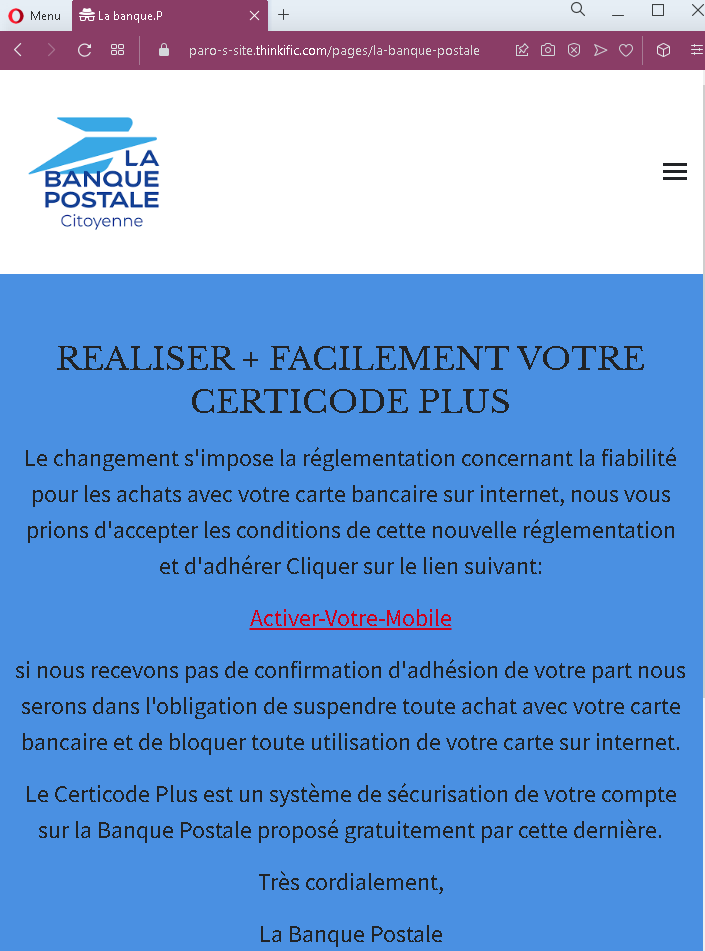
This phishing campaign impersonates La Banque Postale, a major French bank. The message claims that regulatory changes require the victim to accept new conditions and “activate” their Certicode Plus—a legitimate security feature used by the bank for transaction verification. The threat of card suspension is used to pressure the victim into clicking a malicious link.
How it works:
The victim receives this message (likely by email) claiming to be from La Banque Postale. The message:
- States that regulatory changes require the victim to accept new conditions for online card purchases
- Prompts the victim to click a link to “activate” Certicode Plus
- Warns that failure to confirm will result in the suspension of online card purchases and blocking of the card
When the victim clicks the link, they are taken to a phishing page designed to capture their banking credentials, personal information, or Certicode Plus verification codes.
The goal:
The attacker aims to:
- Steal the victim’s La Banque Postale online banking credentials
- Capture Certicode Plus verification codes (two-factor authentication)
- Obtain card details or other personal information
With this information, the attacker can access the victim’s bank account, make unauthorized purchases, and commit fraud.
Red flags to watch for:
- Suspicious link: The message contains a link (disguised as “Active+Votre-Mobile”) that leads to a phishing site. Legitimate La Banque Postale communications do not require customers to click links to activate security features.
- Threat of suspension: The warning that the card will be blocked if no action is taken is a classic fear-based tactic to pressure victims into acting without thinking.
- Unsolicited request: La Banque Postale does not send emails with links requiring customers to “accept new regulations” or “activate” Certicode Plus via external links. Legitimate security features are activated within the app or after logging into the official website.
- Generic greeting: The message does not address the victim by name or reference a specific account number—common in phishing emails.
- Vague regulatory reference: The message refers vaguely to “regulatory changes” without specifics, a common phishing tactic.
- Poor formatting: While the design mimics La Banque Postale’s branding, the layout and language contain stylistic inconsistencies compared to official communications.
What to do if you encounter this:
- Do not click any link in the message.
- Do not enter any personal information, banking credentials, or Certicode Plus codes on any page reached via this link.
- If you are a La Banque Postale customer, always access online banking by typing
labanquepostale.frdirectly into your browser or by using the official mobile app. - If you have already clicked the link and entered any information, contact La Banque Postale immediately through their official customer service hotline to secure your account.
- Report the phishing email to La Banque Postale’s fraud department (e.g., by forwarding it to
[email protected]or using their official reporting channel).
Why this scam is effective:
La Banque Postale has millions of customers in France. Certicode Plus is a real security feature used by the bank for transaction verification, so references to it are familiar and appear legitimate. The threat of card suspension creates urgency, prompting victims to click the link without carefully checking its destination. The message’s design and language closely mimic official bank communications.
Protective measures:
- Never click links in unsolicited emails or messages claiming to be from your bank. Instead, type the official bank URL directly into your browser.
- Be suspicious of any message that creates urgency, threatens consequences (such as card suspension), and asks you to click a link to “activate” or “verify” something.
- Check the sender’s email address carefully. Legitimate La Banque Postale emails come from
@labanquepostale.fror specific subdomains—not from generic or misspelled addresses. - Enable Certicode Plus through the official app if you haven’t already, and remember that legitimate activation processes happen within the app or after logging into the official website—not via a link in an email.
- If in doubt, contact La Banque Postale directly using a phone number from your bank statement or the official website—never use contact information provided in the suspicious message.