
Then user will be redirected to the true Vapes.bg website:

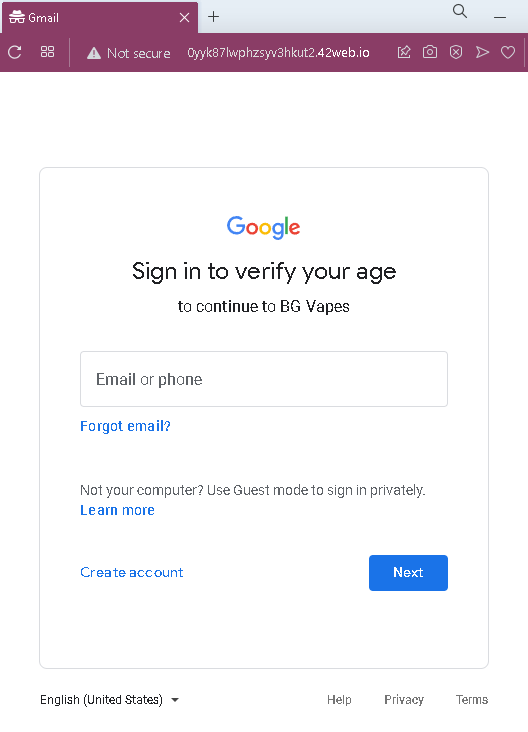
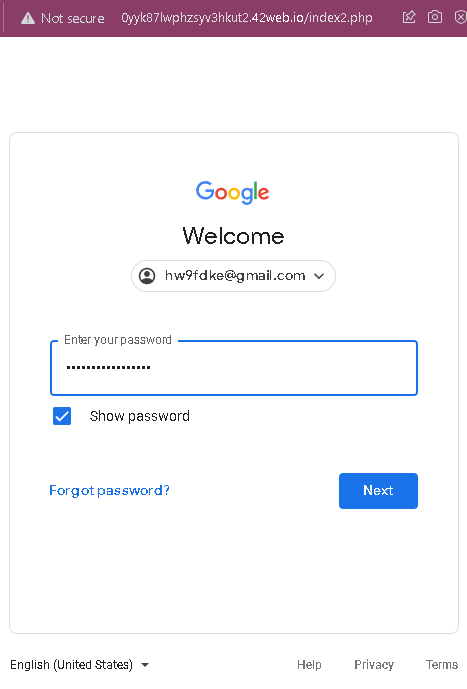
These three screenshots show a Google account phishing attack combined with a post‑phishing redirection to a Bulgarian vape shop page. The attacker uses a fake Google sign‑in flow to steal the victim’s email and password, then redirects to a legitimate‑looking online store to reduce suspicion.
Threat Analysis: Google Account Phishing with Fake Age‑Verification Pretext
This phishing campaign uses a fake “verify your age” screen impersonating Google to steal victims’ Google account credentials. After the victim enters their email and password, they are redirected to a Bulgarian vape products site (likely to make the phishing attempt less obvious and to avoid immediate suspicion).
How it works:
- The victim receives a link—often via email, SMS, or social media—claiming they need to verify their age to access a restricted site (in this case, “BG Vapes”).
- Clicking the link opens a fake Google sign‑in page (first screenshot) asking for an email or phone number.
- After entering an email, the victim is taken to a second fake Google page that requests the password (second screenshot).
- Once the credentials are submitted, the attacker captures them. The victim is then redirected to a real Bulgarian online vape shop (third screenshot), which appears normal and unrelated to the login—so the victim may not realize their account was compromised.
The goal:
The attacker aims to steal Google account credentials. With these, they can:
- Access the victim’s Gmail (to reset passwords for other services)
- Compromise linked services (Google Drive, Photos, etc.)
- Use the account to spread further phishing messages
- Sell the credentials on criminal marketplaces
Red flags to watch for:
- Suspicious URL: The pages are hosted on a domain that is not
google.com. Always check the address bar before entering credentials. - Unusual context: Google does not ask you to “verify your age” to visit a third‑party website. Age verification is handled by the site itself, not by Google.
- Generic design: The fake pages imitate Google’s sign‑in interface but lack the proper security indicators (e.g., the correct URL, a valid SSL certificate showing
google.com, etc.). - Post‑login redirection: After entering credentials, the victim is taken to an unrelated vape shop. Legitimate Google sign‑ins do not redirect to commercial sites.
What to do if you encounter this:
- Do not enter your email or password on such pages.
- If you have already entered your credentials, change your Google password immediately and enable two‑factor authentication (2FA). Also check your Google account for any unauthorized forwarding rules, connected apps, or recent activity.
- Report the phishing page to Google (via
safe.google.com).
Why this scam is effective:
The fake Google sign‑in page looks convincing and uses the “age verification” excuse to make the request seem plausible. The final redirection to a real, functional vape site lowers the victim’s suspicion—they may assume the login “worked” and continue browsing the store without realizing their credentials were stolen.
Protective measures:
- Always check the URL before signing into any Google service. The legitimate Google login page is
accounts.google.com. - Use a password manager: It will autofill only on the real Google domain.
- Enable two‑factor authentication (2FA) on your Google account to prevent unauthorized access even if your password is stolen.
- Be suspicious of any unsolicited link that asks you to sign in to Google, especially if it claims to be for age verification or to access a third‑party site.