
A high-risk Facebook spoofing campaign that uses urgent “security alert” pretexts to harvest user credentials and two-factor authentication codes. These attacks utilize phishing pages and redirect chains to bypass security, often impersonating Meta support to hijack user and business accounts.
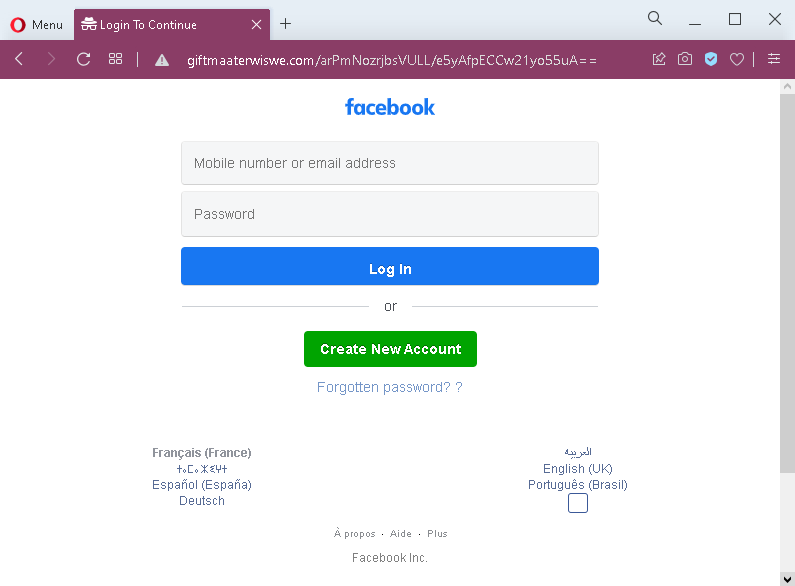
This screenshot shows a generic Facebook phishing page designed to steal login credentials (email/phone number and password). The page mimics the official Facebook login interface, including language selection and footer links, but is hosted on a fraudulent domain.
Threat Analysis: Facebook Spoof Page – Credential Harvesting
How it works:
The victim receives a phishing email, SMS, or social media message claiming a security alert, account verification, or the need to log in to claim a prize or view content. The link leads to this page, which copies Facebook’s design. The victim is asked to enter their mobile number or email address and password, then click “Log In.” The credentials are captured and sent to the attacker.
The goal:
The attacker steals Facebook account credentials to:
- Take over the victim’s Facebook account
- Access private messages and personal information
- Post spam, scams, or malicious links from a trusted account
- Use the account to spread further phishing messages to friends
- Attempt credential reuse on other platforms (email, banking, etc.)
Red flags to watch for:
- Suspicious URL: The page is hosted on a domain that is not
facebook.com. Legitimate Facebook login pages are only on official Facebook domains. - Unsolicited login request: Facebook does not send links requiring users to log in to resolve account issues or claim prizes.
- Minor design inconsistencies: While the page copies Facebook’s layout, it may lack the full security indicators (e.g., proper SSL certificate, dynamic language switcher, or personalized elements).
- No personalization or saved account info: A real Facebook login often shows a profile photo or remembered account – this page does not.
What to do if you encounter this:
- Do not enter your email/phone or password.
- If you have already entered your credentials, change your Facebook password immediately and enable two‑factor authentication (2FA). Also check for any unauthorized activity or connected apps.
- Always access Facebook by typing
facebook.comdirectly into your browser.
Protective measures:
- Bookmark the official Facebook login page and use that bookmark.
- Use a password manager – it will autofill only on legitimate
facebook.comdomains. - Enable two‑factor authentication on your Facebook account.
- Be suspicious of any unsolicited message that asks you to log in via a link.