
Analysis Memo: This malicious interface was logged, cross-checked, and neutralized firsthand by the
Antiphishing.bizsecurity team during our standard URL vetting operations. To protect the public, the phishing source domain has been safely deactivated within our infrastructure. We document and analyze these live visual patterns to help security researchers and users spot lookalike phishing methods before financial damage occurs.
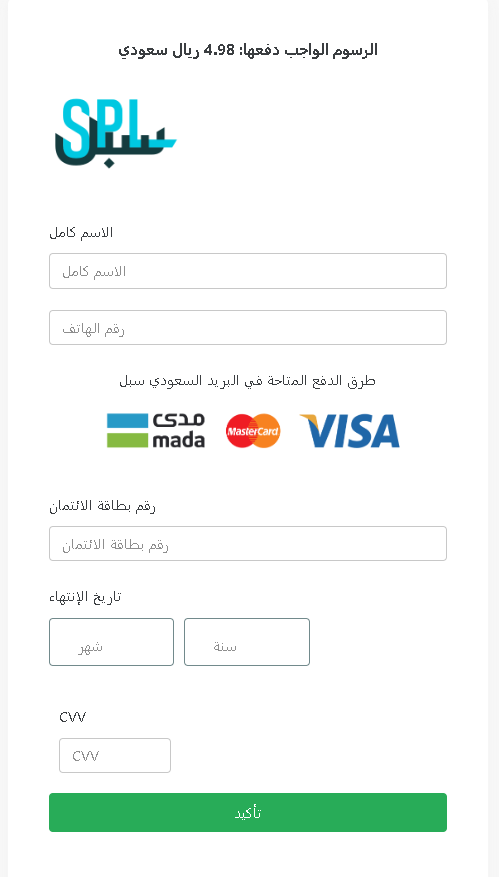
This screenshot shows a phishing page impersonating Saudi Post (SPL – البريد السعودي سبل) , targeting Arabic‑speaking users in Saudi Arabia. The scam asks for a small fee (4.98 SAR) as a pretext to collect full name, phone number, and complete credit/debit card details.
Threat Analysis: Saudi Post Phishing – Small Fee & Card Harvesting
How it works:
The victim receives an SMS or email claiming a package requires a delivery fee, customs payment, or address confirmation. The link leads to this page, which mimics the Saudi Post payment interface. The victim is asked to provide:
- Full name
- Phone number
- Card number
- Expiration date
- CVV
The small amount (4.98 SAR) is intended to lower suspicion.
The goal:
The attacker captures full credit/debit card information (number, expiry, CVV) along with personal details (name, phone) to make fraudulent purchases, clone the card, or sell the information.
Red flags to watch for:
- Suspicious URL: The page is hosted on a domain that is not
sp.post.gov.sa - Request for CVV for a small fee: Legitimate postal services do not ask for your card security code to collect a delivery fee.
- Small fee trick: A trivial amount (4.98 SAR) is used to make the payment seem insignificant.
- No tracking number or personalization: The page does not reference a specific package or tracking number that the victim can verify independently.
- Fake payment branding: Logos for Visa, mada, and Mastercard are displayed to appear legitimate, but they are simply copied.
What to do if you encounter this:
- Do not enter any personal or card information.
- If you are expecting a package from Saudi Post, track it directly by typing
sp.post.gov.sa - If you have already entered card details, contact your bank immediately to block the card and dispute any unauthorized charges.
- Report the phishing page to Saudi Post and to the relevant authorities.
Protective measures:
- Never click links in unsolicited delivery messages. Always go directly to the official courier website.
- Never pay a “redelivery fee” via a link. Legitimate fees are collected in person, through the official app, or after logging into your account on the official site.
- Check the URL carefully: Look for misspellings, extra words, or unusual top‑level domains.
- Enable two‑factor authentication on your bank account and email.