
Who This Guide Is For
This article is written for you – a Poshmark seller who relies on the platform to earn extra income, clear out a closet, or build a small business. You are not a cybersecurity expert. You have never analyzed a phishing email header in your life. When a notification arrives saying your account has been restricted and you have 24 hours to verify your identity or lose everything, your first instinct is not suspicion – it is fear. The thought of losing access to your sales, your earnings, and your carefully built seller reputation is genuinely terrifying.
That fear is exactly what the criminals behind the “fake account restriction” phishing campaign are counting on. They have studied Poshmark’s official communications, copied the platform’s logos and color schemes, and added a fake live chat window with a friendly “support agent” named Amelia. They have built a multi‑step trap that looks so legitimate that even experienced sellers have fallen for it.
The attack documented in this guide was intercepted, verified, and neutralized by the Antiphishing.biz security team during standard URL vetting operations. The dangerous domains have been fully defanged. But new ones appear every day, using the same fake account restriction notices, the same fake support chats, and the same pressure tactics.
This guide will walk you through exactly how the scam works, share real stories of sellers who lost money and those who narrowly escaped, and give you the expert‑backed habits that will keep your card details, your earnings, and your peace of mind safe.
The Anatomy of the Attack: How a Fake “Account Restricted” Page Steals Your Card Details
The criminals behind this operation have built a multi‑stage trap that deceptive tactics your trust, your fear of losing sales, and your lack of technical awareness. Based on the live phishing page captured by the Antiphishing.biz team, here is exactly how the scheme unfolds.
Step One: The Message That Triggers Fear
The first contact arrives as an unsolicited email, SMS, or social media message. It claims that your Poshmark account has been restricted – temporarily blocked – due to suspicious activity, a missed payment, or a security issue. The message is urgent. You have 24 hours to verify your identity and restore access. If you fail to act, the message warns, your account will be permanently deactivated, your listings removed, and your pending payments frozen.
A prominent “Verify” button is displayed. A fake live chat window appears automatically on the page, with a “support agent” – often named “Amelia” – already typing reassuring messages: “Do not worry, I am here to help you. This process is secure and encrypted.”
This is the hook. The threat of losing your account – and the income it generates – creates immediate panic. The fake chat window offers a safety net: a friendly human voice promising to guide you through the process. Your brain stops analyzing the web address and starts looking for the fastest way to fix the problem. The criminals know this and rely on it completely.
Step Two: The Page That Looks Almost Perfect
If you click the “Verify” button, you are taken to a webpage that has been carefully designed to mimic Poshmark’s official interface. The criminals have copied the platform’s logos, categories (Women, Men, Kids), popular brand sections (Nike, Michael Kors, Louis Vuitton), and even the footer links about the company. To an untrained eye, the page looks identical to the real Poshmark.
Threat Intel: This deceptive layout was logged, cross-checked, and neutralized firsthand by the
Antiphishing.bizsecurity team during our standard URL vetting operations. To protect the public, the hostile origin link has been completely disabled within our infrastructure. We document and analyze these live visual patterns to help security researchers and users detect replica fraud techniques before financial damage occurs.
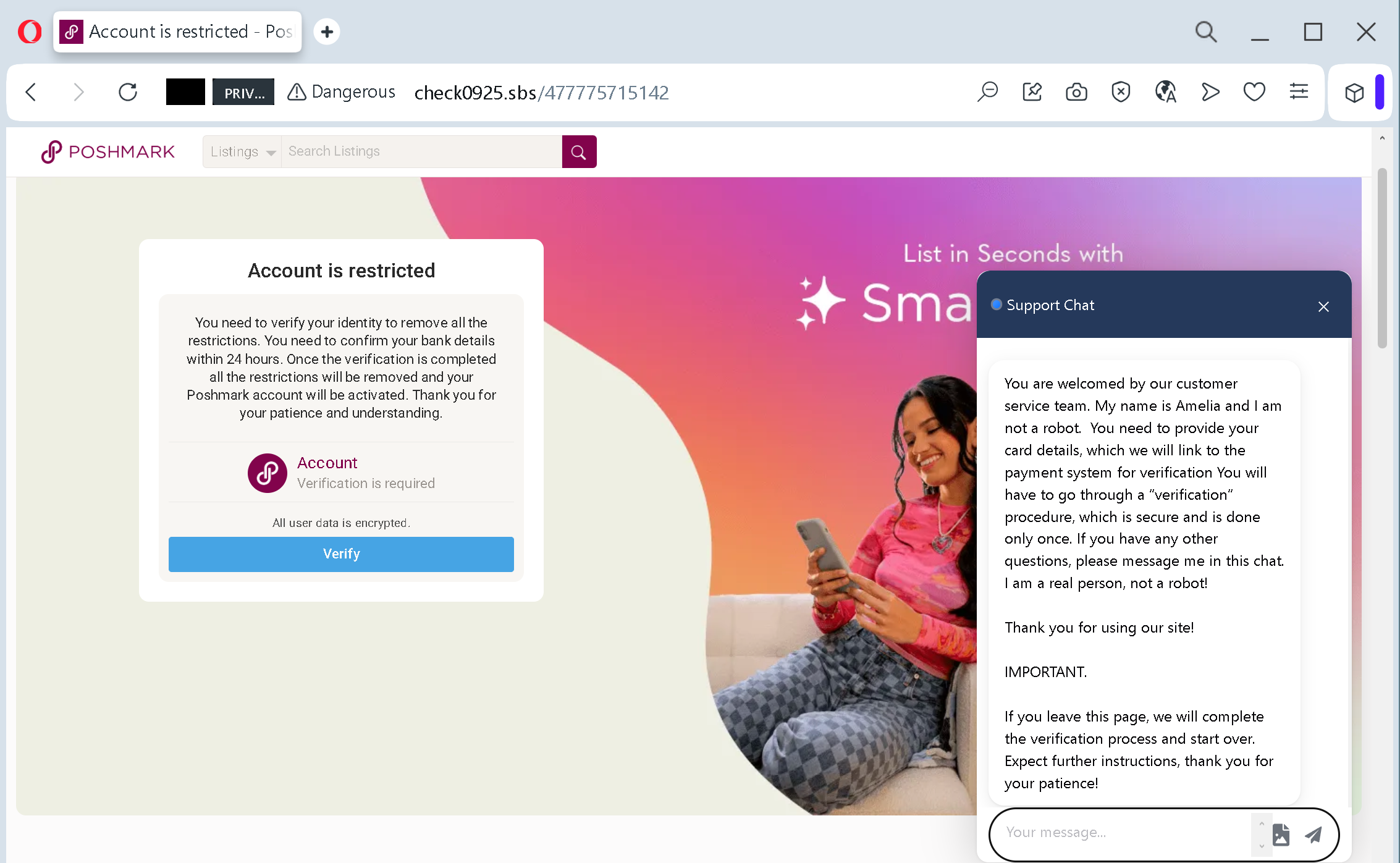
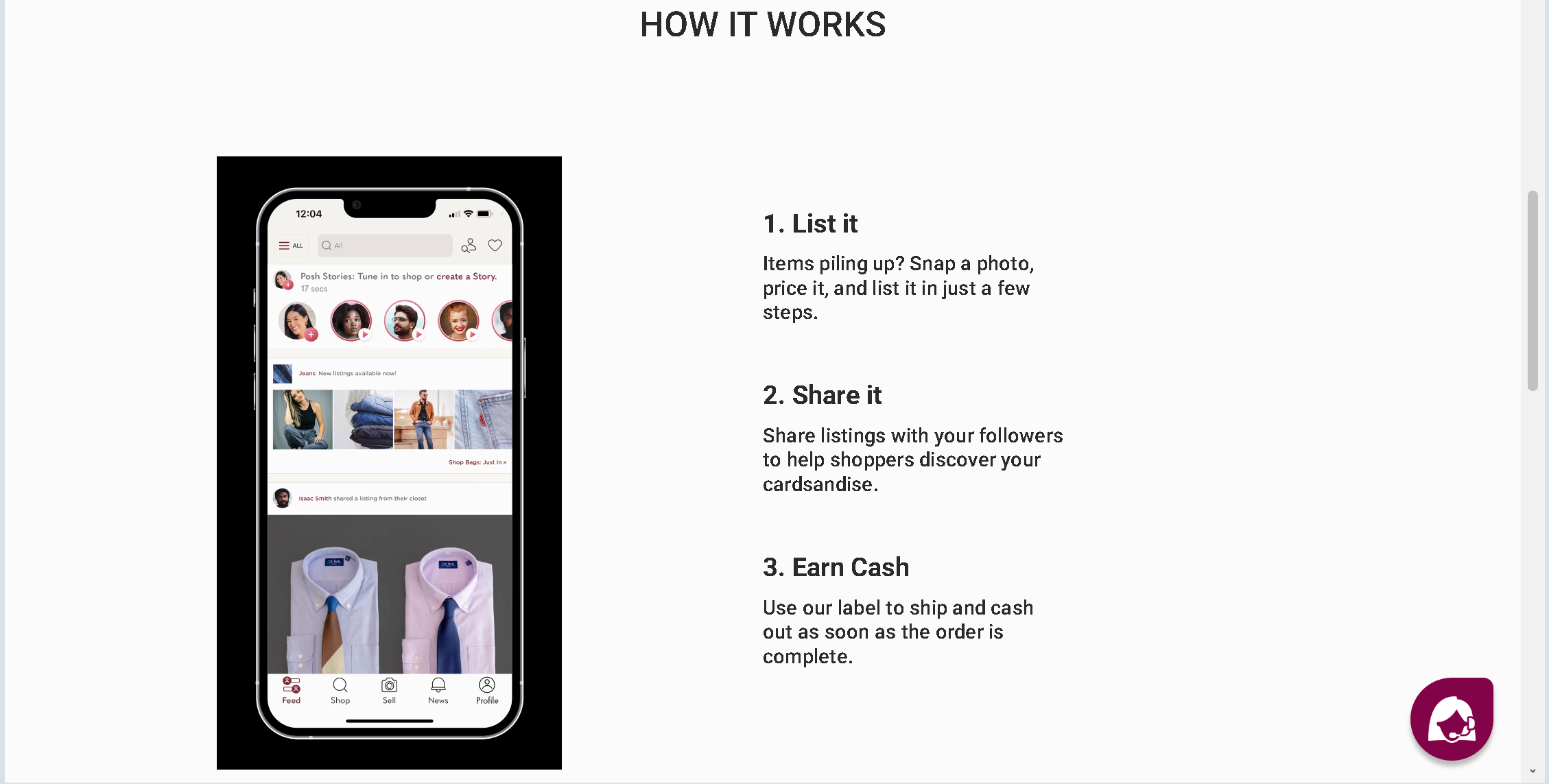
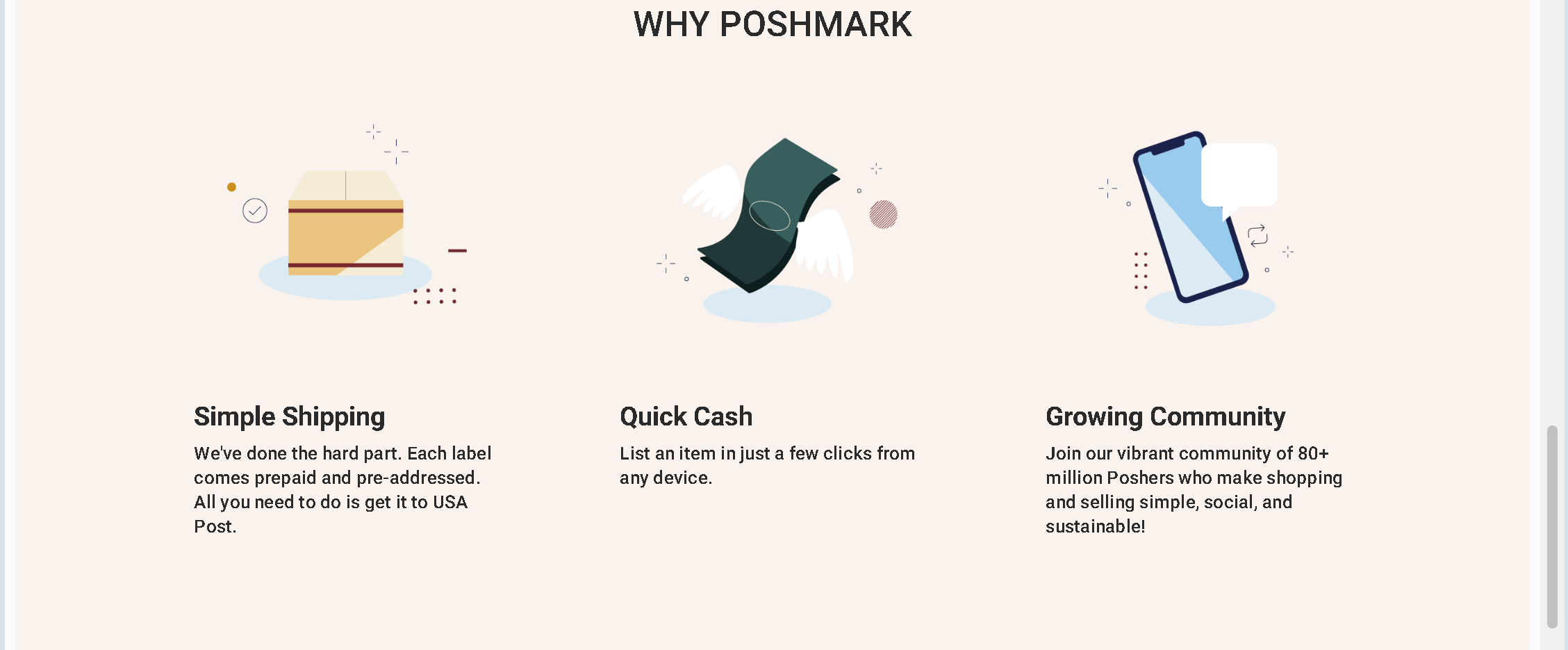
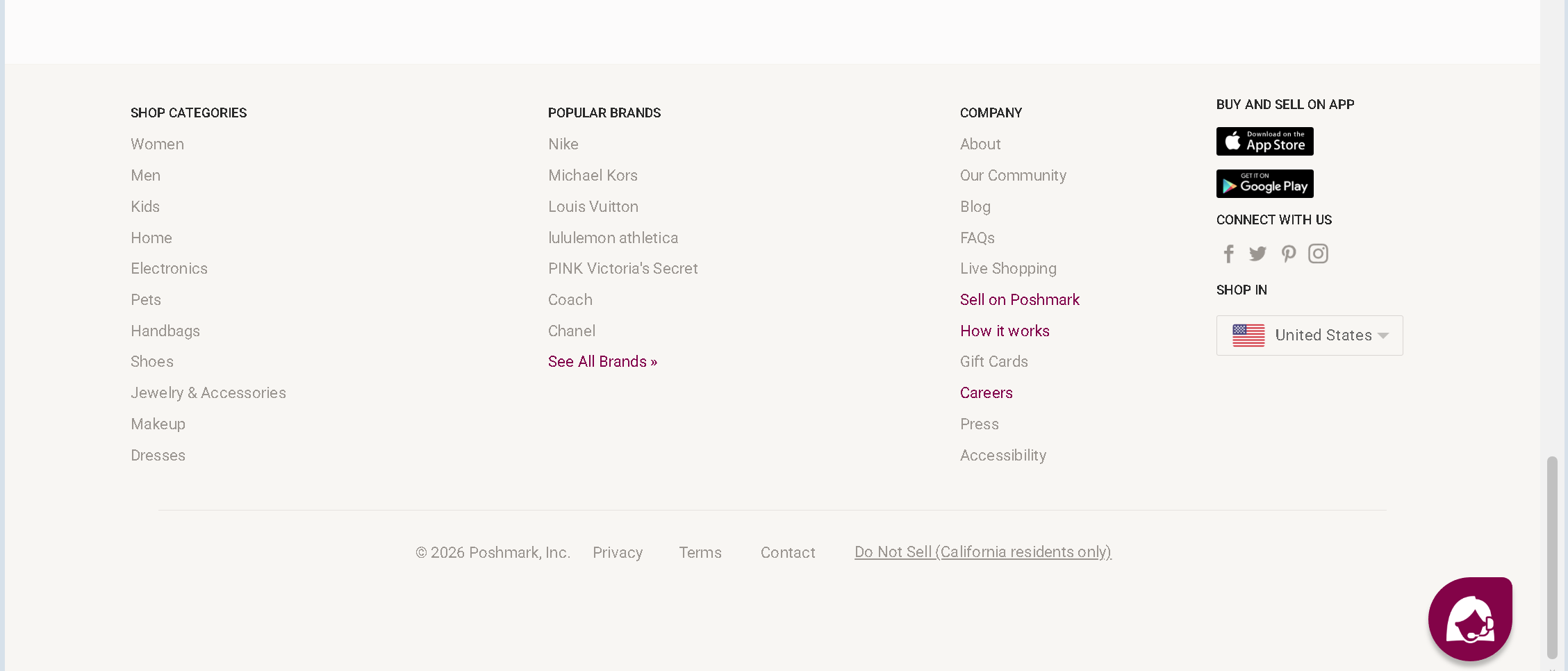
But look closely at the address bar of your browser. The official Poshmark domain is poshmark.comcheck0925.sbs
Step Three: The Form That Takes Everything
The fake page asks for information that no legitimate account verification process would ever request: your full name, your address, your email address, your phone number, and – most damagingly – your full credit or debit card details: the card number, the expiration date, and the three‑digit CVV security code on the back of the card. The page may also include a fake “order summary” showing a small amount (sometimes zero) and a “Submit” button, designed to mimic a legitimate checkout process.
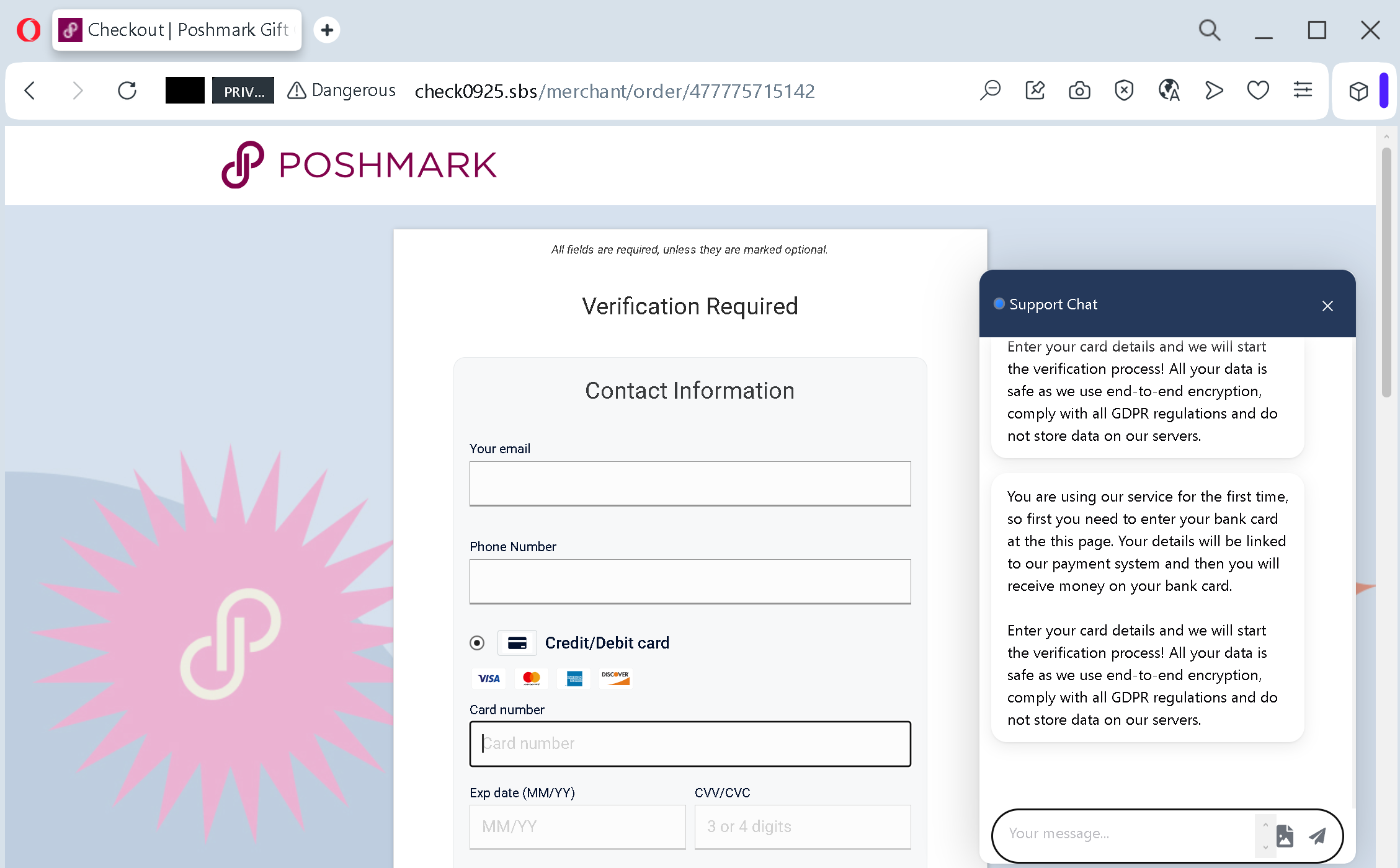
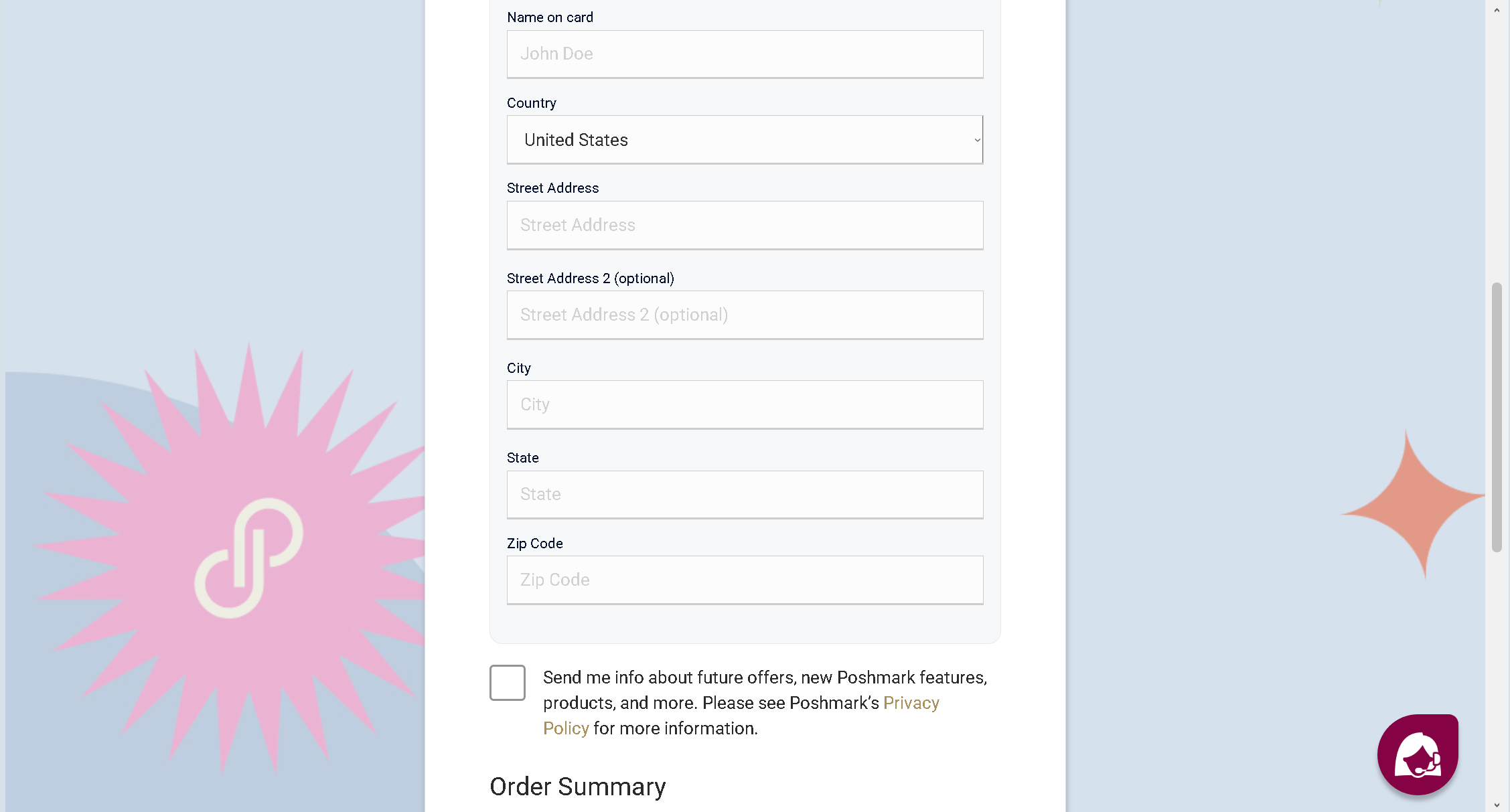
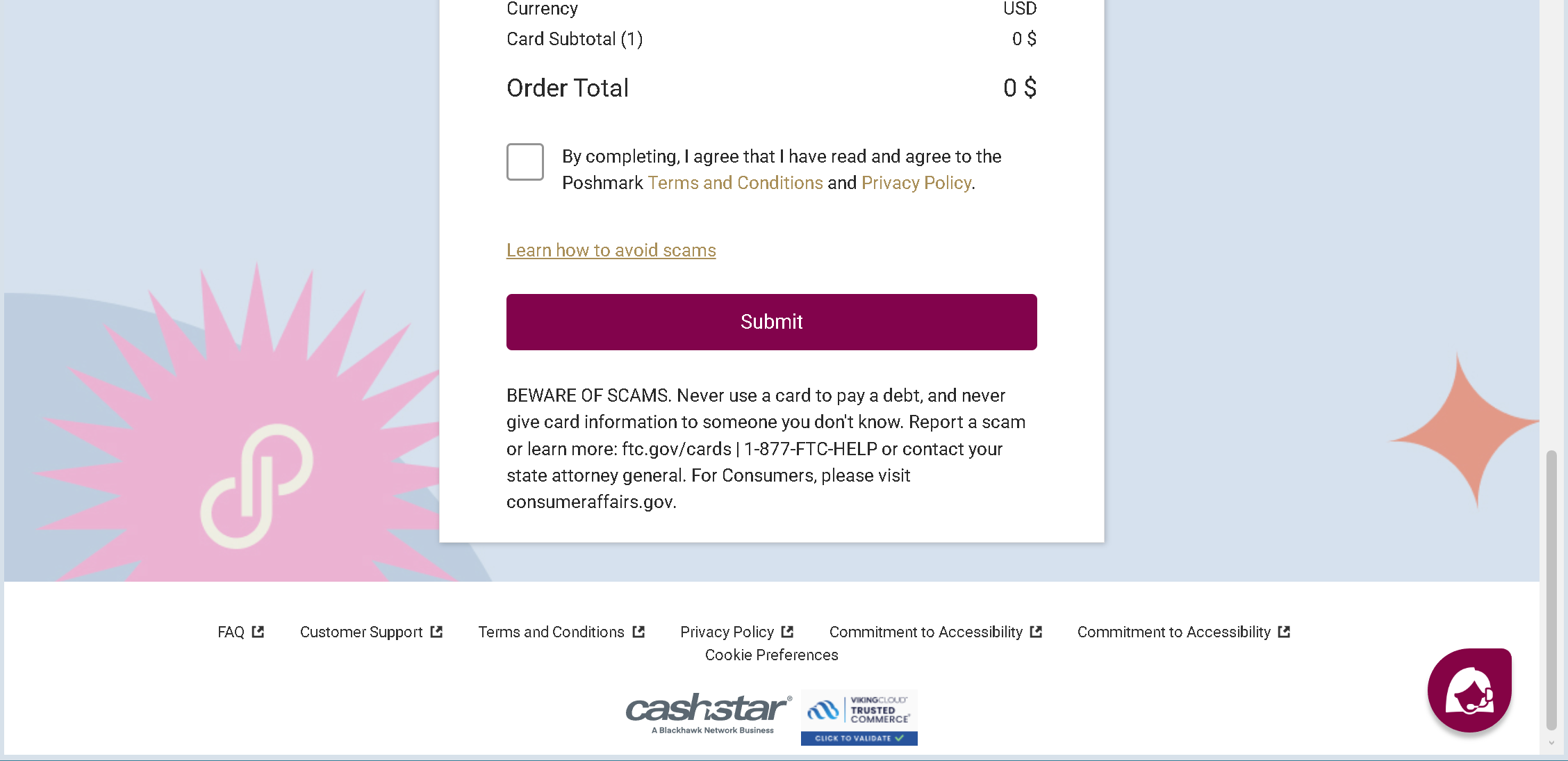
The criminals provide fake assurances: messages claiming the page is “fully protected and encrypted,” that your data is “never shared with third parties,” and that the process is “part of the official account verification.” These are lies. Every word of reassurance is copied from legitimate websites and pasted onto the criminal’s page.
The Antiphishing.biz analysis is blunt: “The goal: the attacker collects full credit/debit card details (number, expiry, CVV) and personal information (full name, address, email, phone number). With this data, the attacker can make fraudulent online purchases, clone the card or sell the information on criminal markets, and use the personal details for identity theft.”
Three Real Stories of Heartbreak – and One Story of Narrow Escape
The London Bride Who Lost $388 in Minutes – and Nearly Her Entire Savings
Meredith Armstrong was trying to sell an old wedding dress. She posted it on Facebook Marketplace, and someone suggested she try Poshmark, a US‑based app that had expanded to Canada. She was “over the moon” when she received an email on a Saturday telling her the dress had sold. The email showed the buyer’s name and address. It redirected her to enter her banking information to receive the payment.
“It was my first time using the app,” Armstrong told CBC News. “The phishing email didn’t trigger any alarm bells.” She entered her banking details. Nothing happened. Then the panic set in. She immediately logged into her bank account and locked her card, but it was too late. A notification arrived: $199 had been transferred out of her account. Then $189. Finally, a third transfer of $179 bounced back into her account because her bank stopped it in time.
The scammers stole $388 before the bank blocked further transfers. “They could have potentially taken my savings,” Armstrong said. “All my accounts were there. They could have charged anything they wanted.” According to fraud experts at TD Canada, over 100,000 reports of fraud resulted in more than $600 million lost in 2024 alone.
Armstrong’s warning to other sellers is simple: always check the domain where the email is coming from for any typos, added hyphens, or anything that looks off. “It’s always okay to take a step back if there’s a message that’s coming in with a link.”
The Texas Seller Who Handed Over Her SSN and Bank Balance
A seller in East Bernard, Texas, received a notification from what she believed was Poshmark: “You have a sale! Verify your credit card to complete the transaction.” Wanting to provide great service to her buyer, she dropped everything and complied. The scammers demanded her Social Security number, her bank account balance, and extensive personal financial information.
“I complied because I thought a buyer was waiting,” she wrote in a Nextdoor warning post. She waited. And waited. The scammers kept saying “2-3 minutes” – this went on for almost half an hour. Finally, they responded not with verification but with a rejection of her card from one of Texas’s largest credit unions.
The horrifying truth came into focus: there was no actual sale. The entire thing was a complete lie, designed to manipulate her into handing over sensitive information. “When I contacted support? ‘We’ll respond in 1-3 business days.’ But they expected MY immediate response for their fake buyer.”
She had been selling on multiple platforms for years and had never experienced anything like it. Her warning to other sellers: “If something feels wrong, trust your gut. Protect your personal information.”
The Seller Who Realized at the Last Possible Second
A seller on Nextdoor shared a narrower escape. She received a message from someone claiming to be a buyer who needed to “update their records” and asked for her personal information. At first, the request seemed routine. But something felt off. She paused. She looked at the message more carefully. She realized that the request was coming from outside the official Poshmark platform.
“I realized at the last possible second what was going on and reported them,” she wrote. The only thing that saved her was that pause – that moment of hesitation before she typed her information into a form.
Her advice is simple: “Only respond to messages on the actual platform, not via text or email.”
The Seller Who Avoided the Trap by Asking One Question
A seller described a near‑miss that could have cost her thousands. She listed a vintage Louis Vuitton bag – a “big ticket item” that would attract scammers like moths to a flame. Within ten minutes, she received a comment: “Beautiful bag! I am very interested. Kindly email me for immediate payment as the app is glitching.”
Her heart jumped. Sold already? She opened her email app, ready to type a reply. Then she paused. Why would a billion‑dollar app “glitch” only for payment? She ignored the comment. Two hours later, that user account was banned. She had almost handed over her banking details to a bot.
“The moment you step off the marked path, the wolves are waiting,” she wrote. “If an email urges you to ‘act now’ within 24 hours, it is 99% likely a scam. Real support tickets rarely have doomsday clocks.”
The Four Red Flags That Give Away the Fake Poshmark Page – Every Time
You do not need to be a cybersecurity expert to spot these attacks. You just need to know what to look for.
Red Flag One: The Web Address Is Not poshmark.com
This is the single most important red flag. The official Poshmark website uses the domain poshmark.comcheck0925.sbsposhmark.com.sbs.top.xyz
Poshmark’s own official guidance states this clearly: “Never enter your Poshmark account login details or payment information on a website that is not Poshmark.com. Always check the URL on your browser before inputting any information.”
Red Flag Two: The Page Asks for Your CVV for “Account Verification”
No legitimate account verification process will ever ask for your credit card CVV code. That three‑digit number exists for one purpose: to prove that you are physically holding the card during a purchase. Poshmark will never ask for your CVV to verify your identity or unblock your account. If a page asks for it, you are looking at a scam.
The Antiphishing.biz analysis is unequivocal: “Poshmark never asks for your card security code to verify or unblock an account.”
Red Flag Three: The Fake Live Chat Window Opens Automatically
Real customer support chats do not initiate contact with a pre‑written explanation before you have even asked a question. If a chat window pops up on a page you reached by clicking a link in a message, and that chat window starts telling you that you need to “verify your account,” you are looking at a script – not a human being. Legitimate support agents wait for you to click a button or type a message.
The fake chat is a psychological manipulation tool, not a real help desk. The “agent” – often named Amelia – is either a script or a criminal whose only goal is to keep you on the page until you submit your card details.
Red Flag Four: The Message Threatens a 24‑Hour Deadline
“If an email urges you to ‘act now’ within 24 hours, it is 99% likely a scam,” warns the closo.co blog. “Real support tickets rarely have doomsday clocks.”
The criminals manufacture urgency because it works. When you are afraid of losing your account, you stop thinking clearly. You stop checking the web address. You just want to solve the problem as fast as possible. The real Poshmark does not send threatening deadlines via email. If there is a genuine issue with your account, you will see a notification inside your dashboard after you log in normally.
Expert Advice: How to Keep Your Poshmark Account Safe Starting Today
The following rules come from cybersecurity professionals, law enforcement agencies, and Poshmark’s own security team. Following them will protect you from the fake account restriction scam and every future variation.
Rule One: Never, Ever Click Links in Unsolicited “Account Restricted” Messages
This is the single most important rule. If you receive an email, text message, or pop‑up notification claiming that your Poshmark account has been restricted – do not click any links. Do not call any phone numbers in the message. Do not reply.
Instead, open a new browser tab. Type poshmark.com
That one habit – typing the official address yourself instead of clicking a link – would have prevented every victim story in this article.
Rule Two: Memorize What Poshmark Will Never Ask You
Poshmark’s official support page states clearly: “Poshmark will never ask you to disclose or verify sensitive personal information over the phone, email, or text message. Never provide login credentials or sensitive information over the phone, email, or text.”
This includes:
- Your Social Security number
- Your full credit card number, expiration date, or CVV
- Your bank account balance
- Your online banking login credentials
- Your one‑time SMS verification codes
If a page or a message asks for any of this information, you are looking at a scam.
Rule Three: Enable Two‑Factor Authentication on Your Poshmark Account
Poshmark uses risk‑based multi‑factor authentication (MFA). When you change your address, for example, the platform automatically sends a one‑time passcode to your phone number or email address. Make sure your contact details are up to date so you receive these codes.
This is your digital seatbelt. Even if a scammer obtains your password through a fake login page, they cannot access your account without the second factor.
Rule Four: Never Take Transactions Off the Poshmark Platform
The golden rule of safe selling on Poshmark is simple: never, ever take a transaction off the app. Scammers will ask you to email them photos, text them details, or use Venmo or PayPal to avoid the 20% commission. The moment you agree, you lose all protection. Poshmark cannot help you if you sent money off‑platform.
Poshmark’s official guidance is unambiguous: “Always communicate through Poshmark.com. Do not engage with users who ask you to communicate with them off Poshmark, such as by email or text message. Do not share your email address or phone number directly with users. Bad actors can use your email address or phone number to phish you or take over your account.”
Rule Five: Trust Your Gut
Every successful prevention story in this article shares a common thread. The person who avoided disaster listened to an inner voice of doubt. The seller who paused before emailing the “buyer.” The seller who realized at the last possible second that something was wrong. The seller who asked herself why a billion‑dollar app would “glitch” only for payment.
When you receive an unexpected message about your account, pause. Take a breath. Ask yourself: “Did I ask for this message? Does Poshmark really communicate this way?”
If the answer is no, do not click. Do not type. Do not call the number in the message. Instead, type poshmark.com
Rule Six: Report Suspicious Messages Immediately
If you receive a phishing message, do not just delete it. Report it. In the Poshmark app, tap the flag next to the suspicious message, then tap “spam.” This alerts Poshmark’s security team to the fraudulent account. You can also report phishing emails to Poshmark’s support team.
Your report could help protect other sellers from falling into the same trap.
What to Do If You Have Already Fallen for This Scam
If you realize that you have clicked a link, entered your card details, or provided personal information on a suspicious website, do not panic. But do not wait, either. Time is the enemy. Act immediately using this step‑by‑step checklist.
First, contact your bank or credit card issuer immediately using the phone number on the back of your physical card. Do not use any phone number from the suspicious message. Tell them that your card details may have been compromised in a phishing attack. Ask them to block the card and issue a new one. If any fraudulent charges have already appeared, report them immediately and request a chargeback. The faster you act, the more likely you are to get your money back.
Second, review your recent transactions carefully. Look for small test charges – often $0.00 or $1.00 – as well as larger amounts you do not recognize. Criminals sometimes test a stolen card with a tiny transaction before making a big purchase. If you see anything suspicious, report it to your bank.
Third, change your Poshmark password immediately. Even if the fake page did not ask for your password explicitly, it is better to be safe. Log into the real Poshmark website – by typing poshmark.com
Fourth, check your Poshmark account for unauthorized activity. Look for listings you did not create, messages you did not send, or changes to your payout information. If you see anything suspicious, contact Poshmark support immediately.
Fifth, file a police report. Many victims delay reporting because they feel embarrassed or ashamed. Do not let that stop you. These criminal networks defraud thousands of people every year. There is nothing shameful about being targeted by a sophisticated attack. The shame belongs to the criminals.
Sixth, share your experience. Tell other sellers what happened. Post a warning on social media. Share this article. The more people understand this scam, the harder it becomes for criminals to profit.
The Bottom Line
The fake Poshmark account restriction scam is a masterpiece of psychological manipulation, not technical hacking. It uses a fake account lock to trigger your fear. It uses a fake live chat window with a friendly “Amelia” to build false trust. It uses a flawless copy of Poshmark’s design to bypass your critical thinking. And it relies entirely on you clicking before you look.
But the scam has a fatal weakness. It falls apart the moment you pause, take a breath, and ask one simple question: “Did I ask for this message?”
If the answer is no – and it almost always is – do not click. Do not type. Do not call the number in the message. Open your browser. Type poshmark.com
The criminals are counting on your speed, your fear, and your momentary distraction. Do not give them any of those things. Stay slow. Stay skeptical. And always, always type the address yourself.
This attack was detected, analyzed, and contained firsthand by the Antiphishing.biz security team during automated link scanning workflows. The phishing source domains have been fully defanged within their infrastructure to protect the public. If you found this guide helpful, share it with every Poshmark seller you know. The more people understand this scam, the harder it becomes for criminals to profit.