
This phishing case targets Sparkasse customers in Germany using a sophisticated “PushTAN/S-ID-Check” scam. Attackers utilize smishing and email to direct users to fraudulent, pixel-perfect sites, harvesting credentials and using Man-in-the-Middle techniques to trick users into authorizing fraudulent device registration through the official app. Protection involves disregarding links, using only the official app, and carefully verifying push notifications.
Analysis Memo: This spoofed page was detected, analyzed, and contained firsthand by the
Antiphishing.bizsecurity team during our standard URL vetting operations. To protect the public, the dangerous destination URL has been safely deactivated within our infrastructure. We document and analyze these live visual patterns to help security researchers and users recognize deceptive clone designs before financial damage occurs.
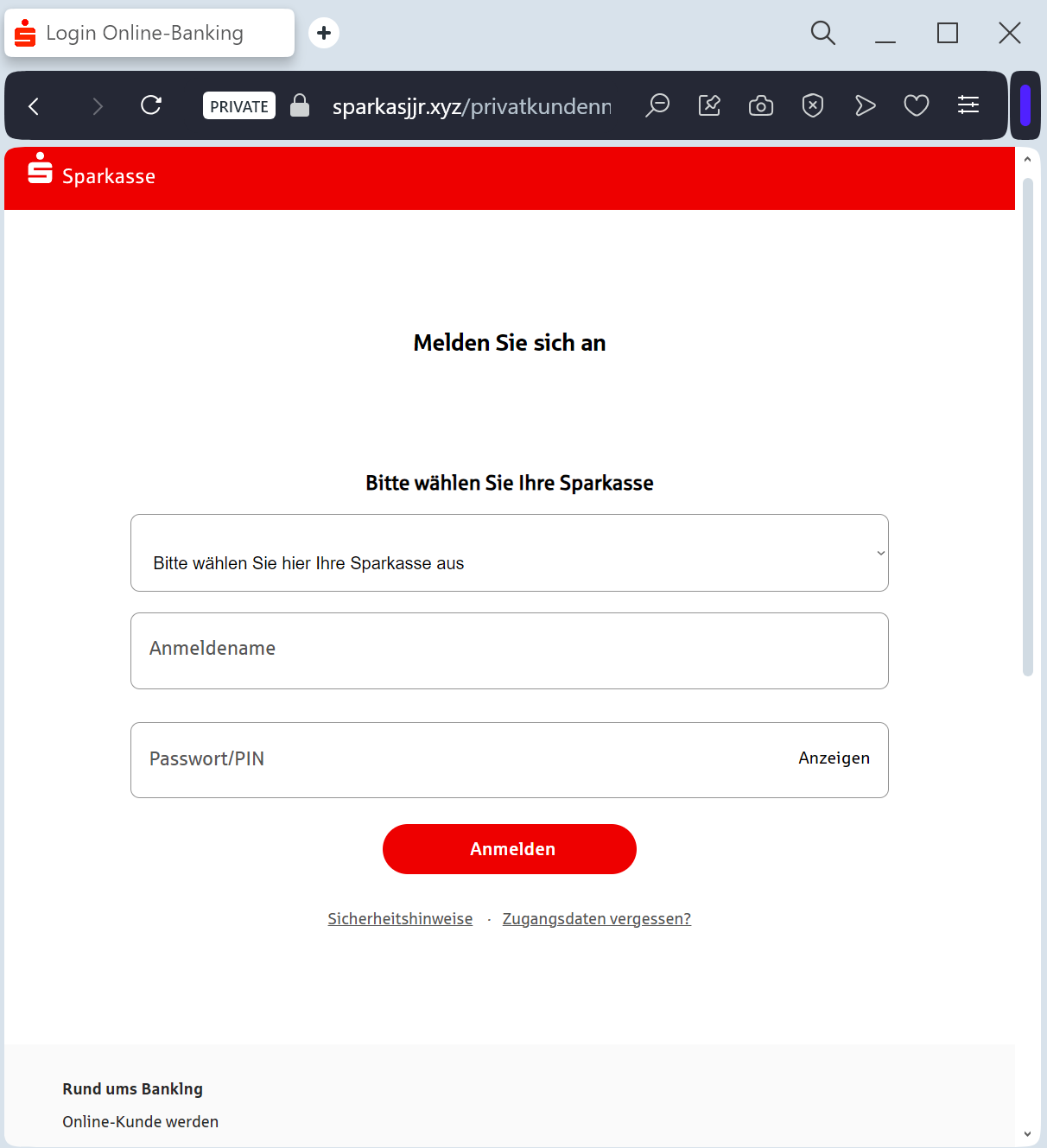
Sparkasse “S-pushTAN Activation” Phishing
Target: Customers of Sparkasse Banks (Germany)
Threat Level: Critical (Real-time Account Takeover & pushTAN Hijacking)
Phishing Method Description
This attack uses a Security Compliance pretext. Victims receive an SMS (Smishing) or Email claiming that their “S-pushTAN access is expiring” or that a “New Security Standard” requires an immediate update to their digital signature method.
The link leads to a high-fidelity clone of the Sparkasse “Online-Banking” portal. This sophisticated phishing kit is designed to perform a Man-in-the-Middle (MitM) attack, harvesting:
Anmeldename / Legitimations-ID (Login ID)
PIN (Online banking password)
Mobile Phone Number
pushTAN / SMS-TAN Codes: The fake site prompts the victim to authorize a “test” or “synchronization” in their pushTAN app. In reality, the victim is authorizing the attacker to link a new device to the account or to perform a large wire transfer.
Red Flags to Watch For
The Lookalike URL: The official domain structure is
sparkasse.de or specific city domains like berliner-sparkasse.de. Phishing sites use deceptive addresses like s-pushtan-aktualisierung.com, sparkasse-sicherheit.net, meine-sparkasse-login.online, or free subdomains like sparkasse.web.app.Urgent Deadlines: Messages like “Action required by midnight to avoid account lock” are classic social engineering tactics.
Requesting a TAN for “Security Updates”: A real bank will never ask you for a TAN (Transaction Number) just to “update” your profile or “verify” your identity. TANs are strictly for authorizing outgoing payments or sensitive changes.
How to Protect Yourself
The “Manual Entry” Rule: Always access your bank by typing the address of your local Sparkasse manually into your browser. Never follow links from SMS or emails.
Use the Official App: Manage your finances and security settings only through the official Sparkasse and S-pushTAN apps.
Read the TAN Content: Before confirming any pushTAN request on your phone, read the description carefully. If it says “New Device Registration” or shows a transaction amount you didn’t initiate, REJECT it immediately.
Immediate Action: If you have entered your data on a suspicious page, call the central emergency blocking number in Germany: 116 116.
Expert Security Tip:
The “pushTAN” HijackThe Method:
This case highlights a Device Binding Scam. Scammers are not just after your password; they want to steal your pushTAN authorization.
The Trap:
By tricking you into “synchronizing” your security, they are actually trying to register their own smartphone as the authorized device for your account. Once they have successfully linked their device, they can empty your account without needing any further codes from you.
How to Protect Yourself:
Never “test” your TAN: Banks do not conduct “test” synchronizations via web links.
Zero Trust for SMS Links: Sparkasse will never send you an SMS with a link to a login page. If there is a link, it is a scam.