
Analysis Memo: This deceptive layout was detected, analyzed, and contained firsthand by the
Antiphishing.bizsecurity team during our daily link moderation procedures. To protect the public, the hostile origin link has been safely deactivated within our infrastructure. We document and analyze these live visual patterns to help security researchers and users recognize deceptive clone designs before financial damage occurs.
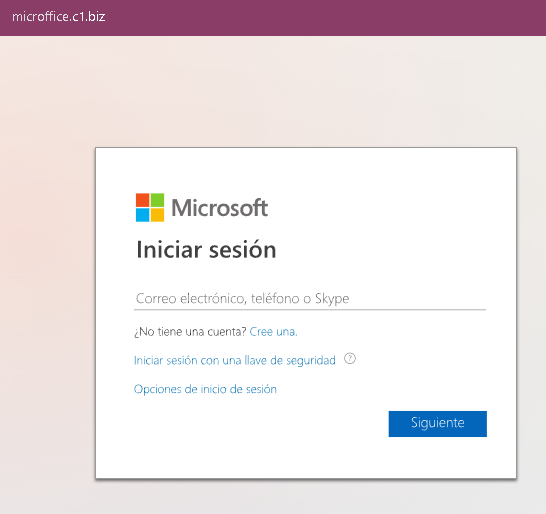
This screenshot shows a phishing page impersonating Microsoft (Outlook / Hotmail / Office 365), targeting Spanish‑speaking users. The page is designed to steal the victim’s email address, phone number, or Skype name as the first step in a credential‑harvesting flow.
Threat Analysis: Microsoft Phishing – First‑Step Login Page
How it works:
The victim receives a phishing email, SMS, or other message claiming a security alert, account issue, or the need to verify their information. The link leads to this page, which mimics the Microsoft login interface. After entering their email/phone/Skype and clicking “Siguiente” (Next), the victim would be taken to a second fake page asking for their password.
The goal:
The attacker captures the victim’s Microsoft account credentials (email and password) to gain access to email, OneDrive, and any services linked to the account.
Red flags:
- Suspicious URL: The page is hosted on
microfite.c.t.bizmicrosoft.comoutlook.com - Generic design with “key” icon: While the page copies Microsoft’s look, the URL is the clearest indicator of fraud.
- Unsolicited login request: Microsoft does not send links requiring users to log in to resolve account issues.
What to do:
- Do not enter your email or any credentials on this page.
- If you have already entered information, close the page and do not proceed to any next step. Change your Microsoft password immediately and enable two‑factor authentication.
- Always access Microsoft services by typing
outlook.commicrosoft.com
Protective measures:
- Bookmark the official Microsoft login page and use that bookmark.
- Use a password manager – it will not autofill on fake domains.
- Enable two‑factor authentication on your Microsoft account.