
Fake Windows 11 upgrade scams use malicious search engine ads and fraudulent websites to impersonate the official Microsoft Download Center. These sites distribute infostealers like RedLine Stealer or steal Microsoft account credentials through fake login prompts. Users are advised to only update Windows via the built-in system settings and to verify that all download domains are strictly “microsoft.com”.
Incident Report: This deceptive layout was logged, cross-checked, and neutralized firsthand by the
Antiphishing.bizsecurity team during our automated link scanning workflows. To protect the public, the phishing source domain has been completely disabled within our infrastructure. We document and analyze these live visual patterns to help security researchers and users spot lookalike phishing methods before financial damage occurs.
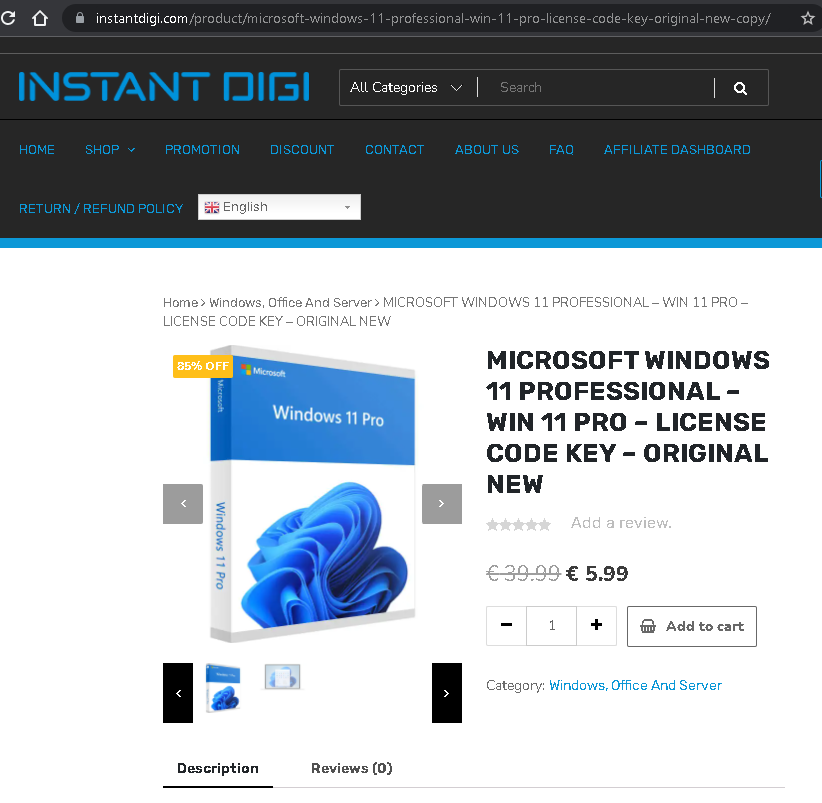
This screenshot shows another page from the same fraudulent online store (instantdigi.com
Threat Analysis: Fake Software Store – Counterfeit Windows License Scam
How it works:
The victim sees an ad or search result for an incredibly cheap Windows 11 Pro license. The page mimics a legitimate e‑commerce store. The victim is tempted to buy a “genuine” license key for $5.99. After payment, the attacker either:
- Provides a fake, already‑used, or blocked key
- Delivers nothing at all
- Steals the credit card details entered during checkout
The goal:
The attacker aims to:
- Steal credit card information for fraudulent transactions
- Collect personal data (name, address, email) for identity theft
- Receive direct payment for a worthless or non‑existent product
Red flags to watch for:
- Too‑good‑to‑be‑true price: A legitimate Windows 11 Pro license costs $100–$200. $5.99 is impossible for a genuine retail key.
- Suspicious domain:
instantdigi.com - 85% discount + “0 reviews”: The extreme discount and lack of genuine customer feedback are common pressure tactics.
- Same fraudulent site as previous example: The identical layout, “INSTANT DIGI” branding, and unrealistic pricing confirm it is part of the same scam operation.
What to do if you encounter this:
- Do not purchase anything or enter any payment information.
- If you have already entered card details, contact your bank immediately to block the card and dispute any unauthorized charges.
- Always buy software licenses directly from Microsoft or authorized retailers.
Protective measures:
- If the price seems too good to be true, it is a scam.
- Verify the domain – Microsoft’s official store is
microsoft.com - Use a credit card with fraud protection and monitor your statements.
- Search for “[store name] scam” before buying from an unfamiliar site.