Threat Intel: This deceptive layout was detected, analyzed, and contained firsthand by the Antiphishing.biz security team during our automated link scanning workflows. To protect the public, the phishing source domain has been completely disabled within our infrastructure. We document and analyze these live visual patterns to help security researchers and users spot lookalike phishing methods before financial damage occurs.
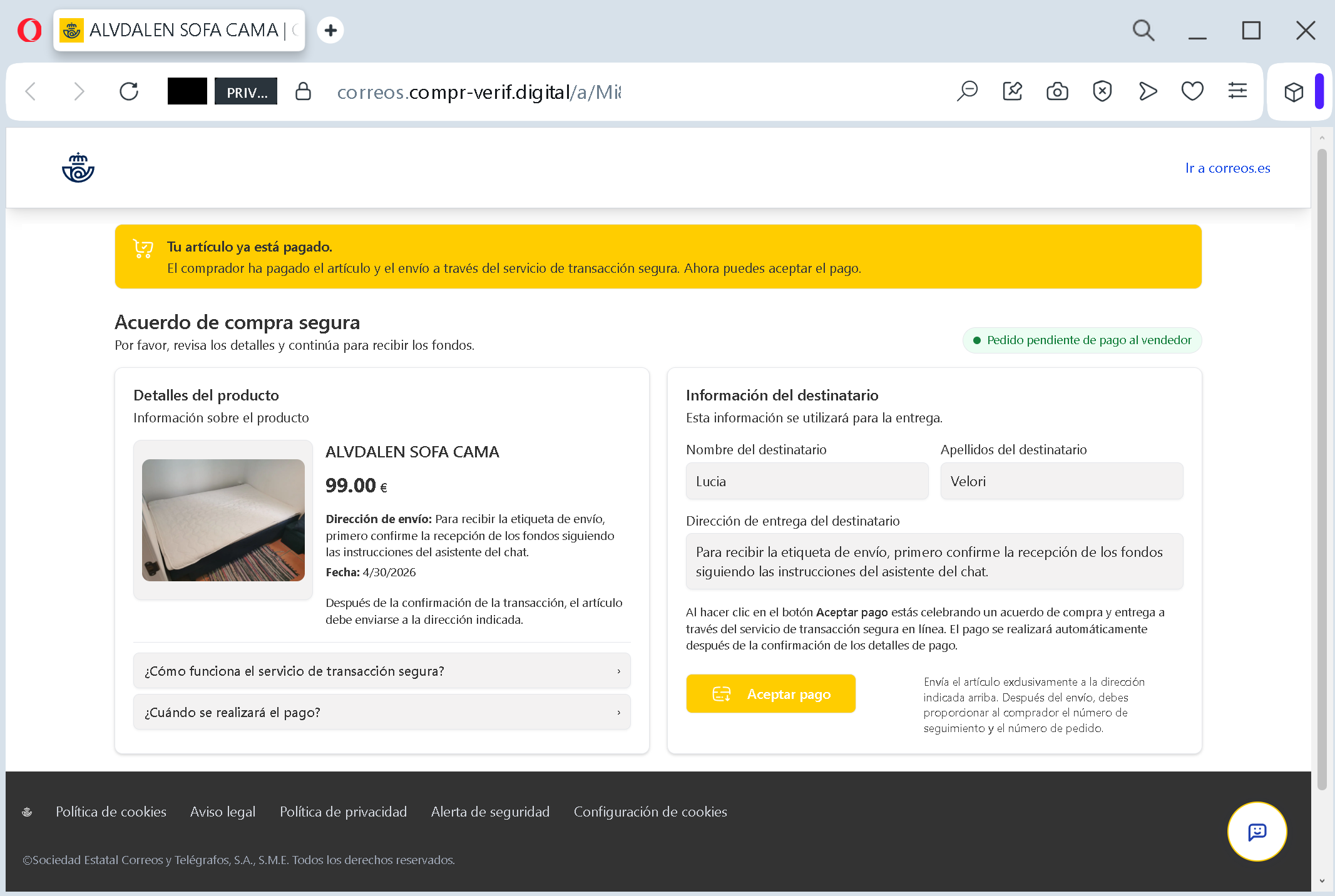
Figure 1: Actual screenshot of the ongoing fraudulent campaign intercepted by our security systems.
This screenshot illustrates a sophisticated phishing attack targeting sellers on classified ad platforms (like OLX, Vinted, or Wallapop). Here is how the scam works and how to stay safe:
1. The Setup
The scammer contacts a seller pretending to be a buyer. They claim they have already paid for the item through a “secure transaction” service provided by a well-known logistics company (in this case, Correos).
2. The Trap (Visual Red Flags)
Deceptive URL: Look at the address bar. The official website is correos.es, but the scammer uses a fake domain: correos.compr-verif.digital. Always check the domain before clicking!
The “Receive Funds” Hook: The page claims your item is paid and asks you to click a button (e.g., “Aceptar pago” / “Accept payment”) to receive your money.
Urgency & Social Engineering: It mentions that to get the shipping label, you must first “confirm the receipt of funds” following the chat assistant’s instructions.
3. The Goal
When the victim clicks the “Accept payment” button, they are redirected to a fake payment gateway. Instead of receiving money, the victim is asked to provide their:
Full credit/debit card details.
Bank account login credentials.
SMS verification codes (which allows scammers to authorize fraudulent transactions).
How to Protect Yourself:
Never leave the platform: Real marketplaces never ask you to go to a third-party link to receive payment. All transactions should stay within the official app or website.
Check the link: If the URL looks long, strange, or ends in .digital, .info, or .top, it is a scam.
No “Payment to Receive”: You should never have to enter your card’s CVV code or an SMS password to receive money.
Stay vigilant! If a buyer sends you a screenshot or a link claiming they’ve paid through an external service—it’s a scam.
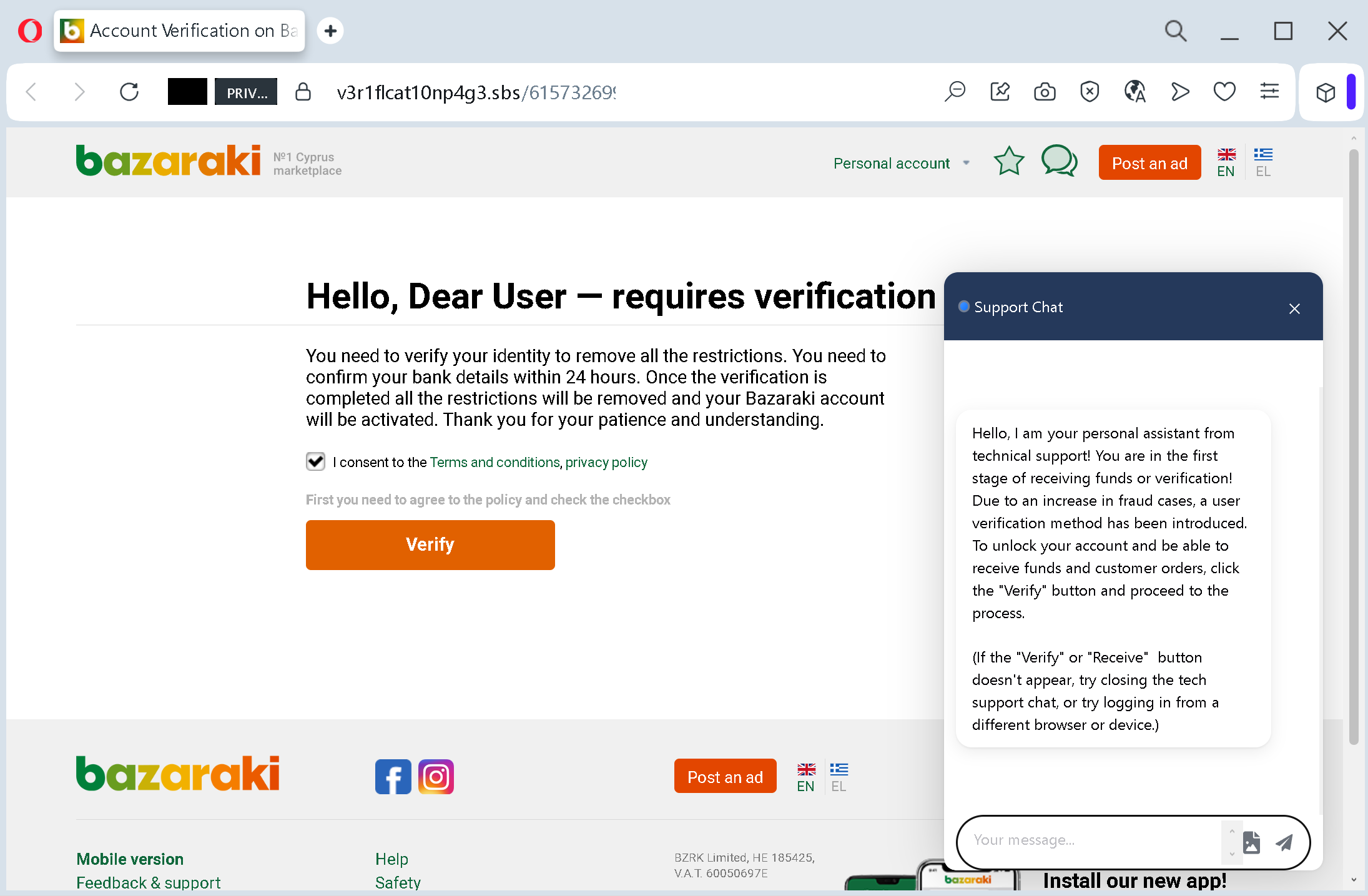
This screenshot shows a phishing page impersonating Bazaraki, a major classifieds platform in Cyprus. The page uses a fake account restriction notice to pressure victims into providing personal and financial information.
Analysis Memo: This spoofed page was intercepted, verified, and locked down firsthand by the Antiphishing.biz security team during our automated link scanning workflows. To protect the public, the phishing source domain has been safely deactivated within our infrastructure. We document and analyze these live visual patterns to help security researchers and users spot lookalike phishing methods before financial damage occurs.
Figure 1: Verified screenshot of the live scam infrastructure isolated on our infrastructure.
How it works: The victim receives a message claiming their Bazaraki account has been restricted and requires identity verification within 24 hours. The page includes a checkbox to agree to terms and a “Verify” button. A fake live chat window appears, with a supposed support assistant explaining that the user must verify their account to receive funds or customer orders.
Clicking the “Verify” button leads to a subsequent page (not fully shown) that likely asks for:
Full name and contact details
Credit/debit card information (card number, expiry, CVV)
Online banking credentials
Personal identification documents
The goal: The attacker aims to steal:
Login credentials for the victim’s Bazaraki account
Payment card details for fraudulent transactions
Personal identity information for further scams or identity theft
Red flags to watch for:
Suspicious URL: The page is hosted on a domain that is not the official Bazaraki domain (bazaraki.com).
Threat of account restriction with a 24‑hour deadline: This is a classic fear tactic to rush victims into action without thinking.
Fake live chat support: The chat window is not a real help desk – it is a scripted message designed to make the page appear legitimate. A real support chat would not initiate contact with a pre‑written explanation about “the first stage of receiving funds”.
Request to “verify” before any details are entered: The current page only asks for a checkbox agreement, but the next page (after clicking “Verify”) will harvest sensitive data.
Unsolicited verification request: Bazaraki does not send links requiring users to verify their identity via external pages. All account-related actions are done within the official website after logging in normally.
What to do if you encounter this:
Do not click the “Verify” button or check the checkbox.
Do not interact with the fake chat or provide any information on subsequent pages.
If you are a Bazaraki user, always log in by typing bazaraki.com directly into your browser. Check your account status from the official dashboard.
If you have already clicked through and entered personal or card details, contact your bank immediately and change your Bazaraki password.
Report the phishing page to Bazaraki’s security team.
Protective measures:
Never click links in unsolicited messages claiming your account is restricted or needs verification.
Always type the official website URL directly into your browser.
Never trust a pop‑up support chat on a page you reached via a link – legitimate support chats appear only on official sites after you navigate there yourself.
Enable two‑factor authentication on your Bazaraki account and email.
Check the URL carefully – look for misspellings, extra words, or unusual top‑level domains.
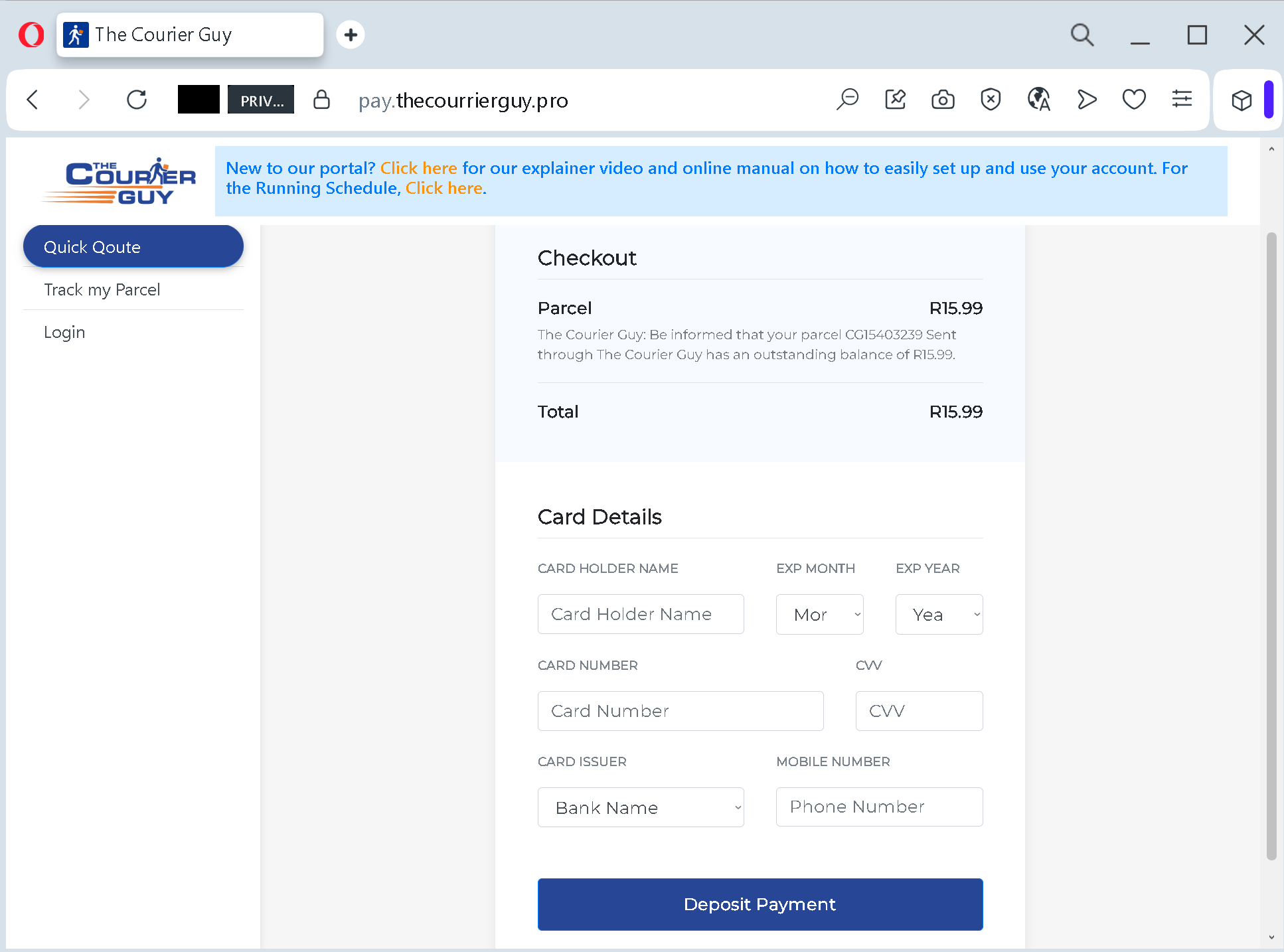
This screenshot shows a phishing page impersonating The Courier Guy, a South African courier service. The victim is told that a parcel has an outstanding balance of R15.99 and must be paid immediately. The page then requests full credit/debit card details (cardholder name, card number, expiry date, CVV) along with the card issuer bank and the victim’s phone number.
Security Notice: This spoofed page was intercepted, verified, and locked down firsthand by the Antiphishing.biz security team during our automated link scanning workflows. To protect the public, the phishing source domain has been fully defanged within our infrastructure. We document and analyze these live visual patterns to help security researchers and users spot lookalike phishing methods before financial damage occurs.
Figure 1: Live screenshot of the active phishing operation isolated on our infrastructure.
How it works: The victim receives an SMS, email, or other message claiming that a package (with a fake tracking number “CG15403239”) requires a small payment (R15.99) to be delivered. The link leads to this page, which mimics the official The Courier Guy checkout portal.
The victim is asked to provide:
Cardholder name
Card number
Expiry month and year
CVV security code
Card issuer (bank name)
Mobile phone number
After filling in the details and clicking “Deposit Payment”, the information is sent to the attacker.
The goal: The attacker collects:
Full credit/debit card information (number, expiry, CVV)
Cardholder name and issuing bank
Phone number
With this data, the attacker can:
Make fraudulent online purchases or clone the card
Use the phone number for SMS-based two-factor interception (SIM swapping) or to sell to other scammers
Red flags to watch for:
Suspicious URL: The page is hosted on pay.thecourierguy.pro, not on the official The Courier Guy domain (which would be thecourierguy.co.za or similar). The .pro TLD is unusual for a legitimate courier service.
Request for CVV and full card details for a small fee: A legitimate courier never asks for your card security code to collect a delivery fee. Such fees would be paid through a secure payment gateway without exposing the CVV.
Small fee trick: R15.99 is a trivial amount designed to make the payment seem harmless.
Fake tracking number: The tracking number “CG15403239” cannot be verified on the official courier website.
Excessive data collection: Asking for the card issuer (bank name) and phone number in addition to full card details is unusual for a simple payment and suggests the attacker wants to gather as much personal data as possible.
Unsolicited request: The Courier Guy does not send links requiring customers to pay for undelivered parcels via an external payment form.
What to do if you encounter this:
Do not enter any card or personal information.
If you are expecting a delivery from The Courier Guy, track it directly by typing the official URL (thecourierguy.co.za) into your browser and using your real tracking number.
If you have already entered card details, contact your bank immediately to block the card and dispute any unauthorized charges.
Report the phishing page to The Courier Guy’s fraud team.
Protective measures:
Never click links in unsolicited delivery messages. Always go directly to the courier’s official website.
Never pay a “redelivery fee” via a link. Legitimate fees are handled in person, through the official app, or after logging into your account.
Check the URL carefully: Look for misspellings, extra words, or unusual top-level domains (.pro, .xyz, .top, etc.).
Enable transaction alerts on your bank account to catch unauthorized charges early.
Use a password manager – it will not autofill on fake domains.
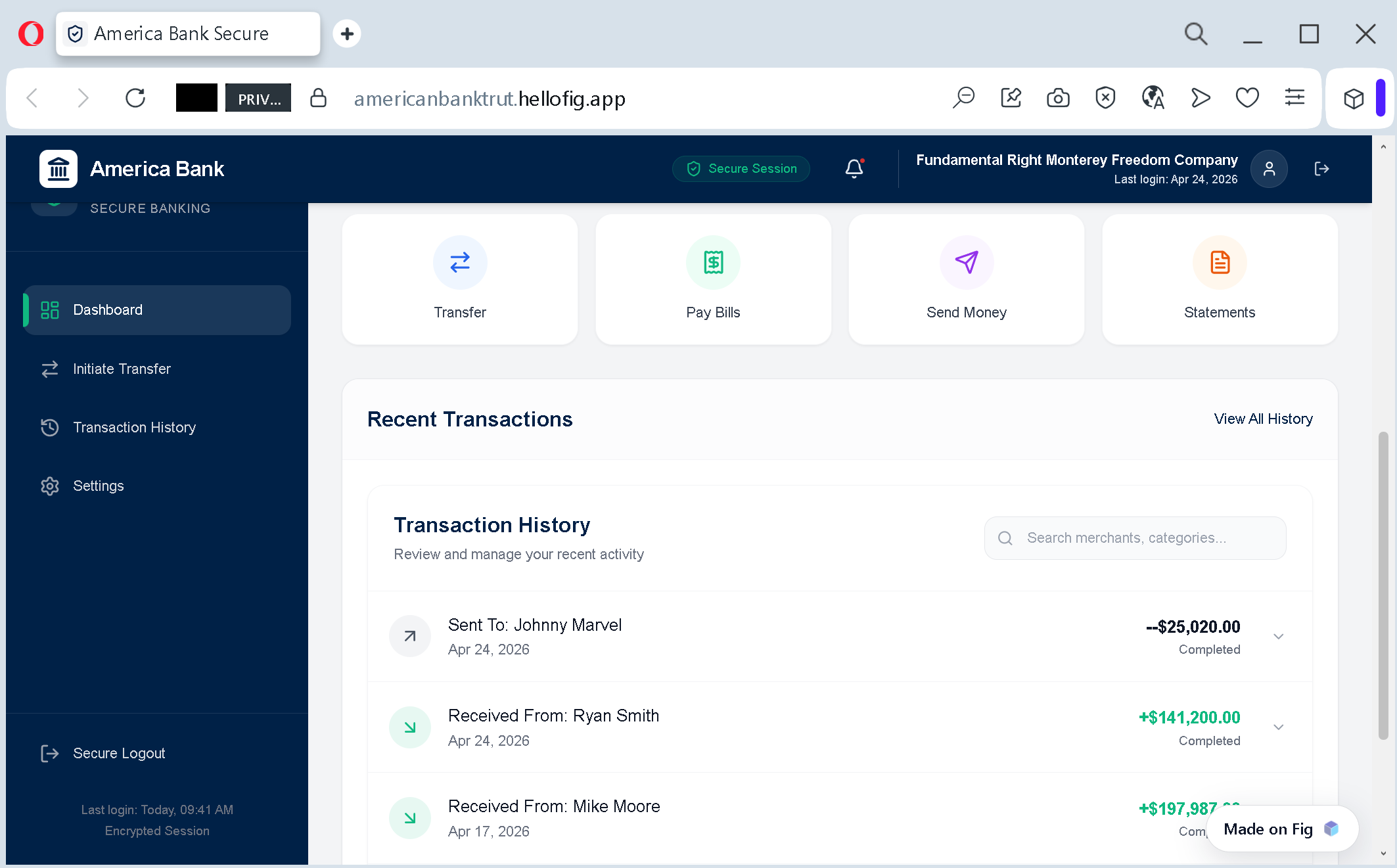
Incident Report: This spoofed page was logged, cross-checked, and neutralized firsthand by the Antiphishing.biz security team during our daily link moderation procedures. To protect the public, the phishing source domain has been completely disabled within our infrastructure. We document and analyze these live visual patterns to help security researchers and users spot lookalike phishing methods before financial damage occurs.
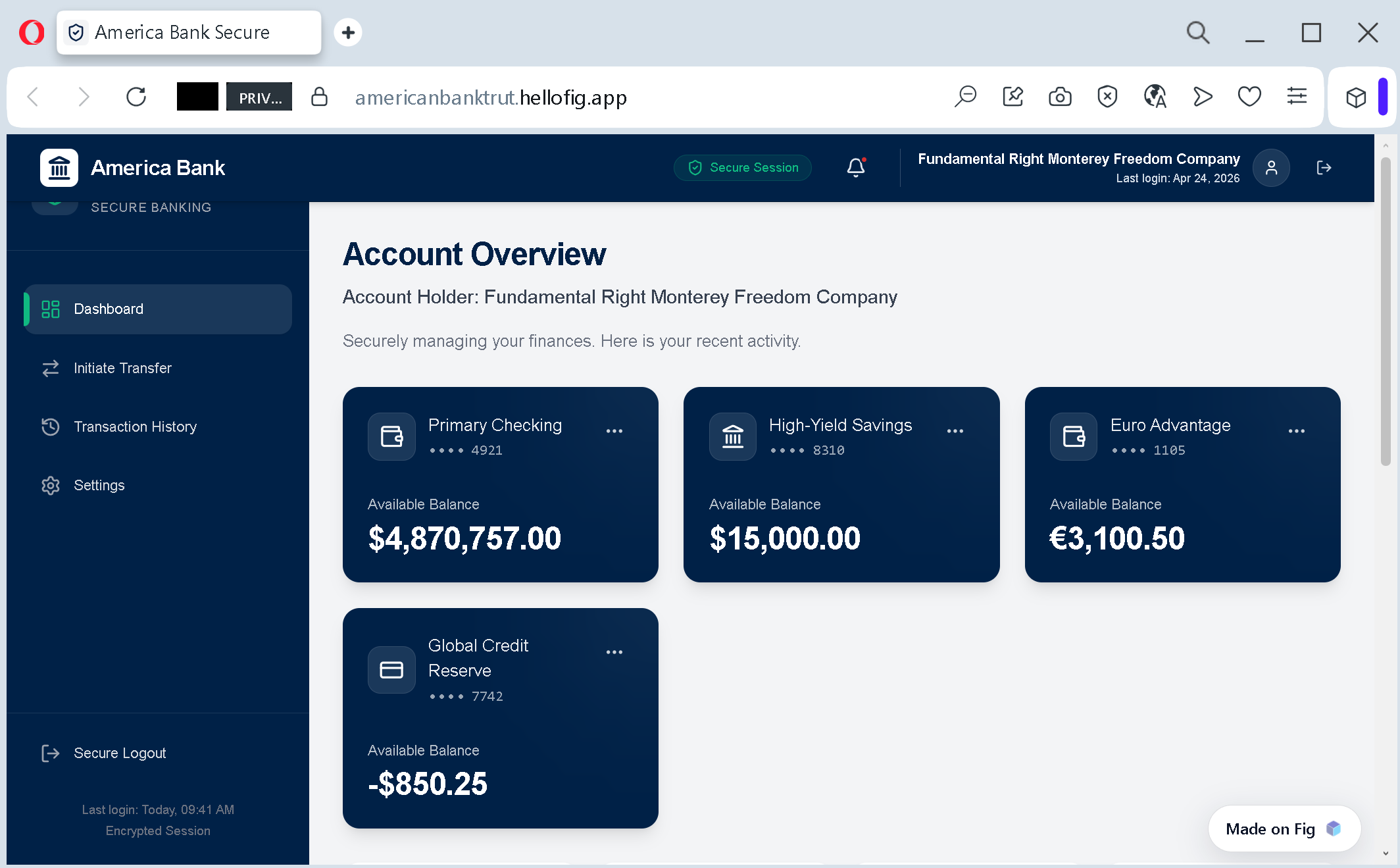
Figure 1: Visual proof of the live scam infrastructure captured during routine moderation.Figure 2: Visual proof of the live scam infrastructure captured during routine moderation.
1. The Anatomy of the Scam
This screenshot shows a sophisticated phishing dashboard designed to look like a high-end online banking portal. The attacker is using a legitimate Fintech-as-a-Service (FaaS) platform, Fig, to build a believable user interface that mimics a real bank’s “Account Overview.”
2. Key Deception Indicators (Red Flags)
Typosquatted Domain: The URL americanbanktrut[.]hellofig[.]app contains a critical spelling error: “trut” instead of “trust.” Scammers use these minor typos to bypass automated keyword filters.
The “Bait” Balance: The dashboard displays a massive balance (e.g., $4,870,757.00). This is a psychological trigger designed to make the victim feel they have inherited or won a fortune, blinding them to the technical red flags.
Abuse of SaaS Platforms: By hosting the scam on hellofig.app, the attacker benefits from a valid SSL certificate and a clean reputation of the hosting provider, making the site appear “Secure” in browser address bars.
3. The Objective: Financial Harvesting
This is not just about stealing login credentials. This setup is used for:
Advance Fee Fraud: The victim is told they must pay a “transfer fee” or “activation tax” to access the multi-million dollar balance.
Data Harvesting: To “verify” the account, victims are asked to provide their real bank details, SSNs, and passport scans.
4. Expert Recommendation for Users
Never trust “Found” Money: If you didn’t open an account with a bank, any notification claiming you have millions waiting for you is 100% a scam.
Scrutinize the TLD: Legitimate banks operate on their own high-security domains (e.g., .com or .bank). They will never host their core banking login on a sub-domain of a design or fintech builder like .hellofig.app.
Verify Spelling: Professional financial institutions have rigorous QA; a typo in the URL is a definitive sign of fraud.
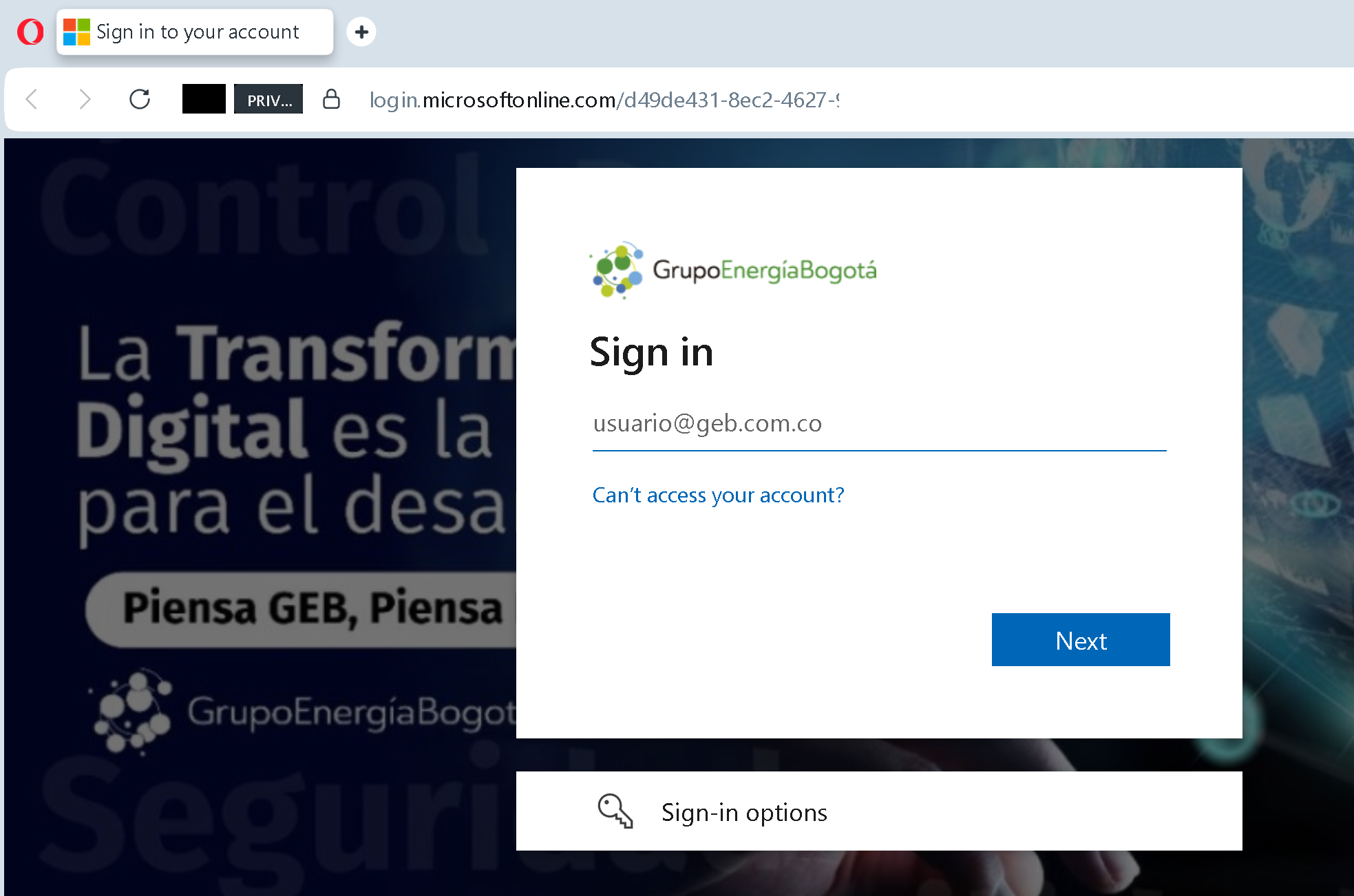
Incident Report: This deceptive layout was logged, cross-checked, and neutralized firsthand by the Antiphishing.biz security team during our automated link scanning workflows. To protect the public, the phishing source domain has been safely deactivated within our infrastructure. We document and analyze these live visual patterns to help security researchers and users recognize deceptive clone designs before financial damage occurs.
Figure 1: Visual proof of the ongoing fraudulent campaign captured during routine moderation.
This is a sophisticated cyberattack targeting employees of a specific organization (Grupo Energía Bogotá). It uses “trust-building” techniques to steal corporate login credentials and bypass security measures.
1. The Strategy: The “Bait and Switch”
The attacker shares a shortened URL that appears to lead to a legitimate, harmless resource — in this case, a corporate benefits platform (Gointegro) showing discounts for books in Bogotá. Because the destination looks familiar and non-threatening, employees are more likely to click.
2. The Trap: Forced Re-authentication
Once the user clicks the link, they are automatically redirected to Microsoft login page.
The user is redirected to a GENUINE Microsoft login page, but the session is hijacked. How it works (Technical Explanation): The Proxied Redirect: The link isn’t just a simple redirect. It acts as a proxy.
The attacker uses a trusted corporate link to initiate a legitimate login process, but controls the redirection path. Once you successfully log in to the real Microsoft portal, the system sends your authentication token back to the attacker’s infrastructure, allowing them to hijack your corporate session without ever knowing your password. Bypassing MFA: Because the site is real, Microsoft sends a Multi-Factor Authentication (MFA) code to the user. The user enters it, thinking everything is fine. The attacker then steals the Session Cookie (the digital “key” that says you are logged in). Full Access: With that stolen cookie, the hacker can enter the victim’s account without needing the password or the MFA code again. They are “in” as the user, bypassing all modern security layers.
Even if the login page looks 100% official (because it is), the path you took to get there was compromised. Attackers use shortened links and ‘trusted’ third-party sites to wrap the official login process in a malicious layer that steals your access token the moment you sign in.
The Psychological Trick: Users often assume their “session has expired” and instinctively enter their username and password to continue to the “discounts” they were promised.
3. Technical Red Flags:
Unauthorized Redirects: A link for “book discounts” should never suddenly ask for your Microsoft password. This is a primary sign of a Credential Phishing attack.
Suspicious Source: These links are often distributed via unofficial channels (personal WhatsApp, social media, or external emails) rather than official company communications.
Abuse of URL Shorteners: Attackers use URL shorteners to hide the final destination and to bypass corporate email filters that would otherwise block direct links to phishing sites.
4. The Goal: Corporate Espionage & Ransomware
By capturing these credentials, hackers can:
Gain access to the company’s internal network and sensitive data.
Perform AiTM (Adversary-in-the-Middle) attacks to intercept Multi-Factor Authentication (MFA) tokens.
Spread ransomware or conduct financial fraud within the organization.
5. How to Protect Yourself and Your Company:
Never trust “Login” prompts from external links: If a link unexpectedly asks for your password, close the tab immediately.
Verify via the Official Portal: Always log in through your company’s official bookmarks or by typing the address directly into your browser.
Report Suspicious Links: If you see a shortened URL claiming to be a corporate resource, report it to your IT Security department before clicking.
Note for Security Professionals:
This attack is particularly dangerous because it originates from the same geographic location (Bogotá) as the victim company, making it appear “local” and less suspicious. For a moderation system, the key is to implement Deep Redirect Inspection — following the link to its final destination and flagging any unauthorized jumps from a “safe” site to a login portal.
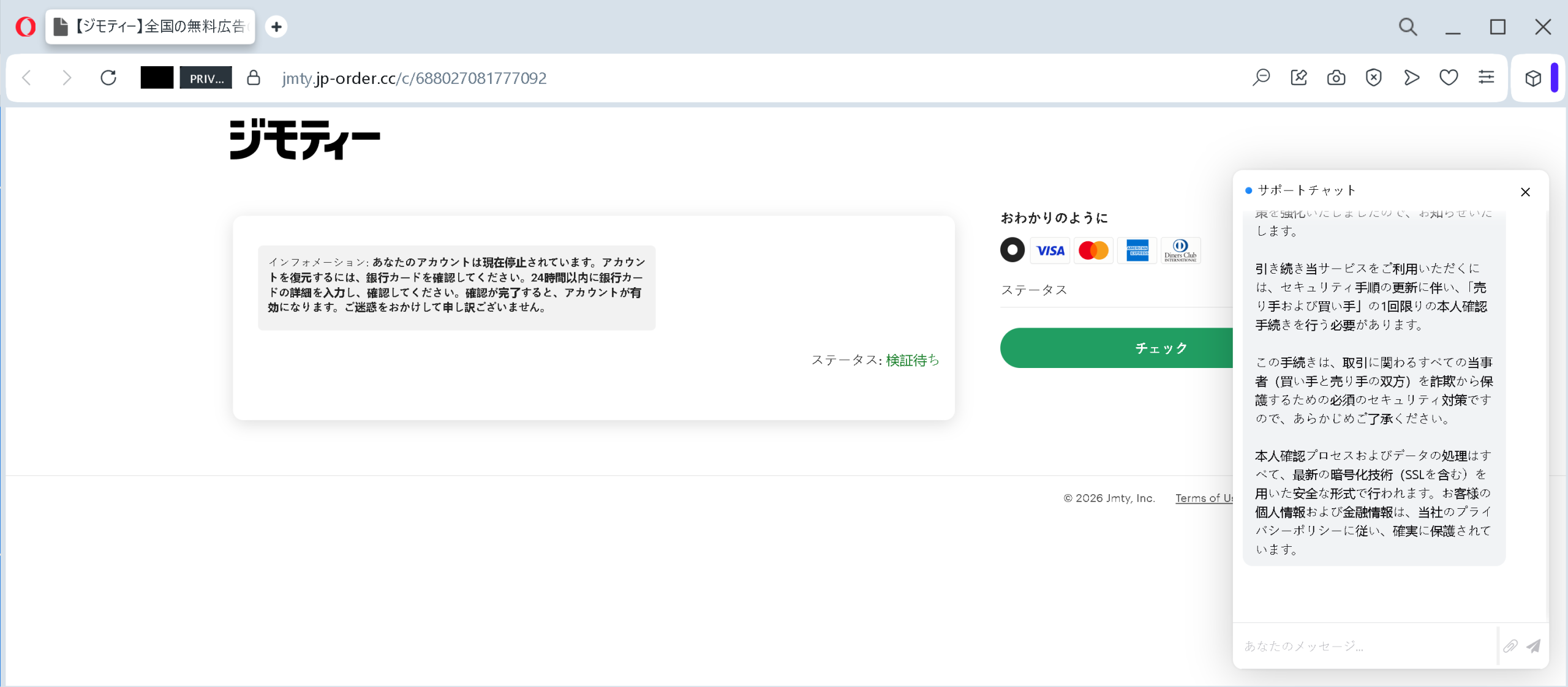
This is a highly sophisticated phishing attack targeting users of online marketplaces (like the Japanese service Jimoty). Here is how the scam works and how to spot it.
Security Notice: This malicious interface was detected, analyzed, and contained firsthand by the Antiphishing.biz security team during our automated link scanning workflows. To protect the public, the phishing source domain has been completely disabled within our infrastructure. We document and analyze these live visual patterns to help security researchers and users detect replica fraud techniques before financial damage occurs.
Figure 1: Live screenshot of the live scam infrastructure intercepted by our security systems.
1. The Trap: Fake Urgency
The page displays a message stating that your account has been suspended. It creates artificial pressure by claiming you must “verify your credit card details within 24 hours” to restore access.
2. The Red Flags (How to identify it):
Malicious Domain: The URL in the screenshot is jmty.jp-order.cc. The official Jimoty domain is jmty.jp. Scammers use “look-alike” domains by adding extra words like -order.cc to trick your eyes.
Unauthorized Payment Request: Legitimate services will never ask for your full credit card details (number, CVV, expiry) just to “verify your identity” or “reactivate an account.”
Fake Support Chat: On the right, there is a popup window mimicking a “Support Chat.” It uses professional-sounding language to reassure you that the process is “secure” and “encrypted (SSL),” which is a common tactic to lower your guard.
3. The Goal: Financial Theft
Once a victim clicks the “Check” (チェック) button and enters their card information, the scammers capture the data in real-time to perform unauthorized transactions or sell the card details on the dark web.
4. How to Stay Safe:
Check the URL: Always look at the domain name carefully. If it’s not exactly jmty.jp, it’s a scam.
Don’t Click Links: If you receive a suspension notice, do not click the link in the message. Instead, go directly to the official website by typing the address in your browser or using the official app.
Report & Block: If you encounter such a page in a URL shortener or message, report it immediately to the service provider.
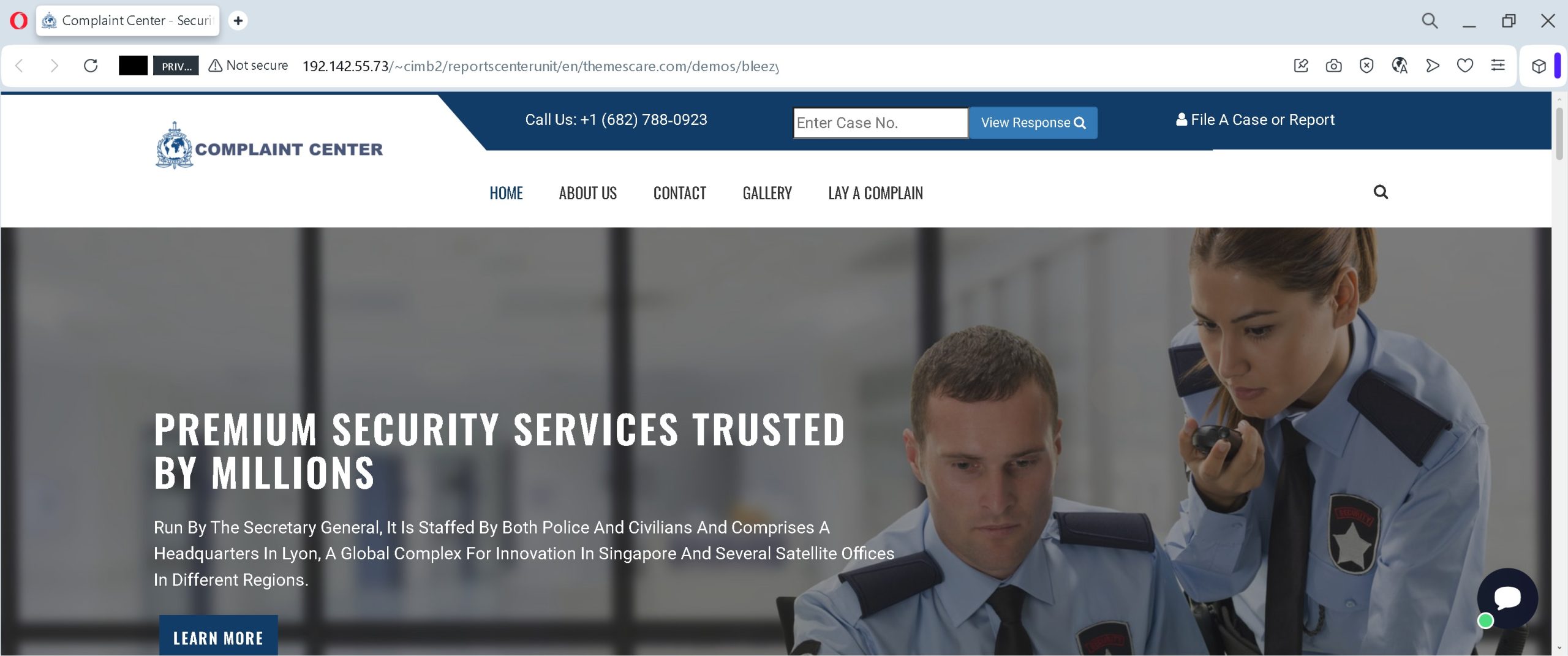
Incident Report: This malicious interface was logged, cross-checked, and neutralized firsthand by the Antiphishing.biz security team during our automated link scanning workflows. To protect the public, the dangerous destination URL has been fully defanged within our infrastructure. We document and analyze these live visual patterns to help security researchers and users detect replica fraud techniques before financial damage occurs.
Figure 1: Visual proof of the live scam infrastructure captured during routine moderation.Figure 2: Visual proof of the live scam infrastructure captured during routine moderation.Figure 3: Visual proof of the live scam infrastructure captured during routine moderation.Figure 4: Visual proof of the live scam infrastructure captured during routine moderation.Figure 5: Visual proof of the live scam infrastructure captured during routine moderation.Figure 6: Visual proof of the live scam infrastructure captured during routine moderation.Figure 7: Visual proof of the live scam infrastructure captured during routine moderation.Figure 8: Visual proof of the live scam infrastructure captured during routine moderation.Figure 9: Visual proof of the live scam infrastructure captured during routine moderation.Figure 10: Visual proof of the live scam infrastructure captured during routine moderation.
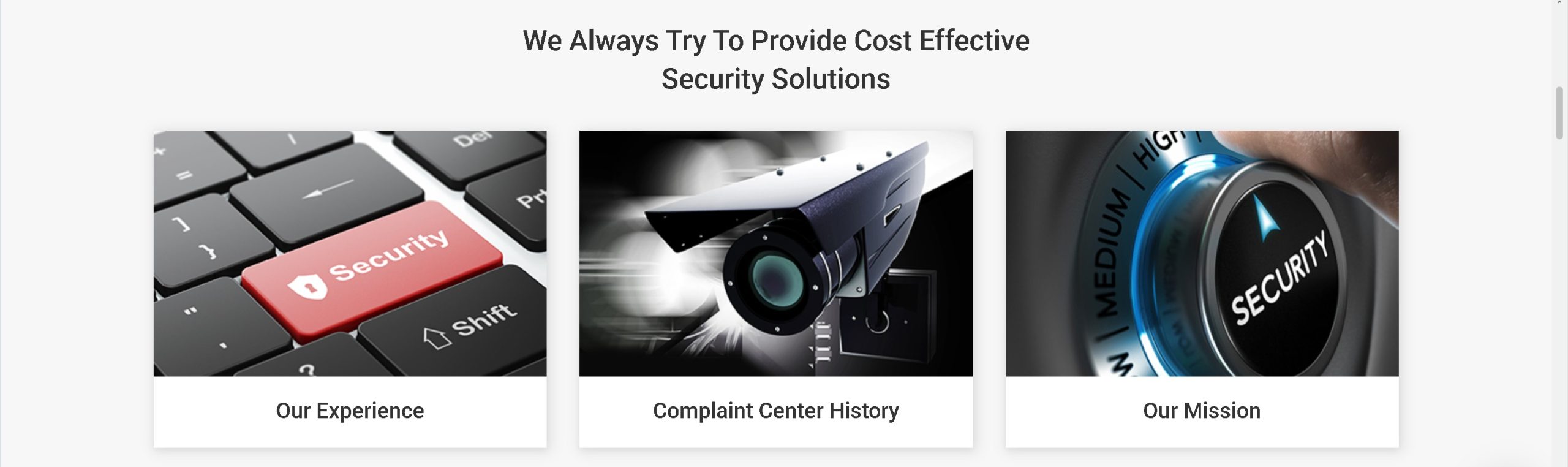
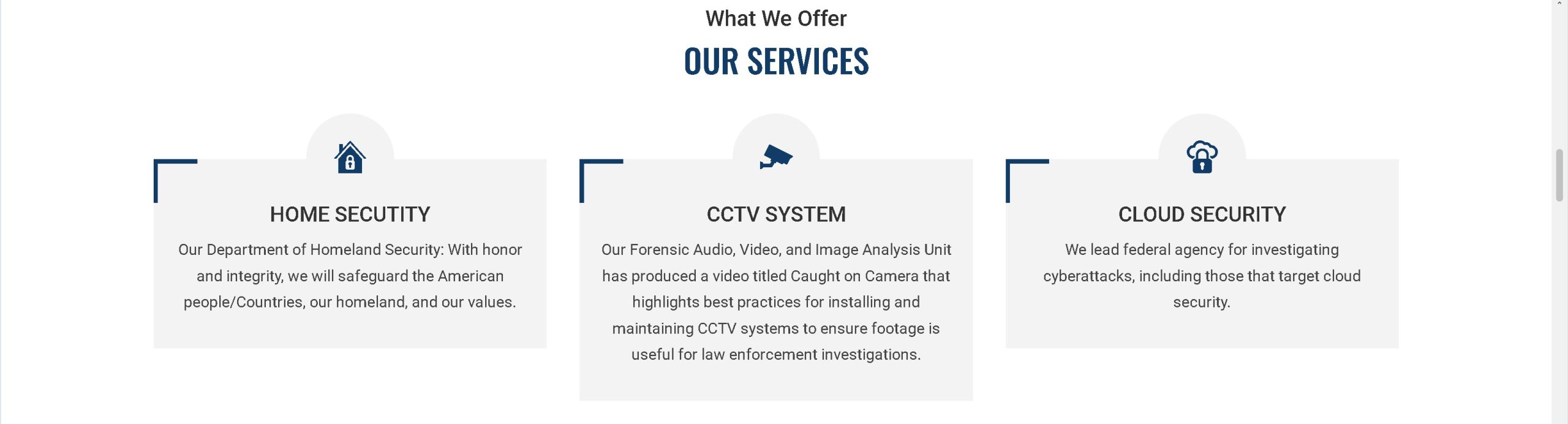
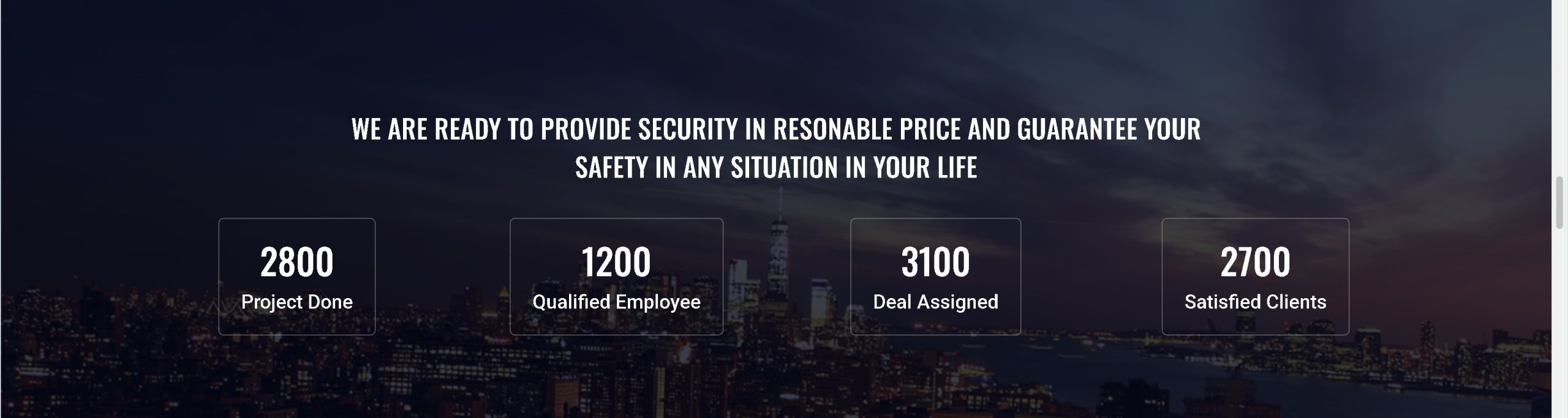
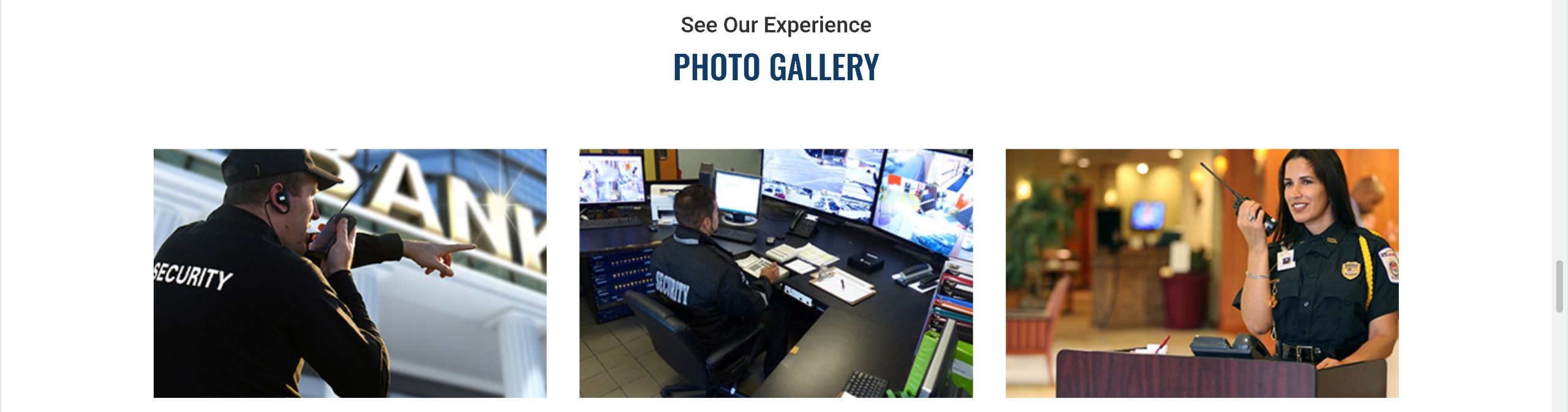
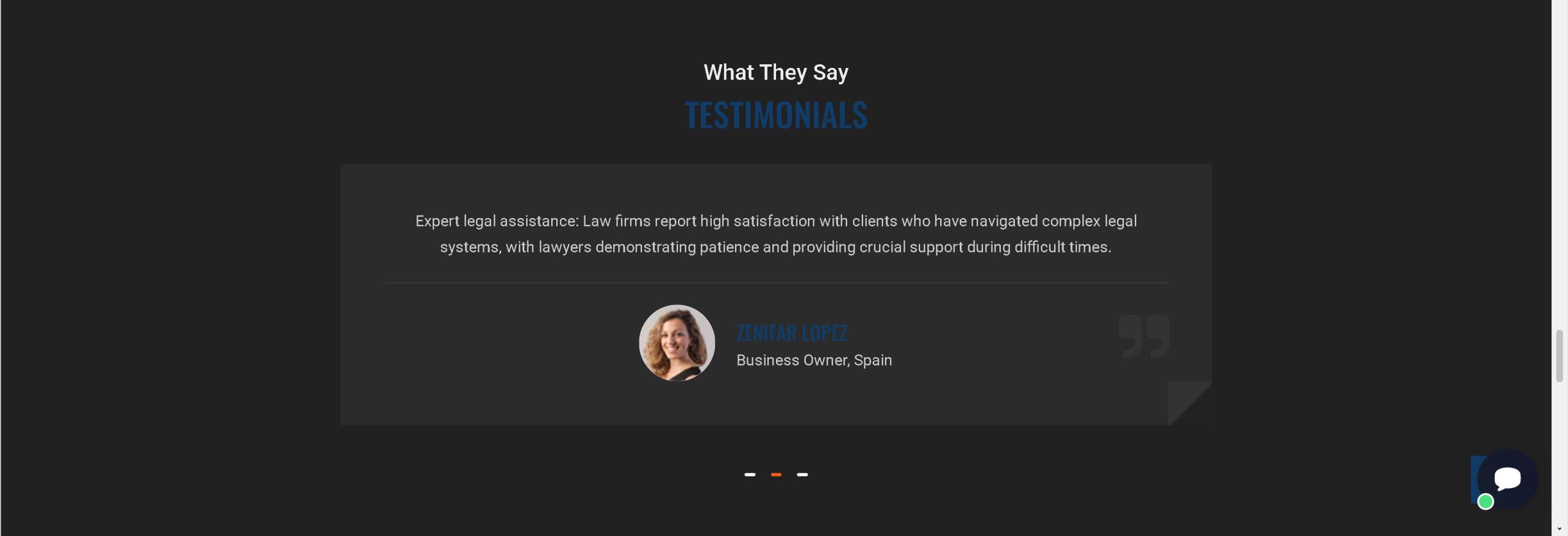
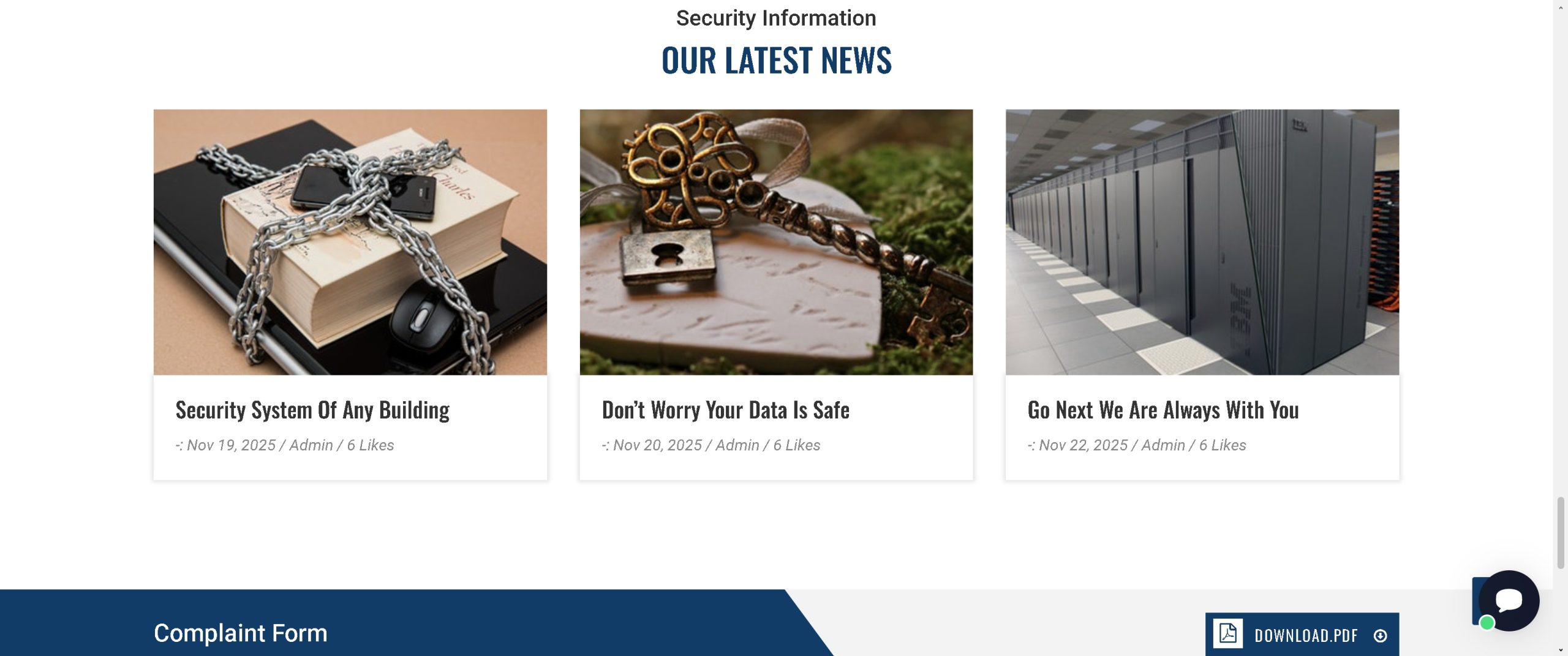
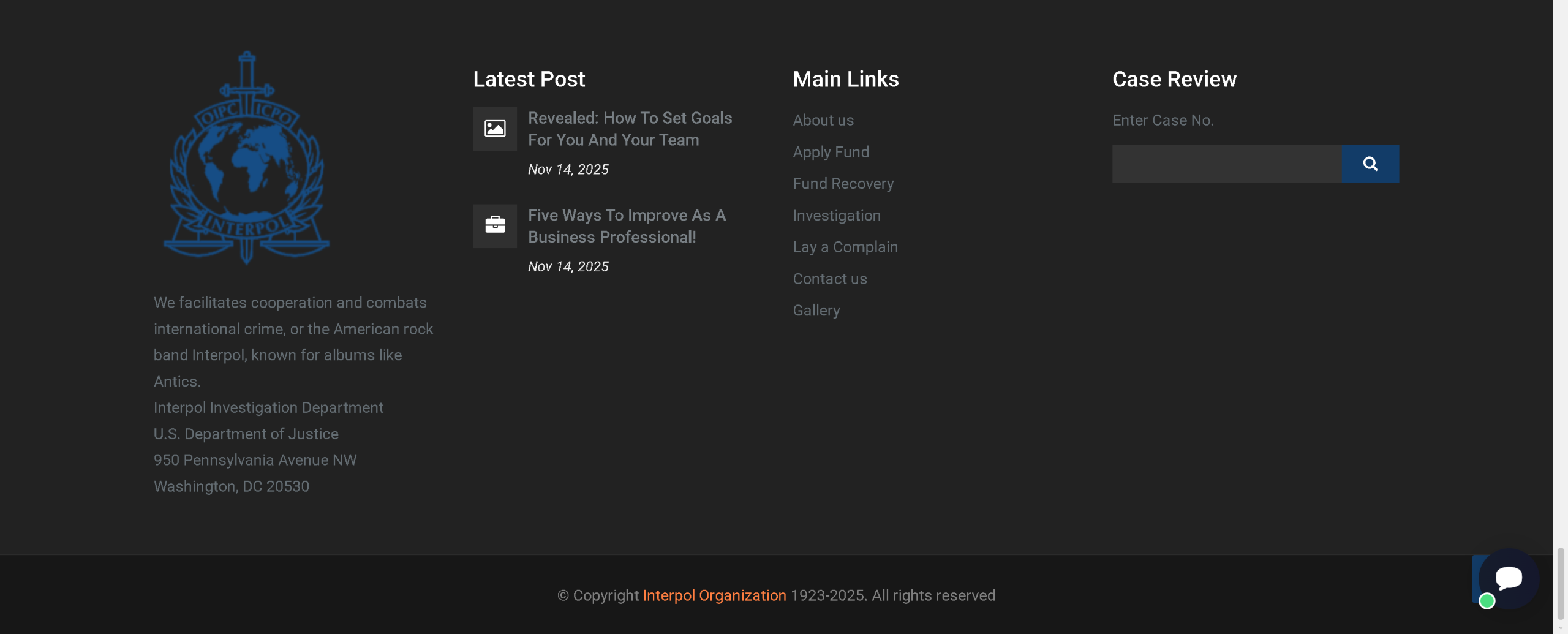
This set of screenshots reveals a fraudulent website impersonating a high-level international complaint center, loosely referencing INTERPOL, the FBI, and the U.S. Department of Justice. The site is designed to appear as a legitimate security or law enforcement agency offering services such as “Fund Recovery”, “Investigation”, and “Case Review”.
How it works: The victim is likely directed to this site after being scammed previously (e.g., via a phishing email or an ad promising help with recovering lost funds). The site features fake testimonials, stock photos, generic security service descriptions, and a “Complaint Form”. The victim is asked to enter a “Case Number” or file a complaint. In subsequent steps (not fully shown in these screenshots), the victim would be asked to provide personal identification, banking details, or upfront fees for “investigation” or “asset recovery”.
The goal:
Steal personal information (name, address, ID documents) for identity theft.
Collect banking or credit card details under the guise of “verification” or “processing fees”.
Perpetrate an advance fee fraud (recovery scam) – the victim pays a fee to “unlock” their non-existent refund or investigation, but never receives any service.
Impersonate law enforcement to intimidate victims into compliance.
Red flags to watch for:
Suspicious domain & IP address: The URL shows an IP address 192.142.55.73 with a path containing ~cimb2/… – not an official government or law enforcement domain (which would be .gov, .int, or similar). The use of a raw IP and a hosting subdirectory is highly unprofessional for any legitimate agency.
Poor design & generic content: The site mixes unrelated topics (“Bodyguard”, “Computer Security”, “Biometric”) with stock images and placeholder text. The “Latest Post” section contains generic blog titles unrelated to law enforcement.
Impersonation of multiple agencies: The site claims to be run by a “Secretary General”, references INTERPOL, the FBI, and the U.S. Department of Justice. No single entity combines all these. This is a common tactic to fabricate authority.
Fake testimonials: Generic quote from “Zenifar Lopez, Business Owner, Spain” – likely fabricated.
Request for case number without prior interaction: Legitimate law enforcement does not ask you to enter a case number on a public website to start a complaint. Official reporting is done through verified government portals or in person.
Offers of “Fund Recovery”: This is a classic recovery scam promise. No legitimate law enforcement or security agency guarantees fund recovery for a fee.
What to do if you encounter this:
Do not enter any case number, personal information, or financial details.
Do not pay any fee for “investigation” or “fund recovery”.
If you have already submitted information, contact your bank immediately and monitor your credit reports for identity theft.
Report the fraudulent website to the real INTERPOL (via their official site), the FBI’s IC3, and the hosting provider.
Protective measures:
Always verify the official website of any law enforcement or security agency by typing the known official URL directly (e.g., interpol.int, fbi.gov, justice.gov).
Never pay upfront fees to recover money from a previous scam – this is almost always a secondary scam.
Be suspicious of unsolicited offers to resolve complaints or investigate fraud, especially if received via email or social media.
Use a password manager and keep your personal information secure.
Incident Report: This deceptive layout was logged, cross-checked, and neutralized firsthand by the Antiphishing.biz security team during our automated link scanning workflows. To protect the public, the hostile origin link has been fully defanged within our infrastructure. We document and analyze these live visual patterns to help security researchers and users detect replica fraud techniques before financial damage occurs.
Figure 1: Visual proof of the live scam infrastructure captured during routine moderation.
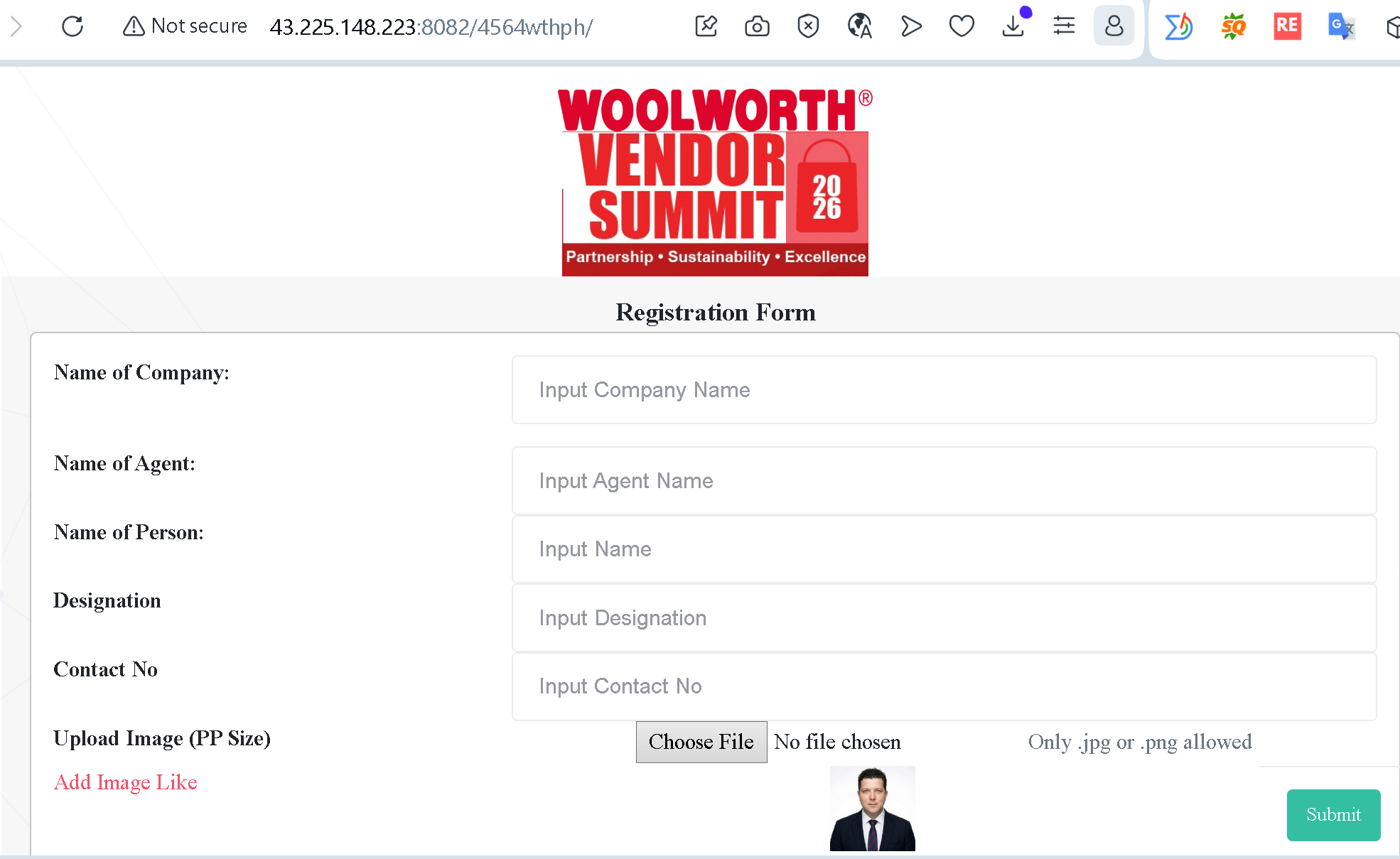
This image displays a classic example of B2B (Business-to-Business) Phishing. Scammers are impersonating the Australian retail giant Woolworths to harvest corporate intelligence and employee data.
How the Scam Works:
Exploiting Professional Authority: By using the Woolworths Vendor Summit 2026 branding, attackers target business partners and suppliers. They exploit the victim’s desire to maintain a good relationship with a major client.
The “Registration” Hook: The page asks for “Company Name,” “Agent Name,” and “Designation.” This is Corporate Reconnaissance. Scammers use this data to perform more convincing Business Email Compromise (BEC) attacks later.
The Image Upload Trap: The request to “Upload Image” is particularly dangerous. It can be used to harvest biometric data (photos) or, more maliciously, to trick users into uploading sensitive corporate ID documents.
Critical Technical Red Flags:
Insecure Connection: The browser explicitly marks the site as “Not secure.” Legitimate corporate portals always use encrypted HTTPS.
Numerical URL: The website uses a raw IP address (43.225.148.223) instead of an official domain like woolworths.com.au. No major corporation hosts registration forms on an exposed IP address.
Non-Standard Port: The use of port :8082 is a common sign of a temporary, malicious server setup.
How to Protect Your Organization:
Verify the Source: Official Woolworths communications will only come from verified @woolworths.com.au email addresses and point to official domains.
Inspect the URL: Never enter data into a site that uses a raw IP address (numbers only) or displays a “Not secure” warning.
Report & Block: If you encounter this specific IP or similar “Registration Forms,” report them to your IT Security department immediately.
Quick Check: Is This Site a Scam?
Before entering any corporate or personal data, look for these 4 Red Flags identified in the recent Woolworths impersonation scam:
The “Not Secure” Warning: If your browser displays a “Not secure” message in the address bar, stop immediately. Legitimate companies always use HTTPS to encrypt your data.
Numbers instead of a Name: Official portals use clear domains (e.g., woolworths.com.au). If the address is just a string of numbers (like 43.225.148.223), it is almost certainly a malicious server.
Unusual Data Requests: Be wary of forms asking for “Agent Names,” “Designations,” or especially those requiring you to upload images/files on an unverified site.
Poor Visual Quality: Look for “copy-paste” logos, inconsistent fonts, or strange phrasing like “Add Image Like.” Real corporate sites go through strict quality control.
Rule of Thumb: If a registration link doesn’t end in the official company domain, do not click, do not type, and do not upload.
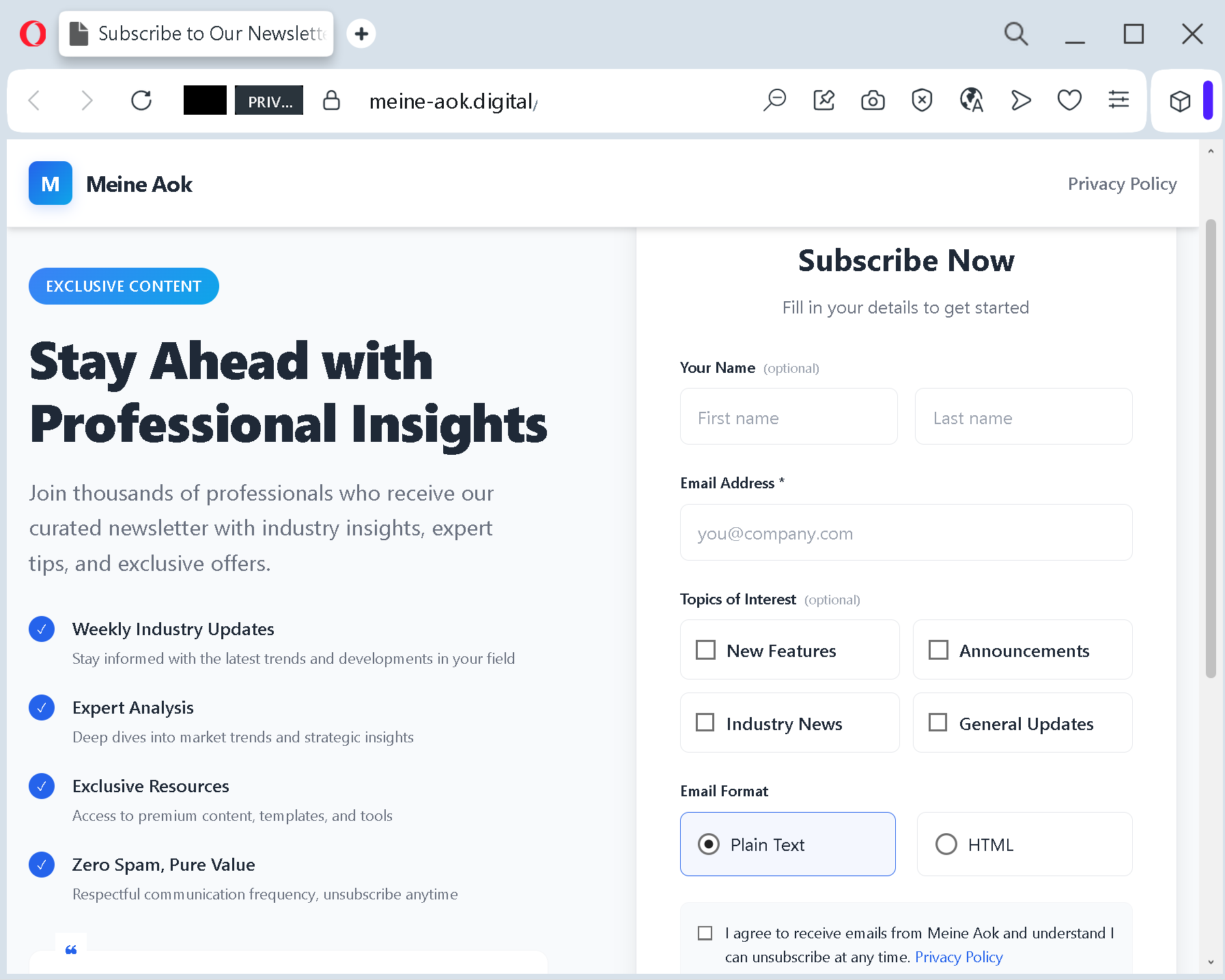
This screenshot is a perfect example of a sophisticated phishing landing page. Here is a description of this method in English, designed to inform and warn users:
Analysis Memo: This deceptive layout was intercepted, verified, and locked down firsthand by the Antiphishing.biz security team during our standard URL vetting operations. To protect the public, the phishing source domain has been completely disabled within our infrastructure. We document and analyze these live visual patterns to help security researchers and users recognize deceptive clone designs before financial damage occurs.
Figure 1: Verified screenshot of the active phishing operation isolated on our infrastructure.
Phishing Alert: The “Professional Insight” Subscription Trap
This image reveals a deceptive phishing tactic used to harvest personal information under the guise of a professional newsletter subscription.
How the Scam Works:
Impersonation & Trust: The page uses the branding “Meine Aok” (mimicking a major German health insurance provider) to create a false sense of security. It uses a clean, professional layout and promises “Exclusive Content” and “Expert Analysis” to lure targets.
The Hook: It appeals to professionals by offering “Industry Insights” and “Weekly Updates,” claiming that thousands of others have already joined.
Data Harvesting: The form asks for your Full Name and Email Address. While it looks like a standard sign-up, this information is used to build profiles for identity theft or to launch more targeted “spear-phishing” attacks.
Malicious Domain: The URL in the address bar is meine-aok.digital. The official domain for AOK is aok.de. Scammers often use .digital, .info, or hyphenated names to trick users who aren’t looking closely.
Red Flags to Watch For:
Mismatched URL: Always check the domain. If the brand is “AOK” but the URL ends in something other than their official .de domain, it is a scam.
Generic Language: The text “Stay Ahead with Professional Insights” is very generic and doesn’t align with the actual services a health insurance company provides.
Privacy Policy Links: Often, on these fake sites, the “Privacy Policy” links are either broken or lead back to the same page.
How to Stay Safe:
Never enter your details on a site reached via a suspicious link in an email or SMS.
Manually type the official website address into your browser if you need to access a service.
Look for the lock icon, but remember: even scam sites can have SSL certificates. The domain name is your best clue.
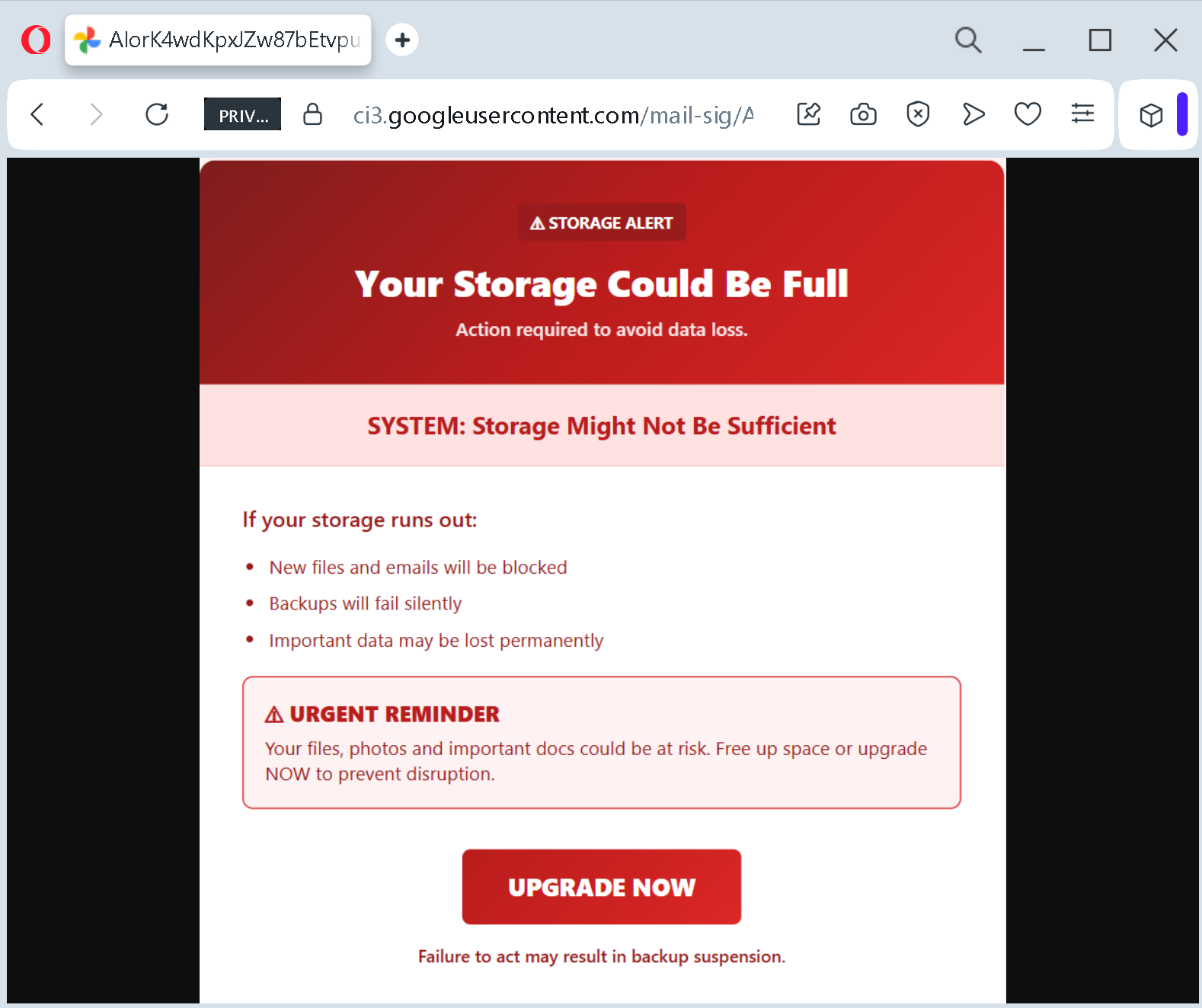
This screenshot shows a fake “storage alert” phishing page designed to scare victims into believing their device or cloud storage is nearly full. The message threatens data loss, blocked files, and backup suspension unless the user clicks an “UPGRADE NOW” button – which leads to a phishing site.
Incident Report: This spoofed page was detected, analyzed, and contained firsthand by the Antiphishing.biz security team during our daily link moderation procedures. To protect the public, the phishing source domain has been fully defanged within our infrastructure. We document and analyze these live visual patterns to help security researchers and users detect replica fraud techniques before financial damage occurs.
Figure 1: Visual proof of the live scam infrastructure intercepted by our security systems.
How it works: The victim receives an email, pop‑up, or SMS claiming that their storage is critically low. The message uses urgent language (“URGENT REMINDER”, “Action required”, “Failure to act may result in backup suspension”) to create fear. A button labelled “UPGRADE NOW” is prominently displayed.
Clicking the button leads to a fraudulent website that:
Requests payment information (credit card details) for a fake storage upgrade
Installs malware disguised as a “cleanup tool” or “upgrade utility”
The goal: The attacker aims to:
Steal login credentials for cloud or email accounts
Capture credit card details for fraudulent transactions
Trick the victim into downloading malware
Red flags to watch for:
Unsolicited storage alert: Legitimate storage notifications come from within the app or operating system – not via random emails or pop‑ups with a clickable “UPGRADE NOW” button.
Threats of immediate data loss: “New files and emails will be blocked”, “Backups will fail silently”, “Important data may be lost permanently” – these are classic fear tactics.
Vague system references: The message does not specify which service or device is affected (e.g., no mention of Google Drive, iCloud, Windows, etc.).
Generic branding: No company logo or official header is shown.
Urgency and pressure: Phrases like “URGENT REMINDER” and “Failure to act” are designed to bypass critical thinking.
What to do if you encounter this:
Do not click the “UPGRADE NOW” button or any links.
Check your actual storage status through your device’s settings or the official app of your cloud provider.
If you have already clicked and entered credentials, change your password immediately and enable two‑factor authentication.
If you entered payment details, contact your bank immediately to block your card.
Report the phishing page to the legitimate service being impersonated (if identifiable).
Protective measures:
Never click links in unsolicited storage alerts. Always check storage directly through official system settings.
Use a password manager – it will not autofill on fake domains.
Enable two‑factor authentication on all cloud and email accounts.
Be suspicious of any message that creates urgency and threatens data loss.