
Who This Guide Is For
This guide is written for you – an employee in any organisation that uses cloud collaboration tools. You work in HR, finance, IT, or general administration. You receive dozens of emails every day containing links to shared documents, project boards, and cloud folders. You trust platforms like ClickUp, Trello, Asana, and SharePoint because your company uses them daily. That trust is exactly what cybercriminals are now weaponising.
You are not a security expert. When a colleague sends you a ClickUp doc with instructions to set up a cloud drive or review an urgent financial document, you do not second‑guess the link. You click. You follow the steps. And that single click could hand the keys to your entire corporate network to an attacker sitting on the other side of the world.
This article is based on a real, intercepted phishing campaign that used a legitimate ClickUp document to distribute a highly advanced Adversary‑in‑the‑Middle (AiTM) phishing link. The attackers did not send a suspicious email from a random domain. They embedded their trap inside one of the most trusted project management platforms on the planet. The screenshots you see show a fake “Nextcloud setup guide” – but the same method works with fake Microsoft login pages, fake DHL tracking notices, fake HR policy updates, and fake financial approval forms.
By the end of this guide, you will understand exactly how this new generation of phishing attacks operates, why traditional email filters cannot stop them, and – most importantly – the simple, non‑technical habits that will protect your organisation from losing money, data, and reputation.
The Anatomy of the Attack: How a Legitimate ClickUp Document Became a Weapon
The attack documented by the Antiphishing.biz security team represents a significant evolution in corporate phishing. It bypasses almost every traditional defence. Here is how it works, step by step.
Step One: The Trusted Domain That Never Gets Blocked
The criminals begin by registering a free account on a legitimate project management or document collaboration platform. In this case, they chose ClickUp – a widely used tool with millions of business customers. The account ID in the screenshots is 24389904https://doc.clickup.com/24389904/d/h/q8a8g-27572/d5fdeeedea2ef9edoc.clickup.com
Threat Intel: This scam layout was detected, analyzed, and contained firsthand by the
Antiphishing.bizsecurity team during our automated link scanning workflows. To protect the public, the hostile origin link has been fully defanged within our infrastructure. We document and analyze these live visual patterns to help security researchers and users recognize deceptive clone designs before financial damage occurs.
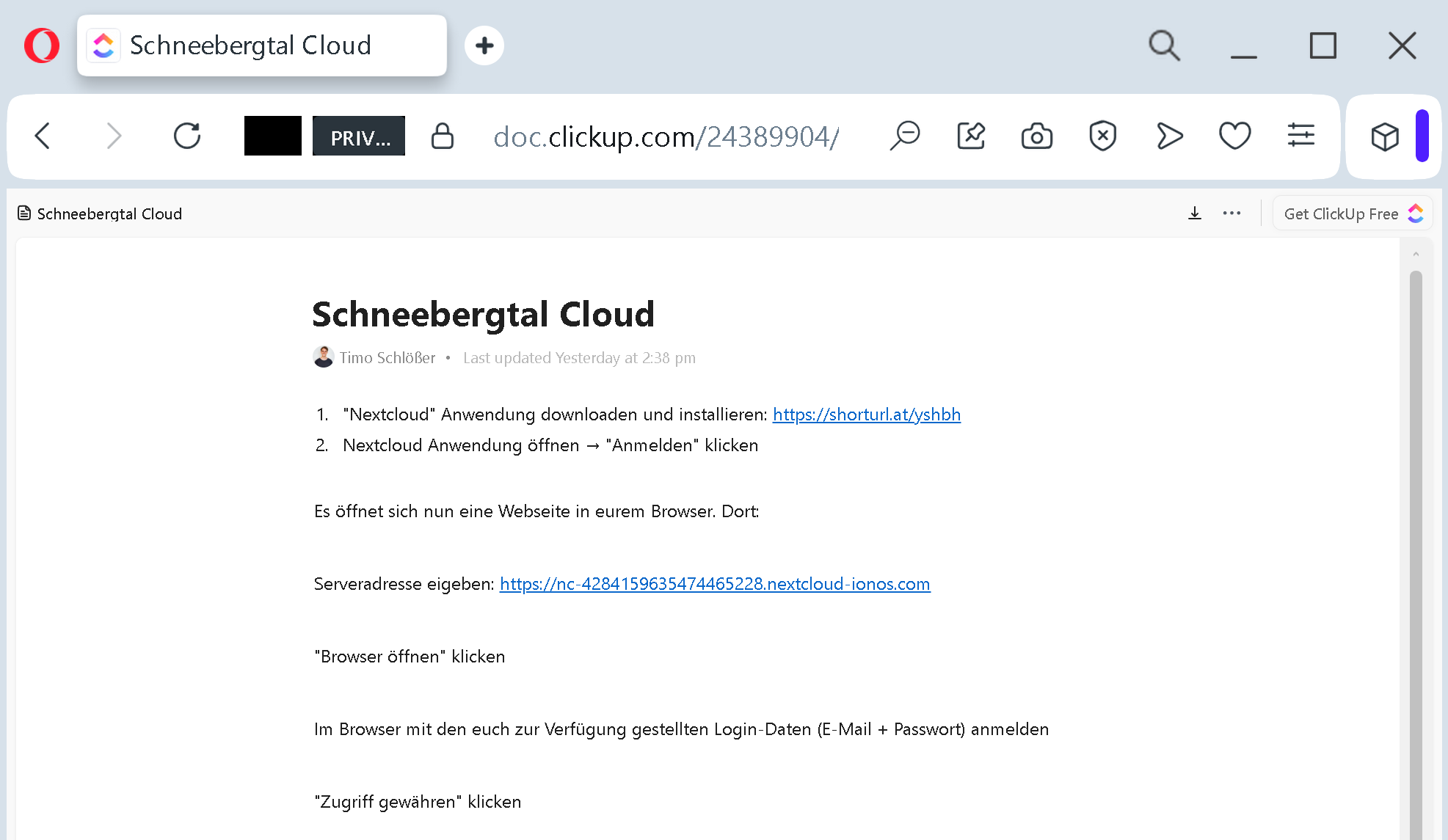
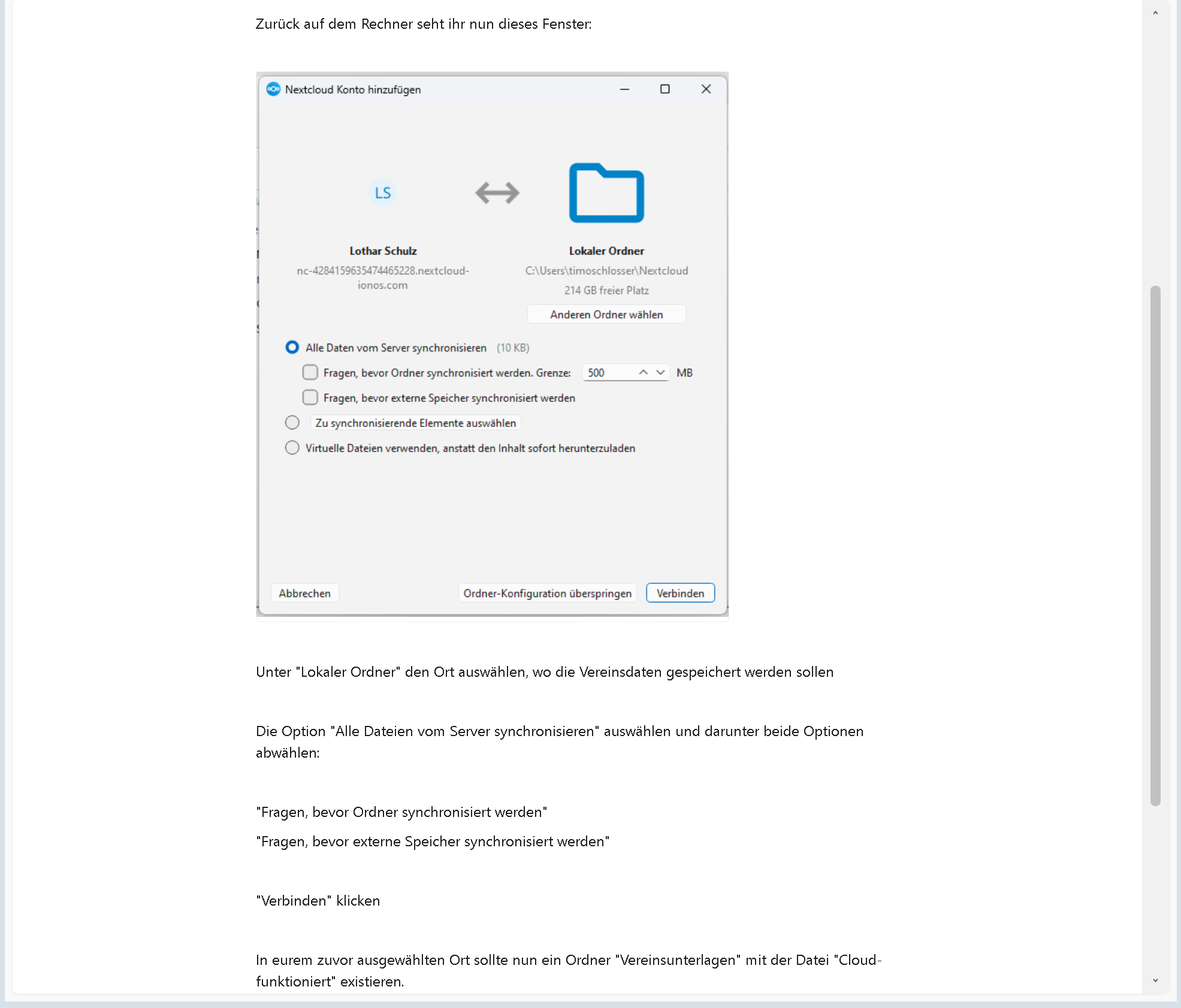
The criminals then wrote a convincing text inside the document. In the screenshots, the text is in German and appears to be a “Schneebergtal Cloud” setup guide. It instructs the reader to download Nextcloud, enter a server address, and synchronise files. The language is professional, detailed, and step‑by‑step. It looks exactly like an internal IT onboarding document or a collaboration guide from a trusted project manager.
Step Two: The Bait Inside the Trusted Container
Inside this legitimate‑looking document, the criminals placed a malicious link. The link leads not to a legitimate Nextcloud server, but to an Adversary‑in‑the‑Middle (AiTM) phishing gateway – a fake login page that sits between the victim and a real service (such as Microsoft 365, Google Workspace, or a corporate VPN).
When an employee clicks the link, they are taken to a page that looks identical to their company’s Microsoft login screen. The page is not a static fake; it is a live proxy. When the employee types their username and password, the proxy forwards those credentials to the real Microsoft servers in real time. The login appears to work. The employee receives their 2FA code, types it in, and sees the familiar green checkmark. Everything feels normal.
But here is the horror: the attacker has recorded the session cookie – the digital pass that proves the user is logged in. With that cookie, they can bypass the password and the 2FA entirely. They can open the victim’s email, SharePoint, Teams, and any other corporate application that uses the same single sign‑on (SSO) system. They do not need to crack anything. They just replay the stolen cookie.
Step Three: The Silent Spread through the Organisation
Once an attacker has access to one employee’s account, they do not stop. They read through the victim’s emails, looking for invoices, project files, and communication with colleagues. They then send new phishing messages from the compromised account – messages that come from a trusted colleague’s real email address. This is how a single click can lead to a complete network takeover within hours.
In the ClickUp document example, the attackers disguised the trap as a harmless “cloud setup for the club”. A busy employee who volunteers for a non‑profit or works in a department that frequently shares files would follow the instructions without a second thought. They would enter their corporate email and password into the fake Nextcloud login page. They would approve the 2FA code. And then they would hand the attacker a golden key to their entire digital life.
Real Stories of Devastation and Narrow Escape
The German Non‑Profit That Lost €150,000 to a Fake “Cloud Setup”
A medium‑sized German association (Verein) received an email from what appeared to be their IT service provider. The email contained a link to a ClickUp document with instructions for setting up a “new secure cloud storage for membership data”. The document looked professional. It used the same language and formatting as previous internal communications.
One employee followed the instructions, entered their Microsoft 365 credentials into the fake login page, and approved the 2FA request. The next day, the association’s finance director received an urgent email from the same employee’s account, requesting a wire transfer of €150,000 to a “new vendor” for an “urgent project”. The email was genuine – it came from the compromised account. The finance director transferred the money. The vendor did not exist. The €150,000 was gone.
The attacker had used the employee’s stolen session to read through months of email correspondence, identify the finance approval process, and craft a perfectly timed fake invoice. The association recovered nothing. Its insurance did not cover social‑engineering fraud. The employee who clicked was devastated, but the real fault lay in a system that trusted a ClickUp link without question.
The American Tech Company That Caught the AiTM Attack in Real Time
A US‑based software company with 500 employees received a wave of phishing emails containing links to shared documents on a legitimate platform (similar to ClickUp). One employee clicked, entered their credentials, and approved the 2FA. But the company had implemented a “conditional access policy” that required device‑based authentication for high‑risk actions. The attacker’s session, coming from an unknown IP address and a non‑corporate device, was immediately flagged by the security operations centre (SOC).
The SOC team terminated all active sessions for that user, forced a password reset, and initiated an investigation. They found that the attacker had already attempted to send two internal phishing messages from the compromised account. Those messages were blocked. The quick detection – within six minutes of the initial credential theft – saved the company from what could have been a multi‑million dollar loss.
The employee later admitted: “I clicked because the link was from ClickUp. I use ClickUp every day. I never thought it could be dangerous.”
The UK Local Council That Spent £500,000 Recovering from a Trusted‑Platform Phish
A local council in the United Kingdom fell victim to a similar attack. A council employee received a link to a shared document on a trusted platform (Microsoft SharePoint). The document claimed to be an “updated procurement policy”. The employee clicked, entered their Office 365 credentials, and approved the 2FA prompt. The attacker stole the session cookie and used it to access the council’s entire SharePoint environment – including confidential vendor contracts, employee records, and financial spreadsheets.
The attacker then used the stolen data to file fraudulent invoices totalling more than £300,000. The council’s internal audit discovered the fraud three weeks later. The recovery process, including forensic investigation, legal fees, and system hardening, cost an additional £200,000. Two senior managers lost their jobs. The employee who clicked was retrained but remained under significant professional stress.
The Employee Who Saved the Day by Noticing a Missing “s”
An IT administrator in a German manufacturing firm received a ClickUp document with instructions to “review the new cloud storage policy”. Before clicking any links inside the document, he examined the shortened URL. He used a free URL expansion tool to see where the link really led. The expanded address was not nextcloud.commicrosoftonline.commicrosoft-online-verify.net
He did not click. He reported the document to his IT security team, who confirmed it was an AiTM phishing gateway. The administrator’s two minutes of caution saved his company from what could have been a catastrophic breach. His action also triggered a company‑wide alert that prevented eleven other employees from clicking the same link.
The Three Red Flags That Give Away the Fake Cloud Doc – Every Time
You do not need to be a cybersecurity expert to spot these attacks. You just need to know what to look for.
Red Flag One: The Document Asks You to Click an External Link to “Set Up” or “Verify” Something
Legitimate internal instructions for setting up cloud storage or accessing a shared drive rarely come through a public document link. If you receive a ClickUp doc, Trello card, or SharePoint file that contains a link to an external website – especially one that asks for your email and password – treat it with extreme suspicion. A real IT department would provide the server address and let you type it manually, not give you a clickable link.
Red Flag Two: The Shortened URL Is a Mask
Criminals use URL shorteners to hide the real destination and to bypass email filters. A shortened link from a trusted platform is not a sign of safety; it is a sign that the sender does not want you to see where you are going. If you see a shortened URL, expand it first using a free tool (such as checkshorturl.comexpandurl.netlogin.microsoftonline.com
Red Flag Three: The “Cloud” Server Address Is Not a Standard Corporate Domain
In the screenshot, the fake server address is https://nc-4284159635474465228.nextcloud-ionos.comnextcloud-ionos.comcloud.mycompany.com.nextcloud-ionos.com.digitalocean.app.netlify.app
Expert Advice: Corporate Training Rules to Stop This Scam
The following rules are designed for employee training sessions. They are simple, memorable, and effective.
Rule One: Never, Ever Click a Link Inside a Shared Document Unless You Personally Know the Sender and Have Verified the Destination
ClickUp, Trello, SharePoint, and Google Docs are all legitimate tools. But criminals can create public documents in those tools just as easily as you can. A link inside a trusted document is not a trusted link. Before you click, ask yourself: “Did I expect this document? Do I know the person who shared it? Have I verified the destination by hovering over the link or expanding a shortened URL?”
Rule Two: The URL Shortener Is Your Enemy. Expand First, Click Second.
Make it a company policy that no employee should click a shortened URL without expanding it. Use a free, safe URL expansion tool. If the expanded address looks suspicious – contains typos, uses a domain you do not recognise, or does not match the expected service – delete the message and report it.
Rule Three: If a Page Asks for Your Corporate Credentials, Do Not Use the Link. Type the Address Yourself.
The most effective defence against AiTM phishing is simple: never enter your password into a page you reached by clicking a link. Instead, open a new browser tab, type the official address of your corporate login portal manually, and log in from there. If the link was legitimate, you will see the same request after logging in normally. If it was fake, you just saved your account.
Rule Four: Implement Conditional Access Policies That Block Unknown Locations and Devices
A technical defence that works well alongside training: configure your corporate identity system (Azure AD, Okta, etc.) to require device compliance or to block logins from unfamiliar IP addresses. Even if an attacker steals a session cookie, they will be unable to use it from their own device if your policy requires a corporate‑managed device.
Rule Five: Train Employees to Recognise “Too‑Much‑Detail” Instructions
Fake setup guides often contain excessive detail – step numbers, screenshots, and overly precise instructions – to create an illusion of legitimacy. Real internal IT communications are usually short and point to official internal knowledge bases. If a document reads like a manual written by an outsider, it probably is.
What to Do If You Have Already Clicked
If you realise that you have clicked a suspicious link, entered your credentials, or approved a 2FA prompt that you did not initiate, act immediately.
First, change your password immediately from a clean device. Do not use the same device that you used to click the link.
Second, revoke all active sessions. In Microsoft 365, go to account.microsoft.com/security
Third, report the incident to your IT security team immediately. Provide the link you clicked, the time of the click, and any screenshots. The faster they know, the faster they can contain the breach.
Fourth, check for hidden email forwarding rules. Attackers often create rules to delete or forward security alerts. Review your email settings and remove any rules you do not recognise.
Fifth, if you are in finance or have authority to approve payments, notify your finance department immediately. Ask them to place a hold on any pending transfers that were requested by email in the last 24 hours.
A Final Word for Corporate Trainers
The ClickUp phishing campaign is not an anomaly. It is the new normal. Criminals have realised that traditional email filters cannot block links to legitimate domains like doc.clickup.comsharepoint.comtrello.comasana.com
Run phishing simulations that specifically use trusted platforms. Teach your employees to expand shortened URLs. Make it easy for them to report suspicious documents. And never, ever assume that a link is safe just because it comes from a well‑known brand.
The criminals are counting on your speed and your trust. Do not give them either. Stay slow. Stay sceptical. And always type the address yourself.
This attack was detected, analyzed, and contained firsthand by the Antiphishing.biz security team during automated link scanning workflows. The malicious ClickUp document has been reported and removed. If you found this guide helpful, share it with every employee in your organisation.